Local setup UI
Use the local setup page to connect providers, select the Default, Opus, Sonnet, and Haiku models independently, verify inference, and copy a quoted Claude Code launch command.
Start the current binary:
claude-code-proxy serveIn another terminal, print your private setup link:
claude-code-proxy ui --print-urlOpen that link in your browser. Its fragment contains a management key, which the page removes from the address bar and retains for that tab session. Treat this link like a password. The setup UI is for one user on the local machine. It requires a local Host header, same origin requests, and its own management bearer key; ANTHROPIC_AUTH_TOKEN=unused does not unlock setup.
Connect a provider
Section titled “Connect a provider”Select a provider, then Sign in. Open the provider’s authorization page and approve access there; passwords stay with the provider. The setup page updates when authorization finishes. You can cancel a pending login. OpenCode Go instead accepts its subscription API key. Existing proxy credentials are detected; credentials supplied through the server environment must be changed in that environment.
The proxy includes its own provider clients. Inference and guided login use these adapters, without importing native applications’ private credential stores or executing their agent tools. Claude Code controls local tools. Native Cursor version detection may run cursor-agent --version when no version is configured; the Docker image does not require that application.
Choose and verify models
Section titled “Choose and verify models”Choose each model role. Cursor choices come from the signed in account’s catalog, including supported parameter combinations; use Refresh catalog after an account or model change. Other providers show the proxy’s registered models. A listed model and a saved credential do not prove account access. Verify sends a small inference request that can consume provider quota. Verification results expire when the proxy restarts or credentials change.
Save and launch Claude Code
Section titled “Save and launch Claude Code”Save the profile, then copy the Bash/Zsh command or download settings JSON. The shell export quotes every value, including bracketed Cursor model names. The JSON export can be passed to Claude Code with claude --settings /path/to/claude-proxy.json. These exports contain model names and a local proxy URL, never provider tokens or the management key. Start Claude Code on the host where your project and tools live.
Session preferences
Section titled “Session preferences”The Connection and session preferences panel exposes the local endpoint, compaction window, and optional disabling of nonessential Claude Code traffic. The endpoint in a saved profile is deliberately preserved. If you change the published Docker port, update that endpoint before copying a new command.
Disconnect and recover access
Section titled “Disconnect and recover access”The Lock button clears this tab’s management session. Saved credentials and model choices remain in the proxy profile. Disconnect removes only the selected provider’s proxy login after cancelling its pending authorization. Active inference or token refresh prevents conflicting credential changes, including background work from a disconnected client. Retry after that work completes.
If setup cannot read a saved profile written by a newer version, it preserves the file instead of overwriting it. Restore a compatible profile or upgrade the application. For native diagnostics, use the provider’s existing auth commands. Never paste token files into an issue.
To revoke an exposed setup link, stop the proxy, remove only ui-access.json from its config directory, and restart. A fresh management key is generated; provider logins and model choices remain. Obtain the new link with the ui command.
See it in action
Section titled “See it in action”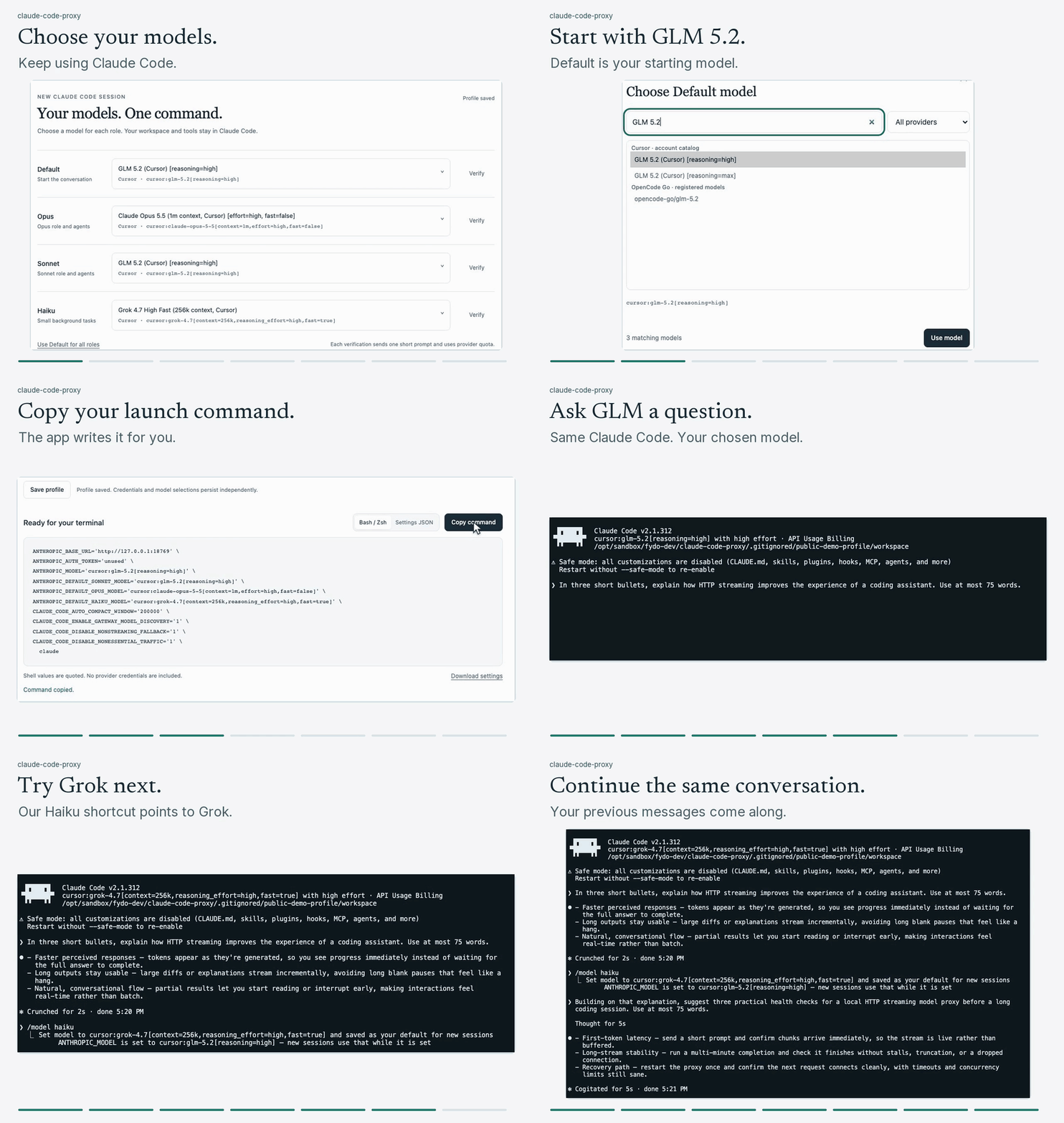
Default is the model that starts your conversation. Opus, Sonnet, and Haiku are Claude Code’s model shortcuts; each can point to a different provider model. In this example, Default starts with Cursor GLM 5.2, and /model haiku switches to Cursor Grok 4.7. The previous messages stay in the conversation.
About this recording and a still preview
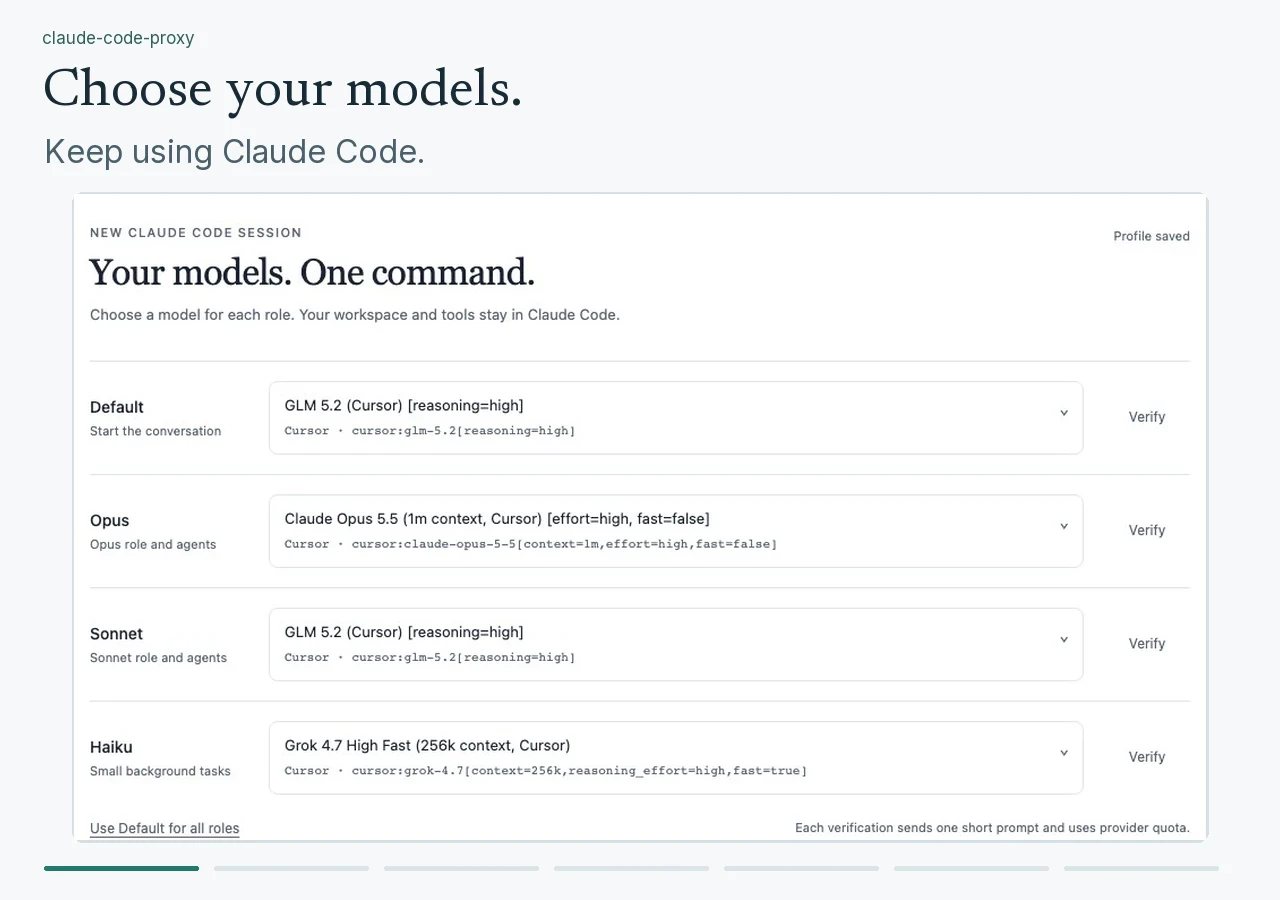
Both answers were captured from live Cursor requests on October 29, 2026. The preview shortens pauses, zooms into the relevant controls, and holds some frames for reading. It uses an existing proxy login supplied through the environment; follow Connect a provider for first use. A private demo profile disables tools and customizations with --safe-mode --tools ''. Normal sessions can use your usual tools and settings.
Model availability depends on your account. Refresh the catalog and verify your own selections.