This is the full developer documentation for claude-code-proxy
# One proxy. Your choice of models.
> Run Claude Code with Codex, Kimi, Grok, OpenCode Go, or Cursor Agent through one local Anthropic-compatible proxy.
Connect Claude Code to Codex, Kimi, Grok, OpenCode Go, or Cursor. Sign in once, choose a model for each role, and keep your workspace and tools in Claude Code.
[**Start with Docker**Run an isolated proxy with persistent credentials. Sign in and select models in your browser.Docker setup and updates →](using/docker/) [**Run on your machine**Install the Rust binary, connect your accounts, and use the same local setup interface.Native installation →](getting-started/#1-install)
Your coding interface **Claude Code**
→
Local bridge **claude-code-proxy** Chooses the provider from your model
→
Supported providers
CodexKimiGrokOpenCode GoCursor Agent
## Why use it?
[Section titled “Why use it?”](#why-use-it)
* **Keep the Claude Code experience.** Skills, tools, hooks, subagents, IDE integrations, and the terminal interface stay on the client side.
* **Connect the accounts you use.** Authenticate in the setup UI or CLI. Provider credentials stay with the proxy; OpenCode Go uses its subscription key.
* **Choose each model role.** Set Default, Opus, Sonnet, and Haiku independently. Verify a short request before starting your session.
* **Use Claude Code normally.** Tools and streaming are translated across providers; images and reasoning depend on the selected provider and model.
* **See what is happening.** The monitor TUI shows sessions, requests, errors, models, token use, and throughput. Structured logs and optional traffic captures support deeper diagnosis.
## Watch the workflow
[Section titled “Watch the workflow”](#watch-the-workflow)
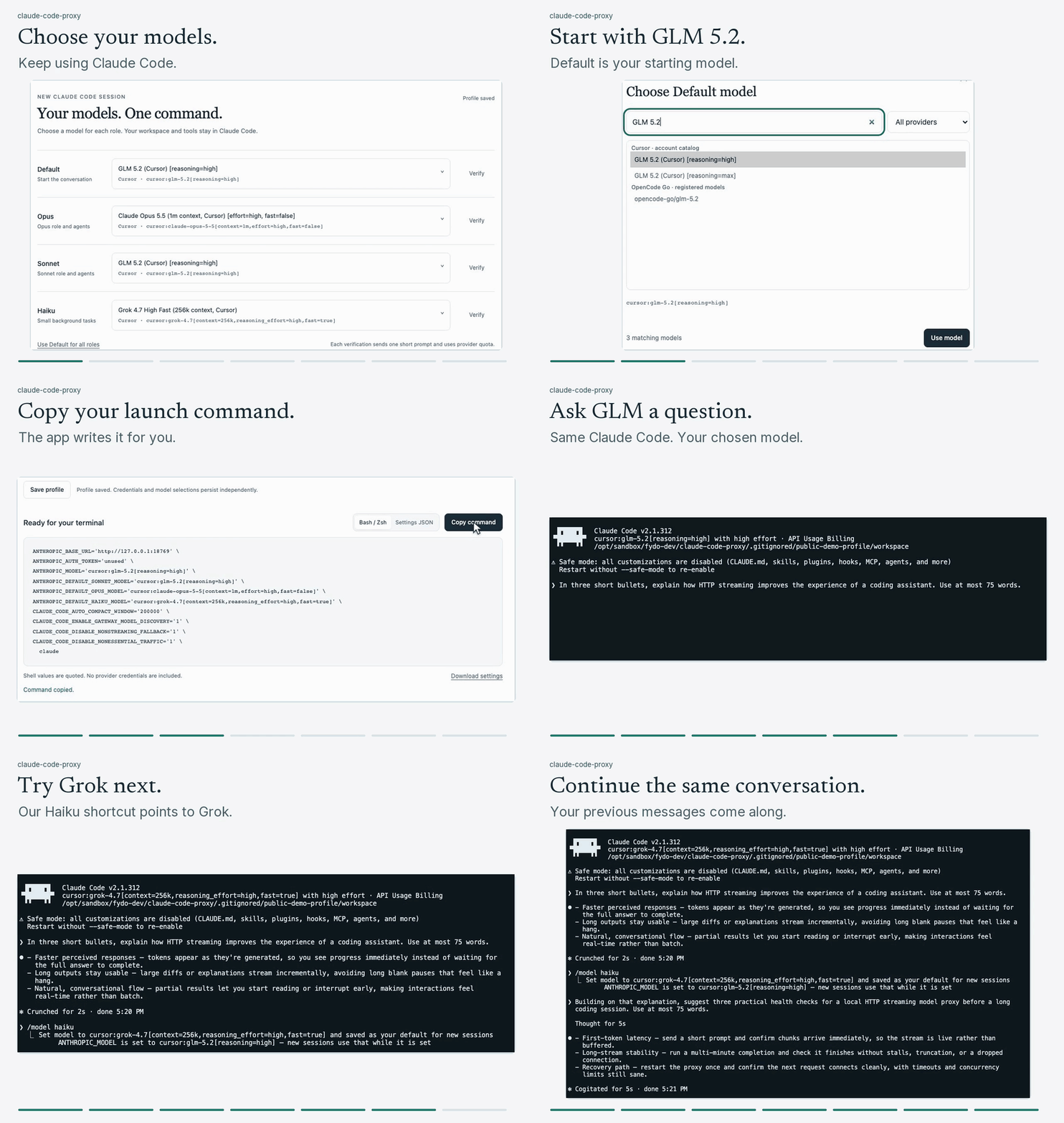
## Next steps
[Section titled “Next steps”](#next-steps)
Follow [Getting started](/claude-code-proxy/getting-started/), open the [local setup guide](/claude-code-proxy/using/local-setup/), compare the [supported providers](/claude-code-proxy/providers/choosing-a-provider/), or read [how requests flow](/claude-code-proxy/how-it-works/).
# Getting started
> Start with Docker or a native binary, sign in through the local UI, choose four model roles, and launch Claude Code.
Start one proxy, connect a provider, and generate a Claude Code launch command. Use Docker for an isolated profile or install the native binary. Both support the browser setup UI and independent Default, Opus, Sonnet, and Haiku models.
Install [Claude Code](https://code.claude.com/docs/en/setup) on the host and confirm `claude --version` works. Your project and tools stay on that host.
## Get the source
[Section titled “Get the source”](#get-the-source)
Use the GitHub CLI with an account that can access the maintained source repository:
```sh
GH_HOST=github.com gh repo clone fydo-dev/claude-code-proxy -- --branch ninja
cd claude-code-proxy
```
These guides describe the current source checkout. Build it before using new commands or UI features.
## Guided setup with Docker
[Section titled “Guided setup with Docker”](#guided-setup-with-docker)
You need a running Docker engine with Compose v2, repository and provider access, an account with model access, and a free loopback port (normally 18765). Host Rust and provider CLIs are not required for this path. See the complete [requirements](/claude-code-proxy/using/docker/#requirements). Docker Hub and Quay.io images are public and need no registry login. GHCR remains private. See [available images](/claude-code-proxy/using/docker/#choose-a-registry). Run from the checkout:
```sh
export CCP_IMAGE=docker.io/c0mpiler/claude-code-proxy:0.2.0
docker compose pull
docker compose up -d --no-build --wait
docker compose exec proxy claude-code-proxy ui --print-url
```
Open the private link, sign in to a provider, choose the four models, and use **Verify** to check inference. Save the profile and copy the generated command into a host terminal. Credentials and selections persist in the named volume across container replacement.
If a native proxy already uses port 18765, follow the [alternate port recipe](/claude-code-proxy/using/docker/#choose-a-host-port). See [Docker setup and updates](/claude-code-proxy/using/docker/) for prerequisites, storage, updates, and verification.
## 1. Install
[Section titled “1. Install”](#1-install)
For a native installation, use a current stable Rust toolchain in a [source checkout](#get-the-source):
```sh
cargo install --locked --path .
claude-code-proxy serve
```
In a second terminal, open the browser setup flow:
```sh
claude-code-proxy ui --print-url
```
Follow [Local setup UI](/claude-code-proxy/using/local-setup/) to sign in and generate your launch configuration. The remaining steps provide the equivalent manual CLI setup, including the Cursor recipe with Gemini as Default and Sonnet, Claude Opus for Opus, and Grok for Haiku.
After installing an update, stop the old proxy process and restart the intended executable. `claude-code-proxy --version` reports the executable on your current `PATH`, which can differ from a server that is already running. If several installations exist, use `command -v claude-code-proxy` on macOS or Linux and start that executable explicitly. See [Troubleshooting](/claude-code-proxy/using/troubleshooting/#cursor-returns-not_found-after-an-upgrade) for listener checks.
## 2. Choose and authenticate a provider
[Section titled “2. Choose and authenticate a provider”](#2-choose-and-authenticate-a-provider)
### Codex
[Section titled “Codex”](#codex)
Use a **ChatGPT account with Codex access**. This connection uses ChatGPT sign in rather than an OpenAI Platform API key:
```sh
claude-code-proxy codex auth login
```
For SSH or another headless environment, use `claude-code-proxy codex auth device` instead.
### Cursor
[Section titled “Cursor”](#cursor)
Use your Cursor account with the proxy’s own login:
```sh
claude-code-proxy cursor auth login
claude-code-proxy models --full
```
The native Cursor application does not need to be running. Confirm that the model selections in the launch recipe are advertised for your account. See [Cursor Agent](/claude-code-proxy/providers/cursor-agent/) for protocol and client-version details.
## 3. Start the proxy
[Section titled “3. Start the proxy”](#3-start-the-proxy)
Keep this process running:
```sh
claude-code-proxy serve
```
It listens on `127.0.0.1:18765`. In an interactive terminal it opens the monitor TUI.
From another terminal, check that the listener responds:
```sh
curl http://127.0.0.1:18765/healthz
```
`{"ok":true}` establishes that the proxy is running. A short model request in the next step verifies the provider connection.
## 4. Start Claude Code
[Section titled “4. Start Claude Code”](#4-start-claude-code)
Open another terminal and use the recipe for the provider you authenticated. These shell recipes work in Bash and Zsh; on Windows, use a Bash environment or the [JSON settings file](/claude-code-proxy/using/configure-claude-code/#save-a-reusable-settings-file).
### Codex launch
[Section titled “Codex launch”](#codex-launch)
```sh
ANTHROPIC_BASE_URL=http://127.0.0.1:18765 \
ANTHROPIC_AUTH_TOKEN=unused \
ANTHROPIC_MODEL='gpt-6-sol' \
ANTHROPIC_DEFAULT_OPUS_MODEL='gpt-6-sol' \
ANTHROPIC_DEFAULT_SONNET_MODEL='gpt-5.6-terra' \
ANTHROPIC_DEFAULT_HAIKU_MODEL='gpt-6-luna' \
CLAUDE_CODE_AUTO_COMPACT_WINDOW=200000 \
CLAUDE_CODE_ENABLE_GATEWAY_MODEL_DISCOVERY=1 \
CLAUDE_CODE_DISABLE_NONESSENTIAL_TRAFFIC=1 \
CLAUDE_CODE_DISABLE_NONSTREAMING_FALLBACK=1 \
claude
```
### Cursor launch with Gemini, Opus, and Grok
[Section titled “Cursor launch with Gemini, Opus, and Grok”](#cursor-launch-with-gemini-opus-and-grok)
```sh
ANTHROPIC_BASE_URL=http://127.0.0.1:18765 \
ANTHROPIC_AUTH_TOKEN=unused \
ANTHROPIC_MODEL='cursor:gemini-4-argon[reasoning_effort=high]' \
ANTHROPIC_DEFAULT_SONNET_MODEL='cursor:gemini-4-argon[reasoning_effort=high]' \
ANTHROPIC_DEFAULT_OPUS_MODEL='cursor:claude-opus-5-5[context=1m,effort=high,fast=false]' \
ANTHROPIC_DEFAULT_HAIKU_MODEL='cursor:grok-4.7-high-fast' \
CLAUDE_CODE_AUTO_COMPACT_WINDOW=200000 \
CLAUDE_CODE_ENABLE_GATEWAY_MODEL_DISCOVERY=1 \
CLAUDE_CODE_DISABLE_NONESSENTIAL_TRAFFIC=1 \
CLAUDE_CODE_DISABLE_NONSTREAMING_FALLBACK=1 \
claude
```
This starts the main conversation and Sonnet role on Gemini, assigns the Opus role to Claude Opus, and sends Haiku background work to Grok. All four selections route through Cursor. The role names describe Claude Code’s choices; they do not require matching model families.
These selections were present in the observed account catalog. Check `claude-code-proxy models --full` for your account before copying them. Availability can change: Gemini requests returned upstream HTTP 429 during the latest walkthrough, so that recording uses Cursor GLM 5.2 and Grok 4.7 instead. An advertised catalog entry alone does not establish inference access. The 200K compaction boundary is conservative, including when the selected Opus variant has a larger window.
Quote model values in shell commands, especially IDs containing brackets, commas, or other shell syntax. Preserve the exact advertised parameter names and values. Shell quotes protect the value; they are not part of the model ID. In JSON settings, use ordinary JSON strings without adding shell quotes.
Send a prompt. The request appears in the monitor and the response streams into Claude Code.
The `ANTHROPIC_DEFAULT_*_MODEL` values pin Claude Code’s Opus, Sonnet, and Haiku roles to backend IDs. The 200K compaction boundary is conservative; raise it only after checking the actual upstream window. In Claude Code, use `/status` to inspect the session and `/model` to choose a discovered model.
For persistent settings, provider switching, and model discovery, continue to [Configure Claude Code](/claude-code-proxy/using/configure-claude-code/) and [Models and routing](/claude-code-proxy/using/models-and-routing/).
# How it works
> Follow authentication, routing, protocol translation, streaming, session state, and diagnostics through claude-code-proxy.
claude-code-proxy exposes Anthropic Messages and optional OpenAI-compatible routes. Messages, Chat Completions, and Responses select a provider from the request model and translate through its native protocol. Separately enabled image and audio transcription routes use Codex.
**API client**Anthropic Messages\
OpenAI Chat or Responses
→
**Proxy pipeline**route model\
refresh auth\
translate events
→
`Codex Responses``Kimi Chat Completions``Grok Responses``OpenCode Chat / Messages / Responses``Cursor Connect`
## Anthropic requests
[Section titled “Anthropic requests”](#anthropic-requests)
1. Claude Code sends an Anthropic Messages request to `/v1/messages`.
2. The registry normalizes a trailing `[1m]`, resolves aliases, and selects a provider from the model ID.
3. The provider loads its proxy-owned credential and refreshes an expiring access token when needed.
4. The request translator maps system content, user and assistant messages, images, tools, tool results, thinking controls, and output settings into the upstream shape.
5. The upstream stream is reduced into typed text, thinking, tool, usage, and completion events.
6. The proxy emits Anthropic SSE events or accumulates a non-streaming Anthropic response.
7. The monitor, JSONL logger, and optional traffic capture record operational details.
## OpenAI-compatible requests
[Section titled “OpenAI-compatible requests”](#openai-compatible-requests)
Enable the OpenAI routes to use `/v1/chat/completions` or `/v1/responses`. The `model` field chooses Codex, Kimi, Grok, OpenCode Go, or Cursor in the same way it does on `/v1/messages`.
Codex Responses requests go directly to the native Codex API. The proxy translates other OpenAI requests to the selected provider and returns either Chat Completions or Responses output. Streaming and non-streaming requests use the same translation rules, and unsupported fields return an error instead of being ignored.
## Authentication boundary
[Section titled “Authentication boundary”](#authentication-boundary)
Each provider login belongs to claude-code-proxy. The proxy does not read native Codex, Grok, or Cursor Agent credentials. Credentials live in the proxy profile files described in [Files and storage](/claude-code-proxy/reference/files-and-storage/). OpenCode Go instead uses the configured subscription API key. Incoming `ANTHROPIC_AUTH_TOKEN` values are accepted for client compatibility and are not used as upstream credentials.
## Local setup and container boundary
[Section titled “Local setup and container boundary”](#local-setup-and-container-boundary)
The same Rust service embeds the [local setup UI](/claude-code-proxy/using/local-setup/). Management uses its own bearer key, loopback Host checks, and same origin requests. The `unused` token in a Claude Code launch command grants no management access.
Guided sign in runs the existing provider authorization flows in bounded, cancellable workers. Provider tokens are saved to the proxy profile; only authorization instructions and credential status reach the browser. Credential changes exclude active inference and token refresh, including blocking work whose caller has disconnected.
[Docker](/claude-code-proxy/using/docker/) packages those native provider clients with the proxy. The host browser completes sign in and host Claude Code runs tools. The named volume persists credentials, the Kimi device ID, the management key, and model selections. Pending provider conversations and verification results remain in memory and reset on restart.
## Routing boundary
[Section titled “Routing boundary”](#routing-boundary)
Routing happens per request, not per server process or API surface. Codex IDs, Kimi IDs, Grok IDs, OpenCode Go IDs, Cursor prefixes, and configured Anthropic-style aliases can share one listener across `/v1/messages`, `/v1/chat/completions`, and `/v1/responses`. Unknown model IDs return HTTP 400 with the supported catalog.
## Session state
[Section titled “Session state”](#session-state)
Claude Code sends `x-claude-code-session-id`. The proxy uses it for monitor grouping and provider features that need continuity. Cursor conversation IDs, optional Codex `previous_response_id`, and optional Codex server compaction state live in memory. A proxy restart clears that state and portable Claude Code history remains the fallback.
## Count tokens
[Section titled “Count tokens”](#count-tokens)
`POST /v1/messages/count_tokens` stays local and does not make an upstream request. Codex uses `o200k_base` for text plus estimates for images, encrypted reasoning, and protocol framing. Other providers use their own local estimators. The result supports Claude Code’s compaction decisions but is not a provider billing count.
See [HTTP API](/claude-code-proxy/reference/http-api/) for route contracts and [Compatibility and limitations](/claude-code-proxy/reference/compatibility-and-limitations/) for translation boundaries.
# Choosing a provider
> Compare claude-code-proxy providers by account, protocol, models, reasoning, multimodal input, tools, and operational tradeoffs.
One `serve` process supports every provider. Choose based on the account you have, model access, and the capabilities your work needs.
| Provider | Account | Upstream protocol | Model selection | Notable capabilities |
| ---------------------------------------------------------- | --------------------------------- | -------------------------------------------------------------------------------------- | ----------------------------------------------------------- | ---------------------------------------------------------------------------------------------------- |
| [Codex](/claude-code-proxy/providers/codex/) | ChatGPT account with Codex access | OpenAI Responses over WebSocket or HTTP SSE | Named Codex catalog, `-fast` and `-ultrafast` variants | Function tools, image input, hosted web search, reasoning summaries, optional native Responses route |
| [Kimi](/claude-code-proxy/providers/kimi/) | kimi.com with Kimi Code access | OpenAI-style chat completions | `kimi-for-coding` and aliases | Function tools, reasoning, image and video input |
| [Grok](/claude-code-proxy/providers/grok/) | grok.com | Responses API | `grok-composer-2.5-fast`, `grok-4.5`, `grok-4.6` | Function tools, reasoning, web search, X search, citations |
| [OpenCode Go](/claude-code-proxy/providers/opencode-go/) | OpenCode Go subscription | OpenAI-compatible Chat Completions, OpenAI Responses, or Anthropic-compatible Messages | Non-conflicting bare IDs and `opencode-go/` forms | Curated models tested and benchmarked for coding-agent use |
| [Cursor Agent](/claude-code-proxy/providers/cursor-agent/) | Cursor account | HTTP/2 Connect stream | Cursor modes and `cursor:` prefixes | Dynamic model catalog, effort variants, images, plan and ask modes, session continuation |
## Practical guidance
[Section titled “Practical guidance”](#practical-guidance)
* Start with **Codex** when you have a ChatGPT subscription and want the most developed Claude Code translation path.
* Choose **Kimi** for the Kimi Code model and multimodal coding input.
* Choose **Grok** for Grok models and hosted web or X search.
* Choose **OpenCode Go** when you have a Go subscription and want its documented model catalog in Claude Code.
* Choose **Cursor Agent** when you want Cursor’s account model catalog and agent modes. The native Rust provider handles its protocol and model discovery directly.
## Shared behavior
[Section titled “Shared behavior”](#shared-behavior)
All providers route by model ID, use proxy-owned credentials, refresh tokens when supported, stream responses, translate Claude Code tool definitions, and report failures through the same Anthropic-shaped API.
**Account policy matters.** Provider subscriptions, model access, regional availability, rate limits, and rules for unofficial clients can change. Review the terms for your account before using a provider through the proxy.
Use `claude-code-proxy models` for the current compact catalog and `claude-code-proxy models --full` for all advertised aliases. The [Models and routing](/claude-code-proxy/using/models-and-routing/) page explains aliases and discovery.
# Codex
> Configure ChatGPT Codex authentication, models, reasoning, tools, images, transports, continuation, compaction, and OpenAI-compatible APIs.
Codex uses the ChatGPT subscription Responses endpoint at `https://chatgpt.com/backend-api/codex/responses`.
This page describes a **backend provider for Claude Code**. You launch `claude`; `claude-code-proxy codex auth login` signs the proxy into ChatGPT. The separate `codex` CLI is not required, and its login is not reused. See [Configure Claude Code](/claude-code-proxy/using/configure-claude-code/) for shell and JSON client settings.
The optional OpenAI-compatible routes below are API surfaces. Their presence alone does not certify every feature of the separate Codex CLI as a client.
OpenAI’s Thibault Sottiaux has publicly welcomed using Codex through other coding harnesses:
> [Share the recipe. People want to know how to use GPT-5.6 Sol in CC. We don’t discriminate on the harness.](https://x.com/thsottiaux/status/2075830097488249060)
## Account and authentication
[Section titled “Account and authentication”](#account-and-authentication)
The [local setup UI](/claude-code-proxy/using/local-setup/) uses device authorization for guided sign in, including inside Docker. The commands below also support native terminal setup.
Sign in with a **ChatGPT account that has Codex access**. The proxy uses the ChatGPT login, rather than an OpenAI Platform API key. Model access and quotas depend on the account.
```sh
claude-code-proxy codex auth login
# Headless device-code flow
claude-code-proxy codex auth device
claude-code-proxy codex auth status
```
The proxy owns its tokens and does not read native Codex CLI credentials. It refreshes expiring access tokens with a single-flight guard. See [Files and storage](/claude-code-proxy/reference/files-and-storage/) for credential locations.
## Models and fast mode
[Section titled “Models and fast mode”](#models-and-fast-mode)
Use `claude-code-proxy models` as the current catalog. Model access depends on your ChatGPT account. A model rejected by the subscription produces the upstream error verbatim.
Claude-style aliases map to Codex models: `haiku` and `claude-haiku-*` to `gpt-6-luna`, `sonnet` and `claude-sonnet-*` to `gpt-5.6-terra`, and `opus`, `fable`, `claude-opus-*` (including `claude-opus-5-5`), and `claude-fable-*` to `gpt-6-sol`.
Append `-fast` to any registered Codex model to request `service_tier: "priority"`. For example, `gpt-6-sol-fast` selects `gpt-6-sol` with fast service.
Append `-ultrafast` to a model that offers the ultrafast tier to request `service_tier: "ultrafast"`. `gpt-6-astra` and `gpt-6.1-sol` offer it today, so `gpt-6-astra-ultrafast` and `gpt-6.1-sol-ultrafast` are the ultrafast IDs.
On `/v1/messages`, `CCP_CODEX_SERVICE_TIER` or `codex.serviceTier` takes precedence over either suffix. A forced `ultrafast` applies to models that offer it, and the proxy requests `priority` for the others. The OpenAI-compatible routes use only the suffix or, on `/v1/responses`, the request’s own `service_tier`.
## Reasoning
[Section titled “Reasoning”](#reasoning)
Claude Code’s `/effort` value maps to Codex `reasoning.effort`: `low`, `medium`, `high`, `xhigh`, or `max`. A proxy override can also force `none`.
When reasoning is enabled, the proxy requests an automatic reasoning summary and translates summary deltas into Claude Code thinking blocks. Codex may omit a summary for a simple prompt. `CCP_CODEX_REASONING_SUMMARY=off` suppresses summaries while preserving effort and encrypted continuation content.
Claude Code summary compaction requests are capped at low effort by default because they perform extraction over a large transcript. `CCP_COMPACT_EFFORT=off` disables the cap, `none` removes reasoning, and another valid effort sets a different maximum. The cap never raises effort.
## Tools and multimodal input
[Section titled “Tools and multimodal input”](#tools-and-multimodal-input)
* Claude function tools and tool results map to Responses API function calls and outputs.
* Claude Code’s forced `web_search_20250305` subrequest uses Codex’s standalone `/alpha/search` endpoint. It keeps the resolved model, omits search reasoning, and preserves non-empty domain filters, so Luna searches do not require a Sol Responses turn. Automatic hosted-search requests remain on the full Responses API because the standalone endpoint cannot decide whether to invoke a tool. Structured result DTOs map back to Anthropic `server_tool_use` and `web_search_tool_result` blocks, while standalone text output remains text. The proxy locally estimates input and output tokens and reports search usage.
* Top-level base64 user images map to `input_image`.
* Supported base64 images nested in tool results also map to `input_image`.
* Remote image URLs, malformed images, and unsupported tool-result image forms remain textual placeholders.
* Strict JSON schema output maps to Responses `text.format`.
## Transport and continuation
[Section titled “Transport and continuation”](#transport-and-continuation)
WebSocket is the default transport. Set `CCP_CODEX_TRANSPORT=http` for HTTP SSE, or `auto` to use WebSocket with HTTP fallback only when setup fails before a request is sent.
On the HTTP transport, the proxy waits five minutes for the response headers before failing the request. Codex withholds the response head until the model produces its first output, so a large request to a high-effort model can hold it for minutes. `CCP_CODEX_HEADER_TIMEOUT_MS` or `codex.headerTimeoutMs` changes that bound.
WebSocket setup honors `HTTP_PROXY` for `ws://`, `HTTPS_PROXY` for the default `wss://` endpoint, `ALL_PROXY` as a fallback, and `NO_PROXY` exclusions. A normal HTTP proxy can therefore carry the default WebSocket connection with CONNECT; TUN mode is not required. Set proxy variables before starting the process and restart after changing them. For example, setting `HTTPS_PROXY` to `http://127.0.0.1:7890` sends HTTPS/WSS destinations through the HTTP proxy at port 7890; it does not require an `https://` proxy URL.
`CCP_CODEX_PREVIOUS_RESPONSE_ID=1` enables append-only WebSocket continuation. A valid identity containing only a Claude Code session ID owns the Main continuation for that session. Each valid direct Agent ID owns an independent continuation and reusable WebSocket within the same session. Nested Agents are keyed by their direct child ID; the parent ID is validated but does not become part of the owner key. The proxy sends `previous_response_id` only when the translated request shape and transcript extension are safe, and only on the exact live WebSocket that produced that response.
An absent, malformed, or ambiguous identity does not reject the HTTP request; that request proceeds without continuation or WebSocket reuse. If the originating socket is missing, dead, or has been replaced, the proxy retries once with the full translated input and without the stale response ID. Continuation and connection state is held only in memory and is lost when the proxy restarts.
Detected auto-review classifier subrequests are intentionally stateless even when valid session and Agent headers are present. They neither consume nor publish continuation or WebSocket ownership.
## Server compaction
[Section titled “Server compaction”](#server-compaction)
Claude Code normally compacts a long conversation by asking the active model to write a portable text summary. Later turns contain that summary instead of the original transcript. This works across providers, but a prose summary can flatten details from a long, tool-heavy Codex session.
Codex server compaction preserves the same boundary in a model-native form. Codex returns an opaque encrypted `compaction` item representing the earlier Responses history. On later turns, the proxy gives that item back to Codex together with selected recent messages and everything added after the boundary. Claude Code still receives its normal portable summary, so the session has a safe fallback.
This is most useful for long coding sessions where continuity after `/compact` or automatic compaction matters. It does not increase the model’s context window or prevent Claude Code from compacting. The boundary also takes longer because it adds one Codex request.
### How it works
[Section titled “How it works”](#how-it-works)
1. Claude Code reaches a manual or automatic compaction boundary.
2. The proxy sends the translated conversation to Codex with a trailing `compaction_trigger`.
3. Codex returns an encrypted `compaction` item, which the proxy keeps in memory for that Claude Code session and model.
4. Claude Code completes its normal summary request. The proxy uses the resulting summary as an exact anchor.
5. On subsequent matching turns, the proxy replaces the portable summary with the encrypted item, retained recent context, and post-compaction messages.
The encrypted item remains opaque to the proxy. It is stored only in memory and sent back to Codex as native Responses input.
### Enable server compaction
[Section titled “Enable server compaction”](#enable-server-compaction)
Server compaction is disabled by default. Enable it in `config.json`:
```json
{
"codex": {
"serverCompaction": true
}
}
```
Or enable it for one proxy process:
```sh
CCP_CODEX_SERVER_COMPACTION=1 claude-code-proxy serve
```
### Fallbacks and visibility
[Section titled “Fallbacks and visibility”](#fallbacks-and-visibility)
Replay requires the same Claude Code session and Codex model with append-only history. A branch, proxy restart, provider or model change, malformed response, upstream failure, memory limit, or 30 minutes without matching activity discards the native state and uses Claude Code’s portable summary instead.
While the native request is active, the monitor shows `compacting`. Structured log events named `server_compaction_triggered`, `server_compaction_completed`, and `server_compaction_failed` report each attempt and outcome.
## OpenAI-compatible APIs
[Section titled “OpenAI-compatible APIs”](#openai-compatible-apis)
`CCP_CODEX_RESPONSES_API=1` enables both `POST /v1/responses` and `POST /v1/chat/completions`. The setting is under Codex configuration, but the routes also accept Kimi, Grok, OpenCode Go, and Cursor models.
The Responses route preserves native JSON or SSE response bodies for registered Codex models. The Chat Completions route translates standard text messages, reasoning effort, JSON object or JSON Schema output, and buffered or streaming responses. Its omitted reasoning effort defaults to `medium`; the proxy-wide Codex effort override still takes precedence.
The proxy replaces incoming credentials with stored Codex auth for both routes. Response retrieval or deletion, function calling through Chat Completions, and WebSocket ingress are outside their scope. See [HTTP API](/claude-code-proxy/reference/http-api/) for supported Chat Completions fields and error behavior.
## Audio transcription
[Section titled “Audio transcription”](#audio-transcription)
`CCP_CODEX_TRANSCRIPTIONS_API=1` or `codex.transcriptionsApi: true` enables the separate `POST /v1/audio/transcriptions` route. It uses the proxy’s ChatGPT OAuth login and accepts one multipart audio file up to 25 MiB, with an optional language hint. The response is JSON containing `text`; streaming and timestamp formats are unsupported. A supplied `model` field is ignored because the route uses Codex transcription.
See the [transcription API contract](/claude-code-proxy/reference/http-api/#post-v1audiotranscriptions) for a working multipart example, MIME types, request limits, and privacy behavior.
## Images API
[Section titled “Images API”](#images-api)
`CCP_CODEX_IMAGES_API=1` separately enables `POST /v1/images/generations` and `POST /v1/images/edits`. The routes reuse the proxy’s stored ChatGPT OAuth session and target the ChatGPT Codex image backend; no OpenAI Platform API key is required.
```sh
CCP_CODEX_IMAGES_API=1 claude-code-proxy serve
```
The model defaults to and is restricted to `gpt-image-2`. Generation accepts JSON. Editing accepts either Codex JSON data URLs or OpenAI-style multipart uploads, which the proxy validates and converts into the Codex JSON contract. Results are returned as `data[].b64_json`. Masks, remote URLs, URL-formatted output, and image variations are not supported.
This is an internal ChatGPT Codex interface rather than the public Platform Images API. It consumes the signed-in account’s image quota and can change without public API compatibility guarantees. Image prompts, uploads, generated base64, and upstream error bodies are excluded from traffic captures and persistent error diagnostics.
Because inference callers are not authenticated, binding to a LAN address lets every firewall-admitted host consume the signed-in account’s quota. Restrict the listener to a trusted interface/subnet and never expose it through router forwarding, UPnP, a public tunnel, or permissive IPv6 rules.
See [Configuration](/claude-code-proxy/reference/configuration/) for every Codex setting and [Troubleshooting](/claude-code-proxy/using/troubleshooting/) for auth, model, and transport failures.
# Cursor Agent
> Configure Cursor authentication, account model discovery, parameter variants, Claude Code model switching, images, and tool bridging.
Cursor uses Cursor Agent’s HTTP/2 full-duplex Connect protocol at `https://api2.cursor.sh/agent.v1.AgentService/Run`.
## Account and authentication
[Section titled “Account and authentication”](#account-and-authentication)
The [local setup UI](/claude-code-proxy/using/local-setup/) guides Cursor authorization, refreshes the account catalog, and lets you select parameter variants. The container owns its login independently of host applications.
Use a **Cursor account**:
```sh
claude-code-proxy cursor auth login
claude-code-proxy cursor auth status
```
The browser flow stores proxy-owned tokens. It does not read Cursor Agent’s Keychain or `auth.json`. `CCP_CURSOR_AUTH_TOKEN` can supply a bearer token directly to the proxy process.
## Native protocol
[Section titled “Native protocol”](#native-protocol)
The provider speaks Cursor’s protocol directly using Rust protobuf definitions. It does not run `agent` for inference or load its JavaScript bundle. An installed `cursor-agent` supplies the detected client version; `CCP_CURSOR_CLIENT_VERSION` can override it.
## Models and modes
[Section titled “Models and modes”](#models-and-modes)
Prefer prefixed IDs:
* `cursor:` runs the named Cursor model in agent mode.
* `cursor-plan:` uses plan mode.
* `cursor-ask:` uses ask mode.
Legacy IDs such as `cursor`, `cursor-plan`, `cursor-ask`, `composer-2.5`, and `composer-2.5-fast` remain available. Prefixes avoid collisions, so `gpt-5.2` can route to Codex while `cursor:gpt-5.2` routes to Cursor.
The proxy queries Cursor’s authenticated `GetUsableModels` and `AvailableModels` services. The first supplies account model aliases; the second supplies family IDs and exact parameter variants. Models that appear only in the wider metadata catalog are not advertised for your account. Use:
```sh
claude-code-proxy models --full
```
Unknown future IDs are accepted through `cursor:`.
Discovery is cached in memory for ten minutes and retried after thirty seconds on failure. A failed refresh can reuse the last successful catalog only for the same credential and endpoint. Account changes, logout, and authentication rejection clear the cached choices. Discovery failure does not prevent other providers from starting.
## Start Claude Code with Cursor models
[Section titled “Start Claude Code with Cursor models”](#start-claude-code-with-cursor-models)
The [getting started recipe](/claude-code-proxy/getting-started/#cursor-launch-with-gemini-opus-and-grok) uses `cursor:gemini-4-argon[reasoning_effort=high]` for the main conversation and Sonnet role, `cursor:claude-opus-5-5[context=1m,effort=high,fast=false]` for Opus, and `cursor:grok-4.7-high-fast` for Haiku background tasks. All roles use the same Cursor account. The [configuration guide](/claude-code-proxy/using/configure-claude-code/#gemini-default-with-opus-and-grok-through-cursor) includes the full command and explains shell quoting.
After upgrading, restart the proxy process serving Claude Code. A fresh CLI catalog does not update an older listener. See [the stale listener check](/claude-code-proxy/using/troubleshooting/#cursor-returns-not_found-after-an-upgrade).
## Model parameters and context
[Section titled “Model parameters and context”](#model-parameters-and-context)
Aliases are resolved using the catalog’s family ID, max mode flag, and complete parameter tuple. The proxy does not infer effort, speed, or context from a model’s name. A legacy alias can have both normal and max context variants; its default follows Cursor’s selection order.
For an explicit selection, copy a bracket variant from `models --full`, for example:
```text
cursor:gpt-5.6-sol[context=272k,reasoning=high,fast=false]
```
Only advertised parameter combinations are accepted. Unknown future plain IDs are forwarded unchanged without invented parameters. Bracket selections require a discovered account catalog.
Display names supplied by Cursor can mention `1M` even when an alias selects a smaller context. Gateway labels show the selected `context` parameter when known. A trailing `[1m]` is a separate Claude Code compaction hint; it never selects an upstream Cursor context variant. Match Claude Code’s compaction settings to the actual selection.
Picker discovery and Claude Code’s model capability recognition are separate. Custom gateway IDs may emit `[claude-code:unrecognized_model]` and use a 200K client context window. That is conservative for the account catalog observed during verification, but it does not enable a larger upstream window. See [Claude Code’s context guidance for gateway and custom model IDs](https://code.claude.com/docs/en/model-config#correct-the-window-for-a-gateway-or-custom-model-id).
## Claude Code model picker
[Section titled “Claude Code model picker”](#claude-code-model-picker)
Enable `CLAUDE_CODE_ENABLE_GATEWAY_MODEL_DISCOVERY=1` when starting Claude Code with `ANTHROPIC_BASE_URL` pointing at the proxy. The HTTP catalog exposes one entry per distinct upstream model, max mode flag, and parameter tuple. Explicit parameter selections are preferred over duplicate aliases. Labels with otherwise identical names show the differing parameters, such as Composer’s `fast=true` and `fast=false` choices.
Gateway IDs use the readable `claude-cursor:` form, preserving the catalog’s explicit parameters. Choose by label in `/model`, or copy an exact advertised `id` from `/v1/models` for scripts.
For a temporary switch, highlight the desired row in `/model` and press `s`; pressing Enter or typing `/model ` also saves the choice as the default for future sessions. See [Claude Code’s model settings](https://code.claude.com/docs/en/model-config#setting-your-model).
```text
/model
```
Raw IDs and synonym aliases remain valid for API requests, `--model`, and `ANTHROPIC_MODEL`. For example, the observed selections `cursor:composer-2.5[fast=false]`, `cursor:gemini-3.7-flash[effort=high]`, and `cursor:gpt-5.6-sol[context=272k,reasoning=high,fast=false]` retain their exact parameters. Use the advertised gateway IDs for in-session switches.
Changing the selected model preserves Claude Code’s portable conversation history. It opens a new Cursor run rather than resuming a parked run belonging to another model, parameter selection, mode, credential, or endpoint.
## Tools and multimodal input
[Section titled “Tools and multimodal input”](#tools-and-multimodal-input)
* System prompts, messages, and tool definitions are rendered into the Cursor agent prompt.
* Base64 user images become Cursor selected images.
* Text, thinking, plan mode, ask mode, and usage stream back to Claude Code.
* The native tool bridge recognizes Cursor requests for `Read`, `Write`, and `Bash` when matching Claude tools are advertised and a Claude Code session ID is present. It pauses the stream, emits an Anthropic tool call, accepts the next tool result, and resumes stored events.
* Other Cursor workspace callbacks and native tool forms do not have a general Claude tool bridge.
## OpenAI-compatible APIs
[Section titled “OpenAI-compatible APIs”](#openai-compatible-apis)
When the OpenAI routes are enabled, Cursor models work with both `POST /v1/chat/completions` and `POST /v1/responses`. To use the `Read`, `Write`, or `Bash` tool bridge, send `stream: true`, define the matching function tools, and include a stable session header. The proxy accepts `x-claude-code-session-id`, `session_id`, or `x-client-request-id`. Other function names are not supported by the Cursor bridge.
## Session continuation
[Section titled “Session continuation”](#session-continuation)
The proxy keeps a pending native tool run open across Claude Code requests carrying the same session identity. The tool result returns to that run on its existing stream. New turns use Claude Code’s rendered conversation history. Restarting the proxy clears pending runs; arbitrary Cursor chat ID resume metadata is not supported.
## Configuration and troubleshooting
[Section titled “Configuration and troubleshooting”](#configuration-and-troubleshooting)
For an opt-in live check, start the authenticated proxy and run:
```sh
python3 scripts/test-cursor-claude --help
```
Supply at least two advertised `--model` IDs and an empty `--output-dir`. The script uses Python’s standard library and the installed Claude Code CLI. It consumes Cursor quota while checking model switches in one Claude session, actual `Read`, new-file `Write`, and `Bash` results, and a natural edit with a verification command. It retains evidence and returns a nonzero exit status on failure. The test process uses safe mode and an explicit tool allowlist; regular launches can retain your existing Claude Code hooks, skills, and settings.
`CCP_CURSOR_BASE_URL` and `CCP_CURSOR_CLIENT_VERSION` override protocol details. The old `CCP_CURSOR_AGENT_BUNDLE` setting is accepted for configuration compatibility but is unused by the native provider. If authentication cannot be refreshed, run `claude-code-proxy cursor auth login` again. A failed catalog query is reported while other providers remain available; account model access still depends on Cursor’s current policies and quotas.
See [Compatibility and limitations](/claude-code-proxy/reference/compatibility-and-limitations/) for the supported tool boundary.
# Grok
> Configure grok.com authentication, Grok models, reasoning, function tools, hosted web and X search, citations, and provider overrides.
Grok uses the Responses endpoint at `https://cli-chat-proxy.grok.com/v1/responses`.
## Account and authentication
[Section titled “Account and authentication”](#account-and-authentication)
The [local setup UI](/claude-code-proxy/using/local-setup/) uses device authorization, which works inside Docker without publishing a callback port. The browser PKCE command below is the native terminal flow.
Use a **grok.com account**. Browser login uses S256 PKCE through `auth.x.ai` and an ephemeral loopback callback:
```sh
claude-code-proxy grok auth login
```
For a headless host, use the device-code flow:
```sh
claude-code-proxy grok auth device
claude-code-proxy grok auth status
```
The proxy owns and refreshes its Grok tokens. It does not read `~/.grok/auth.json`.
## Models
[Section titled “Models”](#models)
The registered IDs are `grok-composer-2.5-fast`, `grok-4.5`, and `grok-4.6`. Account and regional access can vary. Use the same concrete Grok ID for `ANTHROPIC_MODEL` and `ANTHROPIC_DEFAULT_HAIKU_MODEL`.
```sh
ANTHROPIC_MODEL='grok-4.6' \
ANTHROPIC_DEFAULT_HAIKU_MODEL='grok-4.6' \
claude --model grok-4.6
```
Grok 4.5 and Grok 4.6 have a 500,000 token context window. Claude Code treats unknown model IDs as 200,000 tokens, so set `CLAUDE_CODE_MAX_CONTEXT_TOKENS=500000` when using those IDs. Do not append `[1m]`; that is a one-million-token client hint.
## Auto Mode Bash review
[Section titled “Auto Mode Bash review”](#auto-mode-bash-review)
Claude Code’s Auto Mode can send Bash security-review requests with a different model ID from the main conversation. Selecting Grok as the main model does not force these requests onto Grok: recognized Claude model aliases default to Codex unless they have Kimi session affinity or the proxy uses `aliasProvider: "kimi"`.
To route detected classifiers to Grok, set the override on the **proxy process**:
```sh
CCP_AUTO_REVIEW_MODEL=grok-4.6 claude-code-proxy serve
```
Alternatively, add `"autoReviewModel": "grok-4.6"` at the top level of the proxy’s `config.json`. This setting applies to detected classifiers across all sessions served by that proxy, without changing normal message routing.
For debugging, find `auto-review route selected` in the structured proxy log. Its `requestedModel`, `overrideModel`, and `provider` fields show the original model and selected route. Without an override, a classifier resolved to Codex uses `gpt-6-luna`; an explicit Grok model stays on Grok. The monitor also shows the selected provider and model.
See [Configuration](/claude-code-proxy/reference/configuration/) for log settings. Routing a classifier successfully does not establish that different models make equivalent security decisions.
## Reasoning and tools
[Section titled “Reasoning and tools”](#reasoning-and-tools)
The proxy translates Claude messages, function tools, tool results, thinking controls, token usage, and streaming events. Grok reasoning text appears as Claude Code thinking blocks. Grok supports `none`, `low`, `medium`, and `high` effort levels. `xhigh` is forwarded for `grok-4.6`; higher compatibility levels are mapped to the highest supported Grok level for other registered models.
Search reaches Grok-native tools when the caller asks for it:
* Anthropic’s `web_search_20250305` declaration maps to Grok hosted web search. The Grok CLI endpoint accepts the minimal declaration without domain or location constraints.
* A caller-managed search tool remains a function tool for the caller to run.
* An X or Twitter query is additionally offered hosted `x_search`, which the model can use or ignore alongside the caller’s tools.
* Citations and search usage return in Anthropic-compatible usage fields.
* `CCP_GROK_HOSTED_SEARCH=1` enables a policy where hosted tools replace caller search tools and explicit search turns require a tool call.
A hosted search is reported as a text block naming the query. `CCP_GROK_SEARCH_BLOCKS=native` preserves `server_tool_use` plus `web_search_tool_result` or `x_search_tool_result` for clients that consume hosted-tool blocks.
## OpenAI-compatible APIs
[Section titled “OpenAI-compatible APIs”](#openai-compatible-apis)
When the OpenAI routes are enabled, Grok models work with both `POST /v1/chat/completions` and `POST /v1/responses`. Text, reasoning, function tools, tool results, token limits, streaming, usage, and errors use the standard shape for the chosen route. Set `reasoning_effort` on Chat Completions or `reasoning.effort` on Responses. Responses requests also return Grok searches as `web_search_call` items. Citations are available on both routes.
## Multimodal support
[Section titled “Multimodal support”](#multimodal-support)
`CCP_GROK_TOOL_IMAGE` controls image blocks in user messages and tool results:
* `omit`, the default, replaces each image with an `[image omitted: ...]` placeholder. The model does not receive the pixels.
* `reattach` keeps the placeholder in each tool result and sends accepted images in a following user message.
* `inline` sends accepted tool-result images alongside text as `input_image` parts. Text-only outputs retain their string shape.
* `reject` returns the image validation error used by older versions.
Vision modes accept base64 PNG, JPEG, and GIF images with a minimum side of 8 pixels, a minimum area of 512 square pixels, and a decoded size up to 5 MB. At most the last four accepted images in a request are sent. Images that fail a gate, WebP images, and remote URL sources degrade to placeholders with a reason.
Traffic captures redact Anthropic image data and upstream image data URLs.
## Configuration
[Section titled “Configuration”](#configuration)
* `CCP_GROK_BASE_URL` or `grok.baseUrl` changes the API base URL.
* `CCP_GROK_CLIENT_VERSION` or `grok.clientVersion` changes the client version header.
* `CCP_GROK_TOOL_IMAGE` selects `omit`, `reattach`, `inline`, or `reject`.
* `CCP_GROK_HOSTED_SEARCH` enables hosted search replacement and forcing.
* `CCP_GROK_SEARCH_BLOCKS` selects `text` or `native` hosted-search reporting.
See [Configuration](/claude-code-proxy/reference/configuration/) for defaults.
## Limitations and troubleshooting
[Section titled “Limitations and troubleshooting”](#limitations-and-troubleshooting)
The Grok CLI hosted web-search endpoint has no equivalent for Anthropic’s `max_uses`, domain filters, or user location. The proxy accepts and omits a valid `max_uses` value, while non-null domain and location constraints return a request error rather than weakening the requested search scope.
A successful login does not guarantee every model is enabled for the account or region. Model rejection and upstream errors are surfaced to Claude Code. Use `grok auth status` for token state, inspect the failed request in the monitor, and use the structured log or error capture for the full redacted response.
# Kimi
> Configure Kimi Code authentication, model aliases, reasoning effort, tools, images, video, token refresh, and provider settings.
Kimi uses the OpenAI-style chat completions endpoint at `https://api.kimi.com/coding/v1/chat/completions`.
## Account and authentication
[Section titled “Account and authentication”](#account-and-authentication)
The [local setup UI](/claude-code-proxy/using/local-setup/) guides the same device authorization flow and stores the device ID with the proxy profile. In Docker, keep the named profile volume across updates.
Use a **kimi.com account with Kimi Code access**. Authentication is an RFC 8628 device-code flow:
```sh
claude-code-proxy kimi auth login
claude-code-proxy kimi auth status
```
The login prints a verification URL and user code, then polls until authorization completes. Access tokens have a short lifetime and are refreshed before expiry. A persistent device ID is created with the Kimi credential because it is bound into the issued token.
## Model selection
[Section titled “Model selection”](#model-selection)
The upstream wire model is `kimi-for-coding`, displayed by Kimi tooling as Kimi K2.6. The proxy also accepts `kimi-k2.6` and `k2.6` as aliases. Use `[1m]` as a Claude Code compaction hint only when the actual upstream context and your chosen threshold support it.
```sh
ANTHROPIC_MODEL='kimi-for-coding[1m]'
ANTHROPIC_DEFAULT_HAIKU_MODEL='kimi-for-coding[1m]'
```
## Reasoning
[Section titled “Reasoning”](#reasoning)
Claude Code’s `/effort` setting maps to Kimi `reasoning_effort` at `low`, `medium`, or `high`. Returned reasoning streams into Claude Code thinking blocks. If the Anthropic request disables thinking, the proxy omits both Kimi reasoning controls.
## Tools and multimodal input
[Section titled “Tools and multimodal input”](#tools-and-multimodal-input)
* Claude function tools and tool choice map to Kimi chat-completions tools.
* Tool calls and tool results round-trip through Anthropic content blocks.
* Image input maps to Kimi image content.
* Images inside tool results map to `image_url` parts in tool messages.
* Supported video input maps to Kimi video content.
## OpenAI-compatible APIs
[Section titled “OpenAI-compatible APIs”](#openai-compatible-apis)
When the OpenAI routes are enabled, Kimi models work with both `POST /v1/chat/completions` and `POST /v1/responses`. You can use text, supported images, reasoning effort, function tools, tool results, token limits, streaming, and usage reporting. See [HTTP API](/claude-code-proxy/reference/http-api/) for the accepted request fields.
## Configuration
[Section titled “Configuration”](#configuration)
`CCP_KIMI_BASE_URL`, `CCP_KIMI_OAUTH_HOST`, and `CCP_KIMI_USER_AGENT` provide explicit endpoint and client overrides. `CCP_USER_AGENT` is the fallback user-agent override. These settings are intended for compatibility and controlled debugging. See [Configuration](/claude-code-proxy/reference/configuration/) for defaults and file keys.
## Limitations and troubleshooting
[Section titled “Limitations and troubleshooting”](#limitations-and-troubleshooting)
Account access and rate limits come from Kimi. HTTP 429 is returned to Claude Code with `retry-after`. If login succeeds but requests return 401, inspect token expiry with `kimi auth status`, then log in again. Preserve the Kimi device ID alongside the credential when copying a configuration directory.
The proxy estimates count-tokens locally rather than asking Kimi. See [Compatibility and limitations](/claude-code-proxy/reference/compatibility-and-limitations/) for shared boundaries.
# OpenCode Go
> Configure an OpenCode Go API key, model routing, streaming, tools, and provider overrides.
OpenCode Go uses the API at `https://opencode.ai/zen/go/v1`. Its catalog spans OpenAI-compatible chat completions, Anthropic-compatible messages, and OpenAI Responses; the proxy selects the wire protocol for each registered model. Each mapping comes from the [official OpenCode Go endpoint table](https://opencode.ai/docs/go/#endpoints) or direct protocol verification against the API.
## Account and authentication
[Section titled “Account and authentication”](#account-and-authentication)
Subscribe to OpenCode Go and save its API key through the OpenCode Go connection dialog in the [local setup UI](/claude-code-proxy/using/local-setup/). Saved key changes take effect in the running provider; disconnect removes that profile key. An environment supplied key takes precedence and must be changed in the server environment.
For manual configuration, provide the key before starting the proxy:
```sh
export OPENCODE_API_KEY=YOUR_OPENCODE_GO_API_KEY
claude-code-proxy serve
```
`CCP_OPENCODE_API_KEY` takes precedence over `OPENCODE_API_KEY`. The `opencode.apiKey` configuration key is also supported. The proxy does not implement an OpenCode login flow.
## Models
[Section titled “Models”](#models)
Run `claude-code-proxy models` for the statically registered catalog. Every registered model has a provider-qualified form. Bare IDs are also accepted when they do not belong to another provider:
```sh
ANTHROPIC_MODEL='opencode-go/glm-5.2' \
ANTHROPIC_DEFAULT_HAIKU_MODEL='opencode-go/glm-5.2' \
claude --model opencode-go/glm-5.2
```
The bare IDs `gpt-5.6-luna`, `grok-4.5`, `grok-4.6`, `kimi-k3`, and `kimi-k2.6` remain owned by the existing Codex, Grok, or Kimi providers. Prefix those IDs with `opencode-go/` to select the OpenCode Go version.
## Tools and streaming
[Section titled “Tools and streaming”](#tools-and-streaming)
Claude function definitions, tool choices, tool calls, and tool results are translated for chat-completions models. Tool-call argument fragments are streamed incrementally and reassembled into Anthropic `tool_use` blocks. Upstream tool behavior remains model-dependent.
Models served through the Anthropic-compatible endpoint retain their native messages stream. Responses-backed models are translated to the same Anthropic event stream as other providers. The proxy handles `/v1/messages/count_tokens` locally and does not send that request to OpenCode Go.
## Configuration
[Section titled “Configuration”](#configuration)
* `CCP_OPENCODE_API_KEY`, `OPENCODE_API_KEY`, or `opencode.apiKey` supplies the key.
* `CCP_OPENCODE_BASE_URL` or `opencode.baseUrl` changes the API base URL.
OpenCode Go may expose additional model IDs through `/models`, but the proxy registers only models whose wire protocol is documented or has been verified against the live API. Unknown IDs are rejected locally. Access or usage-limit errors for registered models are surfaced from OpenCode.
# Changelog
> Maintained releases and historical upstream release notes for claude-code-proxy.
## v0.2.0 (2026-10-29)
[Section titled “v0.2.0 (2026-10-29)”](#v020-2026-10-29)
This release includes:
* Local setup UI with guided provider sign in, credential status, separate Default, Opus, Sonnet, and Haiku model choices, explicit inference checks, and quoted shell or settings JSON exports.
* An isolated Docker and Compose deployment with bundled native provider clients, persistent credentials and device identity, and a separate management access key.
* Credential changes take effect without restarting the provider. Malformed Kimi login responses preserve working credentials; cancelled blocking Kimi and Cursor refreshes retain protection until writes finish.
* The setup page preserves keyboard focus during polling and recovers automatically after a container restart.
* Native and Compose lifecycle checks cover login, refresh, cancellation, streaming, exports, recreation, and replacement by a distinct image of the same application version. Synthetic fixtures do not establish live account access or future migration compatibility.
* Documentation covers the local UI and Docker workflow, separates management authentication from inference, and uses a responsive theme with locally hosted reading and code fonts.
* A guided preview shows model choice, command export, and live model switching in one conversation.
* Portable ARM64 and AMD64 container builds, architecture-aware lifecycle verification, reproducible executable archives, and checksummed Docker image bundles.
* Public Docker Hub and Quay.io mirrors alongside private GHCR images for Apple Silicon and AMD64, registry access checks, native release archives, and documented startup and update commands.
## Historical upstream releases
[Section titled “Historical upstream releases”](#historical-upstream-releases)
The release notes below preserve the history of the [upstream project](https://github.com/raine/claude-code-proxy). Their version numbers and issue or pull request links refer to that repository. For this maintained version, use the [source repository](https://github.com/fydo-dev/claude-code-proxy) and [current documentation](https://fydo-dev.github.io/claude-code-proxy/).
### v0.1.47 (2026-10-25)
[Section titled “v0.1.47 (2026-10-25)”](#v0147-2026-10-25)
* Grok requests no longer fail with HTTP 502 because of the outdated default client version; version rejections now include instructions for updating it. ([#180](https://github.com/raine/claude-code-proxy/issues/180))
* Grok and Cursor browser login on Windows preserve the full login URL instead of truncating it at `&`. ([#106](https://github.com/raine/claude-code-proxy/issues/106), [#192](https://github.com/raine/claude-code-proxy/pull/192))
* Codex browser login keeps waiting for authentication after unrelated or malformed requests reach its callback listener. ([#167](https://github.com/raine/claude-code-proxy/pull/167))
* Unsupported message-thread continuations are rejected before reaching a provider, instead of silently treating partial history as a full conversation. ([#148](https://github.com/raine/claude-code-proxy/issues/148), [#191](https://github.com/raine/claude-code-proxy/pull/191))
* Codex empty-completion retries and the final 503 now appear in server logs, making these failures easier to diagnose without changing retry behavior. ([#177](https://github.com/raine/claude-code-proxy/issues/177), [#178](https://github.com/raine/claude-code-proxy/pull/178))
### v0.1.46 (2026-10-23)
[Section titled “v0.1.46 (2026-10-23)”](#v0146-2026-10-23)
* Cursor models can read and write files and run shell commands without stopping after one reply, displaying tool calls as text, or repeating completed calls. ([#166](https://github.com/raine/claude-code-proxy/issues/166), [#179](https://github.com/raine/claude-code-proxy/pull/179))
* Cursor models receive instructions for calling MCP and other client tools, including tools discovered through tool search. ([#179](https://github.com/raine/claude-code-proxy/pull/179))
* Cursor file reads no longer expose display line numbers that models could accidentally copy into files they write. ([#179](https://github.com/raine/claude-code-proxy/pull/179))
* Cursor context usage no longer appears inflated after tool calls. ([#179](https://github.com/raine/claude-code-proxy/pull/179))
* Cursor model effort variants, such as `cursor:claude-sonnet-5-5-medium`, now use the correct settings instead of failing with model-not-found errors. ([#193](https://github.com/raine/claude-code-proxy/pull/193))
### v0.1.45 (2026-10-10)
[Section titled “v0.1.45 (2026-10-10)”](#v0145-2026-10-10)
* Codex users can request the ultrafast service tier with `gpt-6-astra-ultrafast` or `gpt-6.1-sol-ultrafast`, or set `CCP_CODEX_SERVICE_TIER=ultrafast` for Messages requests. ([#170](https://github.com/raine/claude-code-proxy/pull/170))
### v0.1.44 (2026-10-07)
[Section titled “v0.1.44 (2026-10-07)”](#v0144-2026-10-07)
* Codex requests that repeatedly produce no output now fail after the proxy’s retries, instead of Claude Code retrying them again and hanging for up to half an hour. ([#174](https://github.com/raine/claude-code-proxy/issues/174), [#175](https://github.com/raine/claude-code-proxy/pull/175))
### v0.1.43 (2026-09-30)
[Section titled “v0.1.43 (2026-09-30)”](#v0143-2026-09-30)
* Codex users can select GPT-6.1 Sol with `gpt-6.1-sol` or its `gpt-6.1-sol-fast` priority-tier variant. ([#169](https://github.com/raine/claude-code-proxy/issues/169))
### v0.1.42 (2026-09-23)
[Section titled “v0.1.42 (2026-09-23)”](#v0142-2026-09-23)
* Codex users can select GPT-6 Sol and GPT-6 Luna, including their `-fast` priority-tier variants. ([#165](https://github.com/raine/claude-code-proxy/pull/165))
* Codex now defaults to GPT-6 Sol. Opus and Fable aliases use GPT-6 Sol, Haiku aliases use GPT-6 Luna, and the Claude Opus 5.5 alias is supported. Sonnet remains on GPT-5.6 Terra. ([#165](https://github.com/raine/claude-code-proxy/pull/165))
* Grok users can select Grok 4.7 with `grok-4.7`. ([#162](https://github.com/raine/claude-code-proxy/pull/162))
### v0.1.41 (2026-09-19)
[Section titled “v0.1.41 (2026-09-19)”](#v0141-2026-09-19)
* Long Codex requests on the HTTP transport no longer hang for minutes and then fail: the proxy waits five minutes for the response headers instead of one, configurable with `CCP_CODEX_HEADER_TIMEOUT_MS` or `codex.headerTimeoutMs`, and a timeout there fails the request once rather than re-sending it. ([#160](https://github.com/raine/claude-code-proxy/pull/160))
* The installer correctly reports the existing version during upgrades instead of showing it as unknown. ([#157](https://github.com/raine/claude-code-proxy/issues/157))
* Codex requests use the current session header for cache affinity, improving compatibility with intermediaries that reject the legacy header. ([#156](https://github.com/raine/claude-code-proxy/pull/156))
### v0.1.40 (2026-09-14)
[Section titled “v0.1.40 (2026-09-14)”](#v0140-2026-09-14)
* Attach one or more monitor dashboards to a background proxy with `claude-code-proxy monitor`; dashboards reconnect automatically and detach without stopping the service. ([#134](https://github.com/raine/claude-code-proxy/pull/134))
* Monitor activity graphs remain accurate across machines with different clocks, and long-running proxies no longer accumulate unbounded monitor history. ([#134](https://github.com/raine/claude-code-proxy/pull/134))
* Exhausted Codex subscription limits now fail immediately instead of retrying for minutes, while preserving reset details for clients. ([#139](https://github.com/raine/claude-code-proxy/pull/139))
* HTTP connections honor the platform trust store, `SSL_CERT_FILE`, and `SSL_CERT_DIR`, enabling private certificate authorities and TLS-inspecting proxies. ([#143](https://github.com/raine/claude-code-proxy/pull/143))
* Codex compaction requests that omit a reasoning effort now use the configured compaction effort cap, reducing unnecessary latency and token usage. ([#151](https://github.com/raine/claude-code-proxy/pull/151))
* Image-heavy Claude Code sessions can send Anthropic-compatible requests up to 64 MiB instead of becoming unusable after crossing the previous 16 MiB limit. ([#152](https://github.com/raine/claude-code-proxy/pull/152))
* Structured traffic captures redact replayable Codex compaction and reasoning data, reducing sensitive capture contents and file size. ([#153](https://github.com/raine/claude-code-proxy/pull/153))
* Grok streams show estimated input usage from the start and use the provider’s exact total when available, so Claude Code’s status bar no longer stays at zero input tokens. Grok 4.5 and 4.6 users can also configure Claude Code for their 500K context window. ([#154](https://github.com/raine/claude-code-proxy/pull/154))
### v0.1.39 (2026-09-10)
[Section titled “v0.1.39 (2026-09-10)”](#v0139-2026-09-10)
* OpenCode Go users can select 14 additional models, including Grok 4.6, GLM 5.3, GLM 5.3 Flash, LongCat 2.0, and Qwen 3.8 Flash. Use `opencode-go/grok-4.6` to select Grok through OpenCode Go. ([#145](https://github.com/raine/claude-code-proxy/pull/145))
* Fix OpenCode Go responses failing when the provider sends a harmless keepalive after completion. ([#145](https://github.com/raine/claude-code-proxy/pull/145))
* OpenCode Go now reports malformed response endings and late connection failures instead of marking affected streamed responses as successful.
### v0.1.38 (2026-09-09)
[Section titled “v0.1.38 (2026-09-09)”](#v0138-2026-09-09)
* Fix requests failing with an invalid Artifact tool schema in Claude Code 2.1.265+ when using Codex. ([#141](https://github.com/raine/claude-code-proxy/issues/141), [#142](https://github.com/raine/claude-code-proxy/issues/142))
### v0.1.37 (2026-09-08)
[Section titled “v0.1.37 (2026-09-08)”](#v0137-2026-09-08)
* OpenCode Go requests work again instead of failing with a missing session header error. ([#137](https://github.com/raine/claude-code-proxy/issues/137), [#138](https://github.com/raine/claude-code-proxy/pull/138))
### v0.1.36 (2026-09-06)
[Section titled “v0.1.36 (2026-09-06)”](#v0136-2026-09-06)
* Codex users can select GPT-6 Astra with `gpt-6-astra` or its priority-tier `gpt-6-astra-fast` alias. ([#129](https://github.com/raine/claude-code-proxy/pull/129))
* Codex conversation continuation stays active after tool calls, avoiding unnecessary full-history uploads and reconnects when continuation is enabled. ([#118](https://github.com/raine/claude-code-proxy/issues/118), [#119](https://github.com/raine/claude-code-proxy/pull/119))
* Claude Code responses include request IDs, including on errors, so transcript tools can avoid double-counting usage and failed requests are easier to trace. ([#104](https://github.com/raine/claude-code-proxy/issues/104), [#105](https://github.com/raine/claude-code-proxy/pull/105))
* Nix builds avoid dependency download failures caused by crates.io API rate limits.
### v0.1.35 (2026-08-19)
[Section titled “v0.1.35 (2026-08-19)”](#v0135-2026-08-19)
* Grok web search works reliably with Claude Code, preserves other tools, and renders results across clients. ([#112](https://github.com/raine/claude-code-proxy/pull/112))
* Grok honors the requested reasoning effort on OpenAI-compatible routes.
* Codex and OpenCode Go streams handle connection failures, rate-limit updates, and output limits more reliably. ([#103](https://github.com/raine/claude-code-proxy/pull/103))
### v0.1.34 (2026-08-12)
[Section titled “v0.1.34 (2026-08-12)”](#v0134-2026-08-12)
* Grok users can select Grok 4.6 with the `grok-4.6` model name.
### v0.1.33 (2026-08-11)
[Section titled “v0.1.33 (2026-08-11)”](#v0133-2026-08-11)
* OpenCode Go users can select GLM 5, Kimi K2.5, Qwen 3.8 Max, and Qwen 3.5 Plus. ([#102](https://github.com/raine/claude-code-proxy/pull/102))
* Codex WebSocket streams stay connected during long quiet responses and retry automatically when keepalive traffic fails.
* Codex connection failures preserve their specific error messages, making transport problems easier to diagnose. ([#100](https://github.com/raine/claude-code-proxy/pull/100))
### v0.1.32 (2026-08-03)
[Section titled “v0.1.32 (2026-08-03)”](#v0132-2026-08-03)
* Kimi subagents and multimodal messages with mixed text and images work instead of failing with an invalid content-part error. ([#98](https://github.com/raine/claude-code-proxy/issues/98), [#99](https://github.com/raine/claude-code-proxy/pull/99))
### v0.1.31 (2026-08-02)
[Section titled “v0.1.31 (2026-08-02)”](#v0131-2026-08-02)
* OpenCode Go subscriptions can power Claude Code with supported OpenAI, Google, and Anthropic models through the new OpenCode Go provider.
* Codex HTTP responses stream as they arrive, remain active during quiet periods, and recover safely from temporary failures before model output begins. ([#51](https://github.com/raine/claude-code-proxy/pull/51))
* OpenAI-compatible requests preserve the caller’s parallel tool-call setting across Codex, Kimi, and Grok routes.
* Claude Code agents sharing a session keep independent Codex continuation state, preventing one agent from consuming or replacing another agent’s context. ([#96](https://github.com/raine/claude-code-proxy/pull/96))
* Overlapping Codex compaction requests preserve the correct conversation history and summary. ([#94](https://github.com/raine/claude-code-proxy/pull/94))
* Monitor session token totals remain accurate as older requests leave the recent request list or receive stale usage updates.
### v0.1.30 (2026-07-31)
[Section titled “v0.1.30 (2026-07-31)”](#v0130-2026-07-31)
* OpenAI-compatible clients can use Kimi, Grok, Cursor, or Codex through the optional `POST /v1/chat/completions` and `POST /v1/responses` endpoints, with support for streaming, reasoning, function tools, usage, and provider routing.
* Codex users can transcribe audio through the optional OpenAI-compatible `POST /v1/audio/transcriptions` endpoint using the existing Codex sign-in. Enable it with `codex.transcriptionsApi` or `CCP_CODEX_TRANSCRIPTIONS_API=1`.
* Codex token estimates accurately count CJK text, long identifiers, minified code, and base64-like content, improving context and compaction decisions. ([#90](https://github.com/raine/claude-code-proxy/pull/90))
* Codex WebSocket sessions remain reliable under high concurrency instead of failing with 403 upgrade rejections. ([#87](https://github.com/raine/claude-code-proxy/issues/87), [#88](https://github.com/raine/claude-code-proxy/pull/88))
### v0.1.29 (2026-07-30)
[Section titled “v0.1.29 (2026-07-30)”](#v0129-2026-07-30)
* Codex honors required, disabled, and single-tool choices from Claude Code, and disables parallel tool calls when requested. ([#89](https://github.com/raine/claude-code-proxy/pull/89))
### v0.1.28 (2026-07-29)
[Section titled “v0.1.28 (2026-07-29)”](#v0128-2026-07-29)
* OpenAI-compatible clients can generate and edit images with `gpt-image-2` through optional Codex Images API routes using the existing ChatGPT sign-in. ([#85](https://github.com/raine/claude-code-proxy/pull/85))
* Codex streams show estimated input usage from the start and exact usage at completion, keeping Claude Code’s live token counters useful. ([#86](https://github.com/raine/claude-code-proxy/pull/86))
### v0.1.27 (2026-07-29)
[Section titled “v0.1.27 (2026-07-29)”](#v0127-2026-07-29)
* Grok streams remain reliable during long responses, keepalive events, and output-token truncation instead of failing after partial output.
* Forced Codex web searches keep the selected model, so Luna searches no longer switch to Sol, while preserving domain filters and search usage reporting. ([#53](https://github.com/raine/claude-code-proxy/pull/53))
* Codex WebSocket connections honor `HTTP_PROXY`, `HTTPS_PROXY`, `ALL_PROXY`, and `NO_PROXY`, restoring standard non-TUN HTTP proxy support. ([#83](https://github.com/raine/claude-code-proxy/pull/83))
### v0.1.26 (2026-07-28)
[Section titled “v0.1.26 (2026-07-28)”](#v0126-2026-07-28)
* Standard OpenAI clients can use Codex through the optional `POST /v1/chat/completions` endpoint, with streaming, reasoning effort, and structured output support.
* Cursor Agent works with current client versions and restores text, thinking, usage, model mode, and fast-mode handling.
* Claude Code’s `claude-opus-5` model name routes correctly through Codex and Kimi.
* Claude Code’s automatic security-review classifier can use a dedicated model configured with `CCP_AUTO_REVIEW_MODEL` or `autoReviewModel`. ([#72](https://github.com/raine/claude-code-proxy/pull/72))
* Codex retries empty successful completions and returns a clear error if no usable response arrives. ([#70](https://github.com/raine/claude-code-proxy/pull/70), [#71](https://github.com/raine/claude-code-proxy/pull/71))
* Grok handles images in user messages and tool results without failing requests. Images are omitted by default, with opt-in vision through `CCP_GROK_TOOL_IMAGE`. Traffic captures redact image payloads. ([#69](https://github.com/raine/claude-code-proxy/pull/69))
* Nix builds use vendored dependencies for reproducible sandboxed builds. ([#80](https://github.com/raine/claude-code-proxy/pull/80))
### v0.1.25 (2026-07-24)
[Section titled “v0.1.25 (2026-07-24)”](#v0125-2026-07-24)
* Kimi users can select Kimi K3 with the `kimi-k3` or `k3` model name, including its one-million-token context window and `max` reasoning effort. ([#79](https://github.com/raine/claude-code-proxy/pull/79))
* The monitor shows active native Codex compaction requests with a dedicated `compacting` status.
* The new [documentation site](https://claude-code-proxy.raine.dev) provides setup guides, provider details, configuration references, troubleshooting, and an `llms.txt` version for coding agents.
### v0.1.24 (2026-07-23)
[Section titled “v0.1.24 (2026-07-23)”](#v0124-2026-07-23)
* Codex optionally preserves conversation continuity across Claude Code compaction boundaries with native encrypted compaction artifacts. Enable it with `codex.serverCompaction` or `CCP_CODEX_SERVER_COMPACTION`.
* Native OpenAI Responses clients can use `POST /v1/responses` with existing Codex authentication, including JSON responses, SSE streaming, and automatic token refresh. Enable the endpoint with `codex.responsesApi` or `CCP_CODEX_RESPONSES_API=1`; it is disabled by default.
### v0.1.23 (2026-07-22)
[Section titled “v0.1.23 (2026-07-22)”](#v0123-2026-07-22)
* Codex WebSocket streaming handles pooled connections and HTTP fallback more reliably, preventing concurrent requests from blocking each other or sending the same request twice.
* Codex errors preserve upstream status codes and optional retry timing, with clearer permission failures and safer WebSocket handshake diagnostics.
* Codex streaming limits oversized events and error responses, preventing malformed or stalled upstream responses from consuming unbounded memory.
### v0.1.22 (2026-07-20)
[Section titled “v0.1.22 (2026-07-20)”](#v0122-2026-07-20)
* Grok accepts request metadata and tool-result references sent by current Claude Code versions while continuing to reject malformed and unknown fields. ([#56](https://github.com/raine/claude-code-proxy/pull/56))
* Gateway model discovery lists every configured provider model and Claude-style alias through `GET /v1/models`, making supported aliases available in Claude Code’s model picker. ([#60](https://github.com/raine/claude-code-proxy/issues/60), [#61](https://github.com/raine/claude-code-proxy/pull/61))
* Codex preserves supported base64 images in tool results while keeping mixed text, image, error, and fallback content in its original order. ([#59](https://github.com/raine/claude-code-proxy/pull/59))
* Codex requests continue after the included usage limit when account credits remain available. ([#68](https://github.com/raine/claude-code-proxy/pull/68))
* Codex compaction requests cap reasoning effort at `low` to reduce latency and reasoning-token usage. `CCP_COMPACT_EFFORT` can choose a different cap or disable the behavior. ([#67](https://github.com/raine/claude-code-proxy/pull/67))
### v0.1.21 (2026-07-15)
[Section titled “v0.1.21 (2026-07-15)”](#v0121-2026-07-15)
* The monitor shows session token activity trends at common terminal widths, making throughput history visible without an extra-wide window.
### v0.1.20 (2026-07-15)
[Section titled “v0.1.20 (2026-07-15)”](#v0120-2026-07-15)
* The monitor reliably shows project names for Claude Code sessions and keeps them visible as requests are sequenced.
* Keyboard navigation scrolls session and recent-request tables to keep the selected row visible.
* Pressing `q` asks for confirmation before gracefully shutting down the proxy.
* Compact monitor layouts show more project, provider, model, effort, and token details without requiring a wider terminal.
### v0.1.19 (2026-07-15)
[Section titled “v0.1.19 (2026-07-15)”](#v0119-2026-07-15)
* The monitor shows project and session context at more terminal widths while preserving key request details in narrower layouts.
### v0.1.18 (2026-07-15)
[Section titled “v0.1.18 (2026-07-15)”](#v0118-2026-07-15)
* Codex preserves encrypted reasoning across turns, improving continuity when conversation history is replayed. ([#52](https://github.com/raine/claude-code-proxy/pull/52))
* The new `demo` command opens the interactive monitor with simulated traffic, without starting a proxy server or requiring provider credentials.
* Session rows show project names and output-token activity over time, making concurrent sessions and usage bursts easier to identify.
* Monitor tables adapt more consistently across terminal sizes and keep important request details readable in compact layouts.
* The monitor stays visible during graceful shutdown and shows progress until the proxy finishes draining connections.
### v0.1.17 (2026-07-14)
[Section titled “v0.1.17 (2026-07-14)”](#v0117-2026-07-14)
* The proxy can listen on a configurable IP address through `CCP_BIND_ADDRESS` or `bindAddress`, enabling protected access from containers and remote hosts. ([#48](https://github.com/raine/claude-code-proxy/pull/48))
* Model names with context-window hints such as `[1m]` route correctly across providers. ([#50](https://github.com/raine/claude-code-proxy/pull/50))
* The monitor reports more accurate output rates by measuring generation time and excluding requests without complete usage and timing data.
### v0.1.16 (2026-07-13)
[Section titled “v0.1.16 (2026-07-13)”](#v0116-2026-07-13)
* GPT-5.6 Luna requests work without a custom User-Agent instead of failing with a model unavailable error. ([#45](https://github.com/raine/claude-code-proxy/issues/45))
* Canceled or replaced Codex prompts cannot interrupt later turns with stale continuation state.
* GPT-5.6 setup examples use a 272K compaction window to stay within the current ChatGPT context limit.
* Homebrew installations can run the proxy at login as a background service with `brew services start claude-code-proxy`. ([#44](https://github.com/raine/claude-code-proxy/pull/44))
### v0.1.15 (2026-07-12)
[Section titled “v0.1.15 (2026-07-12)”](#v0115-2026-07-12)
* Codex function tools preserve optional parameters, preventing unintended tool arguments and incorrect agent isolation choices. ([#43](https://github.com/raine/claude-code-proxy/issues/43))
* Forced Codex web searches return live results while preserving allowed and blocked domain filters. ([#26](https://github.com/raine/claude-code-proxy/issues/26))
* Codex credentials are stored and refreshed independently from the native Codex CLI, preventing either application from invalidating the other’s login. Users who relied on the native Codex login must sign in to the proxy once after upgrading.
* [Expanded guidance](https://github.com/raine/claude-code-proxy/#switching-models-and-backends) explains how to switch models within the proxy and how to switch between the proxy and direct Anthropic.
### v0.1.14 (2026-07-12)
[Section titled “v0.1.14 (2026-07-12)”](#v0114-2026-07-12)
* Codex hosted web searches work when Claude Code routes them through the Luna small model. ([#26](https://github.com/raine/claude-code-proxy/issues/26), [#35](https://github.com/raine/claude-code-proxy/pull/35))
* Codex context-window errors trigger Claude Code’s compaction flow instead of ending the request. ([#29](https://github.com/raine/claude-code-proxy/pull/29))
* Codex requests fall back to HTTP after WebSocket handshake failures while preserving live streaming for established connections. ([#39](https://github.com/raine/claude-code-proxy/pull/39))
* Codex HTTP and WebSocket failures retain upstream status codes and error details, making failures clearer and more actionable. ([#40](https://github.com/raine/claude-code-proxy/pull/40))
### v0.1.13 (2026-07-12)
[Section titled “v0.1.13 (2026-07-12)”](#v0113-2026-07-12)
* Grok users can sign in on headless hosts with `grok auth device`. ([#38](https://github.com/raine/claude-code-proxy/pull/38))
* Grok tool calls accept Claude Code’s prompt-cache markers, preventing errors when switching to Grok during a tool-using session. ([#37](https://github.com/raine/claude-code-proxy/pull/37))
* Codex hosted web searches return their result links and citations to Claude Code instead of appearing to produce zero results. ([#10](https://github.com/raine/claude-code-proxy/issues/10))
* Codex authentication refresh is coordinated across concurrent requests and automatically recovers live WebSocket requests after credentials expire.
* Codex requests recover more reliably from temporary upstream failures, connection resets, overloads, and long-running responses.
### v0.1.12 (2026-07-12)
[Section titled “v0.1.12 (2026-07-12)”](#v0112-2026-07-12)
* Codex hosted web searches work with GPT-5.6 models instead of failing with an unsupported tool error. ([#26](https://github.com/raine/claude-code-proxy/issues/26), [#35](https://github.com/raine/claude-code-proxy/pull/35))
* Codex WebSocket connection timeouts are retried automatically, reducing interrupted requests.
### v0.1.11 (2026-07-11)
[Section titled “v0.1.11 (2026-07-11)”](#v0111-2026-07-11)
* Grok subscriptions can power Claude Code through browser login, with support for Grok 4.5 and Composer 2.5 Fast, streaming, thinking, tools, and token counts.
* Codex WebSocket requests recover from handshake failures and stay marked active until the full response body finishes streaming.
* The monitor shows local timestamps, clearer request status and detail indicators, more compact columns, arrow-key pane navigation, and an uncluttered display.
* Forward Claude Code’s `max` effort as Codex `reasoning.effort: "max"` so GPT-5.6 can use its highest supported reasoning level instead of silently receiving `xhigh`. ([#28](https://github.com/raine/claude-code-proxy/pull/28))
### v0.1.10 (2026-07-10)
[Section titled “v0.1.10 (2026-07-10)”](#v0110-2026-07-10)
* Claude Code requests using Opus 4.8, Sonnet 5, and Fable 5 model names can route through Codex
### v0.1.9 (2026-07-10)
[Section titled “v0.1.9 (2026-07-10)”](#v019-2026-07-10)
* Claude model aliases use the matching GPT-5.6 tier through Codex: Haiku uses Luna, Sonnet uses Terra, and Opus uses Sol.
* GPT-5.6 Codex requests preserve reasoning context and support system guidance and tools through the Responses Lite API.
* The dashboard shows requested effort and resolved upstream models, making routing decisions easier to inspect.
### v0.1.8 (2026-07-09)
[Section titled “v0.1.8 (2026-07-09)”](#v018-2026-07-09)
* Codex requests can use `gpt-5.6-sol`, `gpt-5.6-terra`, and `gpt-5.6-luna`, including `-fast` variants.
* The default Codex setup uses `gpt-5.6-sol` with `gpt-5.6-luna` as the small fast model and a 372K compaction window.
### v0.1.7 (2026-07-06)
[Section titled “v0.1.7 (2026-07-06)”](#v017-2026-07-06)
* Codex `Read` tool calls get clearer offset guidance and recover from clearly invalid large offsets, reducing stalled sessions caused by mistaken line-number reads.
* The monitor keeps request lists accurate when a client disconnects or abandons a request.
### v0.1.5 (2026-07-03)
[Section titled “v0.1.5 (2026-07-03)”](#v015-2026-07-03)
* Claude Code’s `xhigh` and `max` effort settings now work with Codex and Kimi requests instead of being rejected or downgraded unexpectedly. ([#20](https://github.com/raine/claude-code-proxy/pull/20))
* Codex receives clearer `Read` tool guidance for line offsets, reducing incorrect follow-up reads on large files. ([#22](https://github.com/raine/claude-code-proxy/pull/22))
### v0.1.4 (2026-07-01)
[Section titled “v0.1.4 (2026-07-01)”](#v014-2026-07-01)
* Codex WebSocket streams recover when a pooled continuation connection closes before the final response, retrying the turn with full context instead of failing the session.
### v0.1.3 (2026-07-01)
[Section titled “v0.1.3 (2026-07-01)”](#v013-2026-07-01)
* Codex WebSocket streams deliver live text and reasoning progress while reusing pooled session continuations to reduce repeated upstream input.
* Codex stream recovery handles retryable startup failures, context-window errors, stale continuations, completed tool-call disconnects, stalled `Read` arguments, quiet upstream turns, and completed-turn stop reasons.
* Codex gateway requests and tool result translation use accepted payload shapes and preserve omitted-block markers for malformed text and image result content.
### v0.1.2 (2026-06-30)
[Section titled “v0.1.2 (2026-06-30)”](#v012-2026-06-30)
* Codex WebSocket continuations recover from streams that only deliver rate limit or control events, preventing Claude Code sessions from waiting indefinitely on a stalled upstream response.
### v0.1.1 (2026-06-30)
[Section titled “v0.1.1 (2026-06-30)”](#v011-2026-06-30)
* Codex reasoning summaries are now surfaced as thinking blocks in the response stream, so you can see the model’s reasoning in your Claude Code session when reasoning effort is enabled. Set `codex.reasoningSummary` or `CCP_CODEX_REASONING_SUMMARY` to `off` or `none` to suppress summary display while keeping reasoning effort active. (Thanks @samot-gc!)
* Codex transport errors (WebSocket connection failures, etc.) now show the actual error message instead of a generic “Upstream error”, making connection issues easier to diagnose.
### v0.1.0 (2026-06-30)
[Section titled “v0.1.0 (2026-06-30)”](#v010-2026-06-30)
* Ships the native Rust implementation as the release binary.
* Adds the default monitor TUI for `serve`.
* Improves diagnostics with failed-response captures and clearer monitor request details.
### v0.0.22 (2026-06-24)
[Section titled “v0.0.22 (2026-06-24)”](#v0022-2026-06-24)
* Codex requests now retry more transient stream and overload failures, making temporary upstream errors less likely to interrupt Claude Code sessions. ([#15](https://github.com/raine/claude-code-proxy/issues/15))
* Codex can now recover stalled `Read` tool calls that previously left Claude Code waiting on incomplete streamed arguments.
* Cursor tool calls are recovered more reliably when Cursor returns XML-style tool use, improving compatibility with Claude Code tools.
* Cursor auth can now be isolated with `CCP_CONFIG_DIR`, so separate proxy configs can keep separate Cursor logins.
* Cursor `composer-2.5` requests now stay in non-fast mode unless fast mode is explicitly requested. ([#17](https://github.com/raine/claude-code-proxy/issues/17), [#18](https://github.com/raine/claude-code-proxy/pull/18))
### v0.0.21 (2026-06-15)
[Section titled “v0.0.21 (2026-06-15)”](#v0021-2026-06-15)
* Forced Codex web search requests now use hosted web search correctly, fixing repeated upstream `Tool choice 'function' not found in 'tools' parameter.` errors. ([#10](https://github.com/raine/claude-code-proxy/issues/10))
### v0.0.20 (2026-06-15)
[Section titled “v0.0.20 (2026-06-15)”](#v0020-2026-06-15)
* Cursor’s generic `cursor`, `cursor-agent`, `cursor-plan`, and `cursor-ask` aliases now use Cursor default model selection instead of forcing Composer 2.5 fast mode.
### v0.0.19 (2026-06-14)
[Section titled “v0.0.19 (2026-06-14)”](#v0019-2026-06-14)
* Codex now supports Claude Code hosted web search through Codex’s native web search, including domain filters and search usage accounting. ([#10](https://github.com/raine/claude-code-proxy/issues/10))
### v0.0.18 (2026-06-09)
[Section titled “v0.0.18 (2026-06-09)”](#v0018-2026-06-09)
* Cursor sessions now stop heartbeat traffic after streams close, reducing stray connection errors.
* Codex now treats runtime system messages as developer guidance instead of assistant output, preventing Claude Code reminders from being repeated.
### v0.0.17 (2026-06-08)
[Section titled “v0.0.17 (2026-06-08)”](#v0017-2026-06-08)
* Added Cursor Agent as a provider, including login, model selection, ask mode, plan mode, and session continuation.
* Cursor users can select models from the Cursor catalog with `cursor:`, `cursor-plan:`, and `cursor-ask:` aliases.
### v0.0.16 (2026-06-02)
[Section titled “v0.0.16 (2026-06-02)”](#v0016-2026-06-02)
* Codex now uses WebSocket transport by default
* Codex sessions can opt in to append-only continuation with `previous_response_id`, reducing repeated upload size on compatible turns.
* `CCP_TRAFFIC_LOG=1` writes redacted per-request traffic captures to help debug sessions.
* Codex request logging now includes size summaries and image warnings to make compaction and large requests easier to diagnose.
* README guidance for Codex context limits and `[1m]` model suffixes is clearer.
### v0.0.15 (2026-05-30)
[Section titled “v0.0.15 (2026-05-30)”](#v0015-2026-05-30)
* Anthropic requests that omit `stream` now receive JSON responses, fixing Claude Code `/model` validation through the proxy.
### v0.0.14 (2026-05-30)
[Section titled “v0.0.14 (2026-05-30)”](#v0014-2026-05-30)
* Codex streaming now stays responsive during long `Read` tool calls by sending keepalive pings while tool arguments are buffered.
* Truncated Codex streams now return a clear error instead of appearing to finish successfully with incomplete tool calls.
* Stalled Codex requests now time out and retry when response headers never arrive, with clearer diagnostics for slow upstream responses.
### v0.0.13 (2026-05-14)
[Section titled “v0.0.13 (2026-05-14)”](#v0013-2026-05-14)
* Windows users can now download prebuilt `windows-amd64` and `windows-arm64` release archives.
### v0.0.12 (2026-05-12)
[Section titled “v0.0.12 (2026-05-12)”](#v0012-2026-05-12)
* Codex requests can now use `gpt-5.3-codex-spark` as a supported model. ([#14](https://github.com/raine/claude-code-proxy/pull/14))
### v0.0.11 (2026-05-12)
[Section titled “v0.0.11 (2026-05-12)”](#v0011-2026-05-12)
* Claude-style aliases such as `haiku`, `sonnet`, and `opus` now default to Codex while still following the provider already active in the current Claude Code session.
* Mixed Codex and Kimi sessions now keep background alias and token-count requests on the right provider instead of unexpectedly switching providers.
* Tool results with images, errors, or unsupported blocks are handled more safely, reducing malformed upstream requests.
### v0.0.10 (2026-05-06)
[Section titled “v0.0.10 (2026-05-06)”](#v0010-2026-05-06)
* Codex requests can now use `codex.serviceTier` or `CCP_CODEX_SERVICE_TIER` to request a service tier; `fast` is sent upstream as `priority`.
* Codex model names can now include `-fast`, such as `gpt-5.4-fast[1m]`, to request fast mode per request without restarting the proxy.
* Codex’s upstream endpoint can now be overridden with `codex.baseUrl` or `CCP_CODEX_BASE_URL`.
### v0.0.9 (2026-05-03)
[Section titled “v0.0.9 (2026-05-03)”](#v009-2026-05-03)
* Kimi debugging overrides now use `CCP_KIMI_OAUTH_HOST` and `CCP_KIMI_BASE_URL`, matching the proxy’s `CCP_` environment variable naming.
### v0.0.8 (2026-04-30)
[Section titled “v0.0.8 (2026-04-30)”](#v008-2026-04-30)
* Added exponential backoff retry on upstream 429 errors, respecting `Retry-After` headers when present
* Added `config.json` as an alternative to environment variables (read from `~/.config/claude-code-proxy/config.json` on macOS, XDG-compliant on Linux)
* Made the `originator` and `User-Agent` headers configurable via new env vars (`CCP_CODEX_ORIGINATOR`, `CCP_CODEX_USER_AGENT`, `CCP_KIMI_USER_AGENT`, `CCP_ORIGINATOR`, `CCP_USER_AGENT`) and the config file
* Codex now sends a default `User-Agent: claude-code-proxy/` header
### v0.0.7 (2026-04-25)
[Section titled “v0.0.7 (2026-04-25)”](#v007-2026-04-25)
* Some security hardening inspired by [#5](https://github.com/raine/claude-code-proxy/pull/5)
### v0.0.6 (2026-04-25)
[Section titled “v0.0.6 (2026-04-25)”](#v006-2026-04-25)
* Added support for `gpt-5.5`, and `opus`/`claude-opus-4-7` aliases now map to `gpt-5.5` instead of `gpt-5.4`
* Model names with a `[1m]` context suffix (e.g. `gpt-5.4[1m]`) are now accepted and stripped before routing, so Claude Code’s larger-context model variants work without errors
* Documented how to switch between the proxy and direct Anthropic in the README
### v0.0.5 (2026-04-22)
[Section titled “v0.0.5 (2026-04-22)”](#v005-2026-04-22)
* Added `CCP_CODEX_MODEL` and `CCP_CODEX_EFFORT` environment variables to override the model and reasoning effort for Codex requests ([#2](https://github.com/raine/claude-code-proxy/pull/2))
* Added `claude-sonnet-4-6` and additional model aliases so more Claude-style model names resolve correctly
* Improved request logging with usage summaries, time-to-first-byte metrics, and stream completion details for easier debugging
* Client disconnections during streaming are now handled gracefully
### v0.0.4 (2026-04-20)
[Section titled “v0.0.4 (2026-04-20)”](#v004-2026-04-20)
* Kimi: reasoning content is now preserved across turns as Anthropic thinking blocks, so Claude Code sees the model’s thinking and multi-turn reasoning stays coherent
* Kimi: thinking is always enabled
### v0.0.3 (2026-04-20)
[Section titled “v0.0.3 (2026-04-20)”](#v003-2026-04-20)
* Renamed to `claude-code-proxy` to reflect multi-provider support
* Added Kimi (kimi.com) as a provider, with device-code login via the install script and support for Kimi’s chat models
* Requests are now routed to providers based on the requested model, so a single proxy can serve both Codex and Kimi models simultaneously
* Improved token counting accuracy and fixed cached token usage reporting
* Added MIT license
### v0.0.2 (2026-04-19)
[Section titled “v0.0.2 (2026-04-19)”](#v002-2026-04-19)
* Accept Claude-style model aliases (`haiku`, `sonnet`, `opus`, and `claude-*` names), resolving them to the appropriate upstream model so portable configs and subagents work without edits
* Fix malformed streamed Read tool arguments that Claude Code would reject when upstream emitted an empty `pages` field
### v0.0.1 (2026-04-19)
[Section titled “v0.0.1 (2026-04-19)”](#v001-2026-04-19)
Initial release.
# Command reference
> Canonical claude-code-proxy command syntax for serving, monitoring, listing models, version output, and provider authentication.
Running `claude-code-proxy` without a subcommand is equivalent to `claude-code-proxy serve`.
## Global version commands
[Section titled “Global version commands”](#global-version-commands)
```sh
claude-code-proxy --version
claude-code-proxy -v
claude-code-proxy version
```
Each prints `claude-code-proxy `.
## `serve`
[Section titled “serve”](#serve)
```sh
claude-code-proxy serve [--port ] [--no-monitor]
```
Starts the local HTTP proxy and blocks until shutdown.
| Option | Behavior |
| --------------- | --------------------------------------------------------------------- |
| `--port ` | Overrides `PORT`, `config.json`, and the default for this invocation. |
| `--no-monitor` | Uses plain output even when stdout is a terminal. |
The bind address comes from `CCP_BIND_ADDRESS` or `bindAddress`. Interactive stdout opens the monitor unless `--no-monitor` is present. Non-terminal stdout uses plain mode.
Plain mode continues collecting monitor history and supports separate dashboards. SIGTERM (Unix) and Ctrl-C request graceful service shutdown.
## `ui`
[Section titled “ui”](#ui)
```sh
claude-code-proxy ui [--print-url] [--url ]
```
Prints the active profile’s private browser setup link. Start `serve` first. The key appears only in the URL fragment and must be treated as a management credential.
| Option | Behavior |
| ---------------------- | ----------------------------------------------------------------------------------------------------------- |
| `--print-url` | Explicitly requests the printed link. The bare `ui` command also prints it. |
| `--url ` | Overrides the browser origin, for example `http://127.0.0.1:18766` when Docker publishes another host port. |
For a container, use `docker compose exec proxy claude-code-proxy ui --print-url` so the command reads the container’s profile. See [Local setup UI](/claude-code-proxy/using/local-setup/) and [Docker setup](/claude-code-proxy/using/docker/).
## `monitor`
[Section titled “monitor”](#monitor)
```sh
claude-code-proxy monitor [--url ]
```
Attach a read-only dashboard to a running proxy. The default URL is `http://127.0.0.1:`. No provider login is needed in the dashboard process. `q` and `Ctrl-C` detach without stopping the proxy; multiple dashboards are supported. After a connection failure, the dashboard retains its last snapshot and retries. The proxy accepts monitor reads only from loopback peers; use an SSH port forward for another machine.
## `demo`
[Section titled “demo”](#demo)
```sh
claude-code-proxy demo
```
Opens the monitor with deterministic simulated traffic. It does not bind a network port or contact providers.
## `models`
[Section titled “models”](#models)
```sh
claude-code-proxy models [--full]
```
Prints supported IDs grouped by provider. The default output compacts Cursor’s runtime catalog. `--full` prints every Cursor alias.
## Provider authentication
[Section titled “Provider authentication”](#provider-authentication)
The command shape is:
```text
claude-code-proxy auth
```
| Provider | `login` | `device` | `status` | `logout` |
| -------- | -------------------- | ----------- | ---------------------------- | ----------------------- |
| `codex` | Browser PKCE | Device code | Account, expiry, storage | Delete proxy credential |
| `kimi` | Device code | Unsupported | User, expiry, scope, storage | Delete proxy credential |
| `grok` | Browser PKCE | Device code | Expiry and storage | Delete proxy credential |
| `cursor` | Browser polling flow | Unsupported | Source, claims, expiry | Delete proxy credential |
Examples:
```sh
claude-code-proxy codex auth login
claude-code-proxy grok auth device
claude-code-proxy kimi auth status
claude-code-proxy cursor auth logout
```
A missing credential makes `auth status` exit with status 1. Other provider command failures exit with status 2. Successful commands exit with status 0.
Logout removes the local proxy-owned credential. It does not call the provider to revoke a refresh token.
## Development commands
[Section titled “Development commands”](#development-commands)
From a source checkout:
```sh
cargo run -- serve
cargo test --all
cargo fmt --all --check
cargo clippy --all-targets -- -D warnings
just check
just docs
```
`just docs` installs the locked documentation dependencies and starts the Astro development server on an available local port.
# Compatibility and limitations
> Canonical security, account, protocol, model, context, multimodal, reasoning, tool, session, rate-limit, and deployment boundaries.
claude-code-proxy targets Claude Code’s practical Anthropic API usage rather than complete protocol equivalence.
## Accounts and provider policy
[Section titled “Accounts and provider policy”](#accounts-and-provider-policy)
* Provider subscriptions, allowed models, regions, quotas, and enforcement remain under each provider’s control.
* OpenAI has publicly welcomed using Codex through other coding harnesses, but public statements do not guarantee future policy or account treatment.
* Kimi, Grok, and Cursor use unofficial client integrations. Review the terms and account risk for your use.
* Upstream rate limits are shared with other clients on the same account.
## Listener security
[Section titled “Listener security”](#listener-security)
* Inference clients are not authenticated. Local setup management requires its separate bearer key and local origin checks.
* The default bind address is `127.0.0.1`.
* A non-loopback listener requires an external firewall or authenticating reverse proxy.
* The proxy stores subscription credentials and can consume account quota, so an exposed listener is equivalent to exposing that capability.
## Local setup and Docker
[Section titled “Local setup and Docker”](#local-setup-and-docker)
* The UI is for one user on one local machine. Compose publishes only to host loopback.
* Guided login uses the proxy’s provider clients and its own credentials; native application logins are not imported.
* A registered model or saved login does not establish inference access. Verification sends a short request and consumes provider quota.
* Environment supplied credentials take precedence and must be changed in the server environment.
* Credential changes return HTTP 409 while provider inference or refresh work is active. Blocking refresh work can outlive a disconnected caller and retains its protection until it finishes.
* The private named volume survives container replacement. Pending conversations and verification results reset on restart.
* Updates replace the application image. Runtime self updates are unsupported.
* Lifecycle fixtures verify refresh, cancellation, and persistence across recreation and a distinct image of the same application version. Live account authorization and future schema migrations require their own checks.
## Anthropic API scope
[Section titled “Anthropic API scope”](#anthropic-api-scope)
* Messages supports streaming and non-streaming responses for the fields exercised by Claude Code.
* `?beta=true` does not select a separate implementation.
* Token counts are local estimates, not exact upstream tokenizer or billing counts.
* Claude Code title generation and other structured background requests are forwarded and consume provider tokens.
* Anthropic-specific fields without a provider mapping can be dropped.
* Native OpenAI Responses passthrough is opt-in and applies to registered Codex models.
* Codex Images passthrough is separately opt-in, restricted to `gpt-image-2`, and supports generation plus JSON or multipart edits. Variations, masks, remote image URLs, and URL-formatted outputs are unsupported.
## OpenAI API scope
[Section titled “OpenAI API scope”](#openai-api-scope)
* `CCP_CODEX_RESPONSES_API=1` enables `/v1/chat/completions` and `/v1/responses` for Codex, Kimi, Grok, OpenCode Go, and Cursor models.
* Codex Responses requests use native passthrough. Requests for the other providers support their mapped subsets of text, reasoning, function tools, tool results, token limits, usage, streaming, aliases, and `[1m]` model hints; exact support depends on the selected provider and model.
* Unsupported non-null request fields return an error instead of being ignored.
* Grok search calls appear as Responses `web_search_call` items. Chat Completions returns the citations without a separate search item.
* Cursor tool bridging supports `Read`, `Write`, and `Bash`. It requires streaming and a stable session ID.
* Stored Responses operations, WebSocket ingress, multiple choices, audio in Chat or Responses requests, log probabilities, and arbitrary hosted tools are unsupported.
* A separately enabled Codex transcription route accepts bounded multipart audio and returns text JSON. It does not support streaming, timestamp formats, or model selection. See [HTTP API](/claude-code-proxy/reference/http-api/#post-v1audiotranscriptions).
## Models and context
[Section titled “Models and context”](#models-and-context)
* Local registration does not guarantee account access to a model.
* Unknown model IDs have no implicit provider fallback.
* Anthropic-style aliases route only to the configured Codex or Kimi alias provider.
* `[1m]` is a Claude Code client hint and does not change upstream context.
* Provider context limits can be lower than Claude Code’s local threshold.
* Switching provider or model can clear provider-specific continuation assumptions while Claude Code retains portable history.
## Codex
[Section titled “Codex”](#codex)
* Base64 user images and supported base64 tool-result images map to Responses images. Remote URLs and malformed or unsupported nested images remain text placeholders.
* Reasoning summaries can appear as thinking blocks. Codex decides whether a summary is emitted.
* Encrypted reasoning and compaction items remain provider continuation data and are not exposed as raw chain of thought.
* Hosted web search supports mapped domain filters, but the Anthropic `max_uses` value is not enforced because Codex exposes no equivalent limit.
* Strict JSON schema output is translated. Other Anthropic-only output settings can be omitted.
* `previous_response_id` and server compaction state are in memory and require stable session routing.
* Automatic transport fallback occurs only before an upstream request is sent, which avoids replaying possible side effects.
## Kimi
[Section titled “Kimi”](#kimi)
* The proxy exposes one Kimi Code wire model plus local aliases.
* Reasoning effort supports Kimi’s low, medium, and high levels.
* Images in tool results use Kimi tool-message image parts.
* The persistent device ID is part of the login identity and must remain stable.
## Grok
[Section titled “Grok”](#grok)
* Model availability varies by account and region.
* Hosted general web search and X search are translated with citations and usage.
* Hosted web search omits `max_uses` because the Grok CLI endpoint exposes no equivalent cap. Non-null domain filters and user location are rejected because dropping them would weaken the caller’s requested search scope.
* The implemented multimodal path does not claim general image or video compatibility.
## Cursor Agent
[Section titled “Cursor Agent”](#cursor-agent)
* The native Rust provider speaks Cursor’s protocol directly; no JavaScript bundle is loaded for inference or model discovery.
* The dynamic catalog reflects the proxy’s authenticated Cursor account. Advertised parameter combinations come from Cursor’s metadata, and account aliases bound which families are exposed.
* Cursor choices use readable `claude-cursor:` names in HTTP discovery, preserving exact model and parameter selections. Corresponding raw `cursor:` requests remain valid.
* The native tool bridge covers recognized `Read`, `Write`, and `Bash` calls when matching tools and a session ID are present.
* Cursor workspace callbacks and arbitrary native tool forms do not have a general Claude tool bridge.
* Pending tool state is in memory. Restarts clear it, and changes to model, parameters, mode, credential, or endpoint start a new run using Claude Code’s history.
* Cursor count-tokens uses a rough rendered-prompt estimate.
## Diagnostics and privacy
[Section titled “Diagnostics and privacy”](#diagnostics-and-privacy)
* Structured logs redact known credential keys, but user-provided strings can still contain secrets.
* Error captures contain complete redacted failed responses.
* Traffic captures intentionally preserve prompts and tool content for message/Responses diagnostics.
* Image generation and edit routes never create traffic captures or persist prompts, uploads, data URLs, generated base64, or upstream error bodies.
* Verbose logging and traffic capture should be scoped to a focused local investigation.
For provider-specific behavior, use the [provider pages](/claude-code-proxy/providers/choosing-a-provider/). For historical upstream releases, see the [Changelog](/claude-code-proxy/reference/changelog/).
# Configuration
> Canonical claude-code-proxy configuration keys, environment variables, defaults, precedence, boolean parsing, and example config.json.
Proxy settings come from environment variables or `config.json`. Precedence is **environment variable, config file, built-in default**. The `serve --port` option takes precedence over all port settings.
These settings configure the proxy process. Claude Code client settings such as `ANTHROPIC_BASE_URL`, `ANTHROPIC_MODEL`, and `CLAUDE_CODE_*` are documented separately in [Configure Claude Code](/claude-code-proxy/using/configure-claude-code/).
## Setup profiles and Docker ports
[Section titled “Setup profiles and Docker ports”](#setup-profiles-and-docker-ports)
The [local UI](/claude-code-proxy/using/local-setup/) saves four model roles and Claude Code session preferences in `session-profile.json`. These settings generate client exports; they do not replace `config.json` or automatically switch an already running Claude Code session.
Docker’s `CCP_HOST_PORT` controls Compose’s published host port. The container continues listening on 18765, with its private configuration and state in the named volume. Use `ui --print-url --url http://127.0.0.1:` for an alternate published port, and keep the saved Claude Code endpoint consistent. See [Docker setup](/claude-code-proxy/using/docker/#choose-a-host-port).
## Example `config.json`
[Section titled “Example config.json”](#example-configjson)
```json
{
"bindAddress": "127.0.0.1",
"port": 18765,
"aliasProvider": "codex",
"autoReviewModel": "gpt-5.6-terra",
"codex": {
"originator": "claude-code-proxy",
"model": "gpt-6-sol",
"effort": "high",
"reasoningSummary": "auto",
"serviceTier": "fast",
"baseUrl": "https://chatgpt.com/backend-api/codex/responses",
"transport": "websocket",
"headerTimeoutMs": 300000,
"previousResponseId": false,
"serverCompaction": false,
"responsesApi": false,
"imagesApi": false,
"transcriptionsApi": false,
"imagesBaseUrl": "https://chatgpt.com/backend-api/codex"
},
"kimi": {
"userAgent": "KimiCLI/1.37.0",
"oauthHost": "https://auth.kimi.com",
"baseUrl": "https://api.kimi.com/coding/v1"
},
"grok": {
"baseUrl": "https://cli-chat-proxy.grok.com/v1",
"clientVersion": "1.0.13"
},
"opencode": {
"apiKey": "YOUR_OPENCODE_GO_API_KEY",
"baseUrl": "https://opencode.ai/zen/go/v1"
},
"cursor": {
"baseUrl": "https://api2.cursor.sh"
},
"log": {
"stderr": false,
"verbose": false
}
}
```
All keys are optional. An unreadable file, malformed JSON, or incompatible field type causes the file configuration to be ignored and built-in or environment values to apply.
## Core and diagnostics
[Section titled “Core and diagnostics”](#core-and-diagnostics)
| Environment | Config key | Default | Purpose |
| ----------------------- | ----------------- | ------------------------- | ------------------------------------------------------------------------------------------------------------------------------------------------------------------- |
| `CCP_BIND_ADDRESS` | `bindAddress` | `127.0.0.1` | Listener IP address. |
| `PORT` | `port` | `18765` | Listener port. |
| `CCP_CONFIG_DIR` | none | Platform config directory | Replaces the configuration and file-backed auth root. |
| `CCP_ALIAS_PROVIDER` | `aliasProvider` | `codex` | Routes recognized Anthropic-style aliases through `codex` or `kimi`. |
| `CCP_AUTO_REVIEW_MODEL` | `autoReviewModel` | `gpt-6-luna` for Codex | Routes Claude Code’s non-streaming, tool-free Bash security-review classifier through a registered model. |
| `CCP_LOG_STDERR` | `log.stderr` | `false` | Mirrors logs to stderr when present in the environment, regardless of its value. |
| `CCP_LOG_VERBOSE` | `log.verbose` | `false` | Preserves full string fields in structured logs when present, regardless of its value. |
| `CCP_TRAFFIC_LOG` | none | `false` | Enables full request captures for `1`, `true`, or `yes`. |
| `XDG_STATE_HOME` | none | `/.local/state` | State base for native builds; the proxy appends `claude-code-proxy`. See [Files and storage](/claude-code-proxy/reference/files-and-storage/) for platform details. |
`CCP_CONFIG_DIR` affects `config.json` and file-backed provider auth. It does not relocate the state directory.
Auto-review routing resolves the classifier’s requested model first, not the main conversation’s model. Recognized Claude aliases follow Codex/Kimi session affinity or `aliasProvider`; Grok and other providers do not establish alias affinity. Codex auto-review classifier requests use `gpt-6-luna` by default. Requests routed through other providers retain their requested model. `CCP_AUTO_REVIEW_MODEL` or `autoReviewModel` selects an explicit registered model for all detected classifier requests without changing the session’s provider affinity. Normal messages, streaming requests, tool-using requests, and token counting retain their requested model.
## Outbound proxies
[Section titled “Outbound proxies”](#outbound-proxies)
Outbound HTTP requests and Codex WebSocket setup inherit standard proxy environment variables when each provider client is created:
| Environment | Applies to | Purpose |
| ----------------------------- | ----------------------------------------------- | --------------------------------------------------------------------------------------------------------- |
| `HTTP_PROXY` / `http_proxy` | `http://` and `ws://` destinations | Routes plain HTTP and WebSocket Upgrade requests through the configured proxy. |
| `HTTPS_PROXY` / `https_proxy` | `https://` and `wss://` destinations | Routes TLS destinations through the configured proxy, normally with HTTP CONNECT. |
| `ALL_PROXY` / `all_proxy` | Any destination without a scheme-specific proxy | Provides the fallback proxy. |
| `NO_PROXY` / `no_proxy` | Matching destination hosts and IPs | Bypasses proxy routing. Supports comma-separated domains, subdomains, IP addresses, CIDR ranges, and `*`. |
On case-sensitive platforms, uppercase names are checked before lowercase names when both spellings exist. Windows treats environment names as case-insensitive, so each uppercase/lowercase pair identifies one variable. Set these variables before starting claude-code-proxy; changing them requires a restart because clients and pooled WebSocket connections retain their startup route. For CGI safety, proxy environment variables are ignored when `REQUEST_METHOD` is present. The variable name describes the **destination** scheme, so this default-WSS configuration is valid even though the local proxy URL uses `http://`:
| Variable | Value |
| ------------- | ----------------------- |
| `HTTP_PROXY` | `http://127.0.0.1:7890` |
| `HTTPS_PROXY` | `http://127.0.0.1:7890` |
After setting both variables through the operating system, service manager, or shell, start `claude-code-proxy serve` in the same environment.
Proxy URLs may use `http`, `https`, `socks4`, `socks4a`, `socks5`, or `socks5h`. HTTP proxy URLs can contain percent-encoded Basic credentials, for example `http://user:password@127.0.0.1:7890`; SOCKS5 and SOCKS5H URLs can contain username/password credentials for the SOCKS handshake. SOCKS4 and SOCKS4A are supported without URL credentials. Prefer a secret-management mechanism when available because environment variables may be visible to other local processes. WSS certificate verification uses both bundled public roots and the platform native root store, including locally installed enterprise proxy CAs. Malformed or unsupported proxy URLs fail provider startup rather than being ignored. Proxy failures do not silently retry with a direct connection; only `NO_PROXY` selects direct routing. OS proxy settings, PAC files, and WPAD are not read automatically.
## Codex
[Section titled “Codex”](#codex)
| Environment | Config key | Default | Purpose |
| -------------------------------- | -------------------------- | --------------------------------------- | ------------------------------------------------------------------------------------------------------------------------------------------------------------------------- |
| `CCP_CODEX_MODEL` | `codex.model` | unset | Forces every Codex request to one upstream model. |
| `CCP_CODEX_EFFORT` | `codex.effort` | unset | Forces `none`, `low`, `medium`, `high`, `xhigh`, or `max`. |
| `CCP_COMPACT_EFFORT` | none | `low` | Caps Codex reasoning effort for Claude Code summary compaction requests. `off` disables the cap and `none` removes reasoning. |
| `CCP_CODEX_REASONING_SUMMARY` | `codex.reasoningSummary` | unset | Overrides summary mode. `off` and `none` suppress summaries. |
| `CCP_CODEX_SERVICE_TIER` | `codex.serviceTier` | unset | Forces `fast`, `priority`, `ultrafast`, or `flex` on `/v1/messages` requests. Fast is sent as `priority`. Ultrafast is sent as `priority` to models that do not offer it. |
| `CCP_CODEX_BASE_URL` | `codex.baseUrl` | ChatGPT Codex Responses URL | Changes the Codex endpoint. |
| `CCP_CODEX_TRANSPORT` | `codex.transport` | `websocket` | Selects `websocket`, `http`, or `auto`. |
| `CCP_CODEX_HEADER_TIMEOUT_MS` | `codex.headerTimeoutMs` | `300000` | Sets how long an HTTP-transport request waits for the Codex response headers. Values below `1000` are ignored. |
| `CCP_CODEX_PREVIOUS_RESPONSE_ID` | `codex.previousResponseId` | `false` | Enables append-only WebSocket continuation for `1`, `true`, or `yes`. |
| `CCP_CODEX_SERVER_COMPACTION` | `codex.serverCompaction` | `false` | Enables or disables native compaction for standard boolean words. |
| `CCP_CODEX_RESPONSES_API` | `codex.responsesApi` | `false` | Enables `/v1/responses` and `/v1/chat/completions` for every registered provider. Accepts `1`, `true`, or `yes`. |
| `CCP_CODEX_IMAGES_API` | `codex.imagesApi` | `false` | Enables `/v1/images/generations` and `/v1/images/edits` for `1`, `true`, or `yes`. |
| `CCP_CODEX_TRANSCRIPTIONS_API` | `codex.transcriptionsApi` | `false` | Enables `POST /v1/audio/transcriptions` for `1`, `true`, or `yes`, using the proxy’s ChatGPT login. |
| `CCP_CODEX_IMAGES_BASE_URL` | `codex.imagesBaseUrl` | `https://chatgpt.com/backend-api/codex` | Sets the trusted Codex Images API root; production use is restricted to HTTPS `chatgpt.com/backend-api/codex`. |
| `CCP_CODEX_ORIGINATOR` | `codex.originator` | `claude-code-proxy` | Changes the Codex `originator` header. |
| `CCP_CODEX_USER_AGENT` | `codex.userAgent` | `claude-code-proxy/` | Changes the Codex user-agent. |
`CLAUDE_CODE_PROXY_CODEX_BASE_URL` remains an accepted fallback for the Codex base URL. `CCP_CODEX_BASE_URL` takes precedence.
## Kimi
[Section titled “Kimi”](#kimi)
| Environment | Config key | Default | Purpose |
| --------------------- | ---------------- | -------------------------------- | ---------------------------- |
| `CCP_KIMI_OAUTH_HOST` | `kimi.oauthHost` | `https://auth.kimi.com` | Changes the OAuth host. |
| `CCP_KIMI_BASE_URL` | `kimi.baseUrl` | `https://api.kimi.com/coding/v1` | Changes the API base URL. |
| `CCP_KIMI_USER_AGENT` | `kimi.userAgent` | `KimiCLI/1.37.0` | Changes the Kimi user-agent. |
## Grok
[Section titled “Grok”](#grok)
| Environment | Config key | Default | Purpose |
| ------------------------- | -------------------- | ------------------------------------ | --------------------------------------------------------------------------------------------------------------------------------------- |
| `CCP_GROK_BASE_URL` | `grok.baseUrl` | `https://cli-chat-proxy.grok.com/v1` | Changes the Responses API base URL. |
| `CCP_GROK_CLIENT_VERSION` | `grok.clientVersion` | `1.0.13` | Changes the Grok client version header. |
| `CCP_GROK_TOOL_IMAGE` | none | `omit` | Selects `omit`, `reattach`, `inline`, or `reject` image handling. |
| `CCP_GROK_HOSTED_SEARCH` | none | off | Set to `1`, `on`, or `true` to let hosted search tools replace the caller’s own search tools and force them on an explicit search turn. |
| `CCP_GROK_SEARCH_BLOCKS` | none | `text` | Selects how a hosted search is reported: `text` for a text block, `native` for `server_tool_use` plus a `*_tool_result` block. |
## OpenCode Go
[Section titled “OpenCode Go”](#opencode-go)
| Environment | Config key | Default | Purpose |
| ----------------------- | ------------------ | ------------------------------- | ---------------------------------------------------------------------------------------- |
| `CCP_OPENCODE_API_KEY` | `opencode.apiKey` | unset | OpenCode Go API key; takes precedence over `OPENCODE_API_KEY` and config. |
| `OPENCODE_API_KEY` | `opencode.apiKey` | unset | Fallback API-key variable accepted by the proxy when the CCP-specific variable is unset. |
| `CCP_OPENCODE_BASE_URL` | `opencode.baseUrl` | `https://opencode.ai/zen/go/v1` | Changes the OpenCode Go API base URL. |
## Cursor Agent
[Section titled “Cursor Agent”](#cursor-agent)
| Environment | Config key | Default | Purpose |
| --------------------------- | ---------------------- | ------------------------------------------------------- | --------------------------------------------------------------- |
| `CCP_CURSOR_BASE_URL` | `cursor.baseUrl` | `https://api2.cursor.sh` | Changes the Cursor API base URL. |
| `CCP_CURSOR_CLIENT_VERSION` | `cursor.clientVersion` | Installed `cursor-agent` version, then bundled fallback | Changes Cursor client version headers. |
| `CCP_CURSOR_AGENT_BUNDLE` | `cursor.agentBundle` | unset | Legacy configuration setting; unused by the native provider. |
| `CCP_CURSOR_AUTH_TOKEN` | none | unset | Uses a bearer token instead of proxy-owned Cursor auth storage. |
## Shared compatibility fallbacks
[Section titled “Shared compatibility fallbacks”](#shared-compatibility-fallbacks)
`CCP_USER_AGENT` is the fallback when a Codex or Kimi provider-specific user-agent is absent. Prefer `CCP_CODEX_USER_AGENT` or `CCP_KIMI_USER_AGENT` in durable configuration.
Endpoint and client identity overrides can break provider compatibility. Use defaults unless a controlled integration or focused diagnostic requires an override.
# Files and storage
> Canonical claude-code-proxy configuration, credential, device ID, log, error, and traffic-capture paths on macOS, Linux, and Windows.
claude-code-proxy separates configuration and credentials from runtime state.
## Directory roots
[Section titled “Directory roots”](#directory-roots)
| Platform | Configuration root | State root |
| ----------------------------------- | ------------------------------------------------------ | ---------------------------------------------------------- |
| macOS, Linux, Windows native builds | `${XDG_CONFIG_HOME:-/.config}/claude-code-proxy` | `${XDG_STATE_HOME:-/.local/state}/claude-code-proxy` |
| Docker | `/var/lib/claude-code-proxy/config` | `/var/lib/claude-code-proxy/state/claude-code-proxy` |
`` is `HOME`, falling back to `USERPROFILE`. The current native resolver uses these XDG-style paths on all three platforms; Windows builds do not automatically select `APPDATA` or `LOCALAPPDATA`. The notation above describes defaults, not Windows shell syntax.
`CCP_CONFIG_DIR` replaces the configuration root for the current process, including legacy credential and Kimi device identity fallback and logout. It does not change the state root. Set `XDG_STATE_HOME` separately when logs and captures must also be isolated. Without an explicit override, legacy credential migration remains available.
## Configuration
[Section titled “Configuration”](#configuration)
`config.json` lives directly under the configuration root. See [Configuration](/claude-code-proxy/reference/configuration/) for its schema and precedence.
## Provider credentials
[Section titled “Provider credentials”](#provider-credentials)
Provider logins are saved to `//auth.json`. On macOS, Codex and Cursor can also read older proxy-owned Keychain entries when no `CCP_CONFIG_DIR` override is set:
* `claude-code-proxy.codex`
* `claude-code-proxy.cursor`
The credential file takes precedence over a Keychain entry. The current implementation saves new or refreshed credentials to files; Keychain writes are unavailable in its compatibility mode. File-backed credentials are written with restrictive permissions where supported. Linux and Windows use the same provider file layout without this macOS compatibility lookup.
When `CCP_CONFIG_DIR` is set, file-backed provider credentials use `//auth.json`, including Codex and Cursor on macOS. `CCP_CURSOR_AUTH_TOKEN` bypasses Cursor’s local credential store for that process.
OpenCode Go is the exception: it reads its API key from `CCP_OPENCODE_API_KEY`, `OPENCODE_API_KEY`, or `opencode.apiKey` in `config.json` and does not create a provider auth store.
The proxy owns these credentials independently of native Codex, Grok, and Cursor Agent stores.
## Separate runtime profiles
[Section titled “Separate runtime profiles”](#separate-runtime-profiles)
Use a dedicated `CCP_CONFIG_DIR` for an independent proxy instance, including a container deployment, and authenticate that profile explicitly. The root must remain writable because token refresh replaces credential files atomically. Keep Kimi’s device ID with its login.
A Linux container cannot use the host’s macOS Keychain directly. A read-only credential mount also cannot persist refreshed tokens. Avoid running host and container proxies against the same writable login files: refresh coordination is currently in process, so independent processes can race when rotating tokens. Prefer one credential writer per profile.
## Kimi device ID
[Section titled “Kimi device ID”](#kimi-device-id)
Kimi stores a persistent UUID at `/kimi/device_id` for file-backed setups. It is bound into the Kimi token and must remain paired with that login.
## Structured log
[Section titled “Structured log”](#structured-log)
`proxy.log` lives under the state root. It uses JSON Lines and rotates at 20 MiB. Known credential keys, including authorization, access tokens, refresh tokens, ID tokens, and account headers, are redacted before writing.
When running under a service manager, configure stdout and stderr destinations there; the proxy does not create a separate `service.log`.
## Failed responses
[Section titled “Failed responses”](#failed-responses)
`errors/` under the state root contains JSON files for failed proxy responses. A `request_failed` log event includes `errorFile`, which points to the complete redacted payload.
Error payloads are safer to share than raw traffic captures, but inspect their prompt-derived content and paths before publishing them.
## Traffic captures
[Section titled “Traffic captures”](#traffic-captures)
Set `CCP_TRAFFIC_LOG=1` to create captures under `traffic/` in the state root. Requests are grouped by Claude Code session and request sequence. A request directory can include:
* inbound Anthropic request and metadata
* translated upstream request
* upstream URL and redacted headers
* raw or decoded upstream events
* translated downstream events and response
* transport or reducer error details
Event filenames use monotonic sequence numbers so lexical order preserves emission order.
**Traffic captures preserve content.** Header and token redaction does not remove prompts, source code, tool definitions, tool inputs, tool results, images, or provider output. Treat the entire directory as sensitive user data.
Enable capture only for a focused reproduction, keep the directory local, and delete it after the investigation.
## Local setup files
[Section titled “Local setup files”](#local-setup-files)
The active configuration root contains these setup files:
| File | Purpose |
| ---------------------- | ------------------------------------------------------------------------------- |
| `ui-access.json` | Private management bearer key, reused across restarts |
| `session-profile.json` | Versioned four-role selections and client session preferences, saved atomically |
| `ui-runtime.json` | Running instance address and version |
| `ui-instance.lock` | Single server ownership of this profile |
| `ui-key.lock` | Coordination between CLI bootstrap and server key creation |
Provider credentials retain the files described above. Docker stores configuration under `/var/lib/claude-code-proxy/config` and application state under `/var/lib/claude-code-proxy/state/claude-code-proxy`, in one named profile volume. Protect backups of that volume as credentials. See [Docker setup and updates](/claude-code-proxy/using/docker/) for recreation, image replacement, and volume removal behavior.
# HTTP API
> Local routes for health checks, Anthropic Messages, token counts, model discovery, OpenAI-compatible requests, Codex images and transcription, and local setup management.
The proxy serves Anthropic Messages, optional OpenAI-compatible endpoints, and local health, monitor, and setup routes. Messages, Chat Completions, and Responses select a provider from the model ID. Images and audio transcription use the Codex backend with separate opt-in flags.
**Inference routes have no client authentication.** They accept requests without validating `Authorization` or `x-api-key`. Setup management uses a separate bearer key and local origin checks. Loopback is the default. Protect every non-loopback listener with a firewall or authenticating reverse proxy.
## `GET /healthz`
[Section titled “GET /healthz”](#get-healthz)
Liveness check:
```json
{"ok":true}
```
It does not verify provider credentials or upstream availability.
## `GET /monitor`
[Section titled “GET /monitor”](#get-monitor)
Read-only dashboard snapshot, available when monitor collection is enabled. The CLI enables collection in both plain and interactive `serve` modes. Only actual loopback peers are allowed; forwarded IP headers do not grant access. Other peers receive HTTP 403, and disabled collection returns HTTP 404. Responses use `Cache-Control: no-store`.
The JSON envelope contains `version: 1` and a `snapshot` with the proxy start time, sessions, active requests and recent requests. It includes the monitor’s display metadata, timing, token usage and computed throughput. It does not include credentials or request/response bodies. Process-local monotonic clocks remain in the service; snapshots contain elapsed durations instead.
The `monitor` CLI polls this endpoint. There is no corresponding mutation or shutdown endpoint. Attaching or disconnecting a viewer does not change proxy lifetime or request accounting.
## `POST /v1/messages`
[Section titled “POST /v1/messages”](#post-v1messages)
Accepts an Anthropic Messages request in streaming or non-streaming mode. `POST /v1/messages?beta=true` reaches the same route.
The request `model` selects the provider. The proxy translates supported message content, system prompts, thinking settings, tool definitions, tool choice, tool calls, tool results, images, output configuration, metadata, and streaming behavior according to the provider.
Streaming responses use Anthropic SSE events such as `message_start`, `content_block_start`, `content_block_delta`, `content_block_stop`, `message_delta`, and `message_stop`. Non-streaming requests are accumulated from the provider’s stream.
Unknown models return HTTP 400 with the supported catalog. Missing provider auth returns HTTP 401.
## `POST /v1/messages/count_tokens`
[Section titled “POST /v1/messages/count\_tokens”](#post-v1messagescount_tokens)
Accepts the same basic Anthropic request shape and returns:
```json
{"input_tokens":1234}
```
Codex tokenizes text locally with `o200k_base` and adds estimates for images, encrypted reasoning, and protocol framing. Kimi, Grok, and OpenCode Go use local text heuristics, while Cursor estimates the rendered prompt from its character length. Counts support Claude Code compaction behavior and are estimates rather than provider billing values.
## `GET /v1/models`
[Section titled “GET /v1/models”](#get-v1models)
Returns Anthropic-shaped model discovery:
```json
{
"data": [
{
"type": "model",
"id": "claude-cursor:composer-2.5[fast=false]",
"display_name": "Composer 2.5 (Cursor) [fast=false]"
}
],
"has_more": false,
"first_id": "claude-cursor:composer-2.5[fast=false]",
"last_id": "claude-cursor:composer-2.5[fast=false]"
}
```
`limit` selects a page size from 1 to 1000, with a default of 1000. `after_id` returns choices after a model ID; `before_id` returns the preceding page. Use `last_id` for the next forward page while `has_more` is true. Encode model IDs as query parameter values.
Cursor discovery refreshes from the authenticated account and uses readable `claude-cursor:` gateway IDs. Each distinct model and parameter tuple appears once; a complete explicit bracket tuple is preferred over equivalent aliases. All raw `cursor:` requests and synonyms remain valid without repeating every name in the HTTP catalog.
Claude Code gateway discovery filters IDs according to its own model rules. See [Models and routing](/claude-code-proxy/using/models-and-routing/).
## `POST /v1/chat/completions`
[Section titled “POST /v1/chat/completions”](#post-v1chatcompletions)
Enable this route with `CCP_CODEX_RESPONSES_API=1` or `codex.responsesApi: true`. The `model` field selects Codex, Kimi, Grok, OpenCode Go, or Cursor. The proxy ignores incoming bearer credentials and uses the configured provider credential.
```sh
curl http://127.0.0.1:18765/v1/chat/completions \
-H 'Content-Type: application/json' \
-d '{"model":"kimi-k2.6","messages":[{"role":"user","content":"Hello"}]}'
```
For Kimi, Grok, OpenCode Go, and Cursor, the route accepts:
* `system`, `developer`, `user`, `assistant`, and `tool` messages
* text, supported user images, function calls, and tool results
* function tools, `tool_choice`, and `parallel_tool_calls`
* `max_tokens` or `max_completion_tokens`
* `reasoning_effort`
* streaming, non-streaming responses, and `stream_options.include_usage`
For Grok, `reasoning_effort` accepts `none`, `low`, `medium`, `high`, `xhigh`, and `max`. `xhigh` is available at full strength on `grok-4.6`; `xhigh` and `max` map to `high` for other registered Grok models.
Codex uses its own compatibility path. It supports text messages, `reasoning_effort`, `response_format`, `stream_options.include_usage`, `temperature`, `top_p`, and `user`. Reasoning effort defaults to `medium`, and the proxy-wide Codex effort setting takes precedence. Function calls, images, audio, log probabilities, multiple choices, storage, and output token limits are not supported on the Codex Chat Completions path.
Non-streaming requests return a `chat.completion` object. Streaming requests return `chat.completion.chunk` events followed by `data: [DONE]`. Grok citations are included in message annotations.
Unsupported non-null fields return `invalid_request_error` with the field named in `error.param`. Cursor tools are limited to `Read`, `Write`, and `Bash`. They require `stream: true` and a stable session header.
## `POST /v1/images/generations`
[Section titled “POST /v1/images/generations”](#post-v1imagesgenerations)
This route exists only when `CCP_CODEX_IMAGES_API=1` or `codex.imagesApi` is true. It reuses the proxy-owned ChatGPT/Codex OAuth session and forwards a bounded JSON request to the Codex image service:
```json
{
"prompt": "A paper-cut fox in a moonlit forest",
"model": "gpt-image-2",
"background": "auto",
"quality": "auto",
"size": "auto"
}
```
`prompt` is required. `model` defaults to and is restricted to `gpt-image-2`; `background`, `quality`, and `size` default to `auto`. Optional `n` must be between 1 and 10. Unknown fields and URL response formats are rejected rather than silently forwarded. Successful responses contain `data[].b64_json`; the proxy never writes generated image data to traffic captures.
## `POST /v1/images/edits`
[Section titled “POST /v1/images/edits”](#post-v1imagesedits)
This route uses the same opt-in gate and accepts either:
* Codex JSON with `images: [{"image_url":"data:image/png;base64,..."}]`; or
* OpenAI-style `multipart/form-data` with one to five repeated `image` or `image[]` files and text fields `prompt`, `model`, `background`, `quality`, `size`, and `n`.
Multipart PNG, JPEG, WebP, and GIF signatures are validated and translated to Codex data URLs. The internal Codex edit contract is JSON, so multipart is an ingress compatibility adapter. Masks, remote image URLs, variations, unsupported fields, and other media types return a 4xx OpenAI error. Request bodies, individual files, aggregate inputs, responses, and concurrency are bounded to protect the proxy process.
The Images API is an internal ChatGPT Codex integration, not the public OpenAI Platform Images API. It consumes the signed-in ChatGPT account’s entitlement and quota, and the internal contract can change independently of the public API.
## `POST /v1/audio/transcriptions`
[Section titled “POST /v1/audio/transcriptions”](#post-v1audiotranscriptions)
Enable this separately with `CCP_CODEX_TRANSCRIPTIONS_API=1` or `codex.transcriptionsApi: true`. It uses the stored ChatGPT/Codex login and the internal ChatGPT transcription service; it does not require an OpenAI Platform API key or the Responses feature flag.
```sh
CCP_CODEX_TRANSCRIPTIONS_API=1 claude-code-proxy serve
```
From another terminal:
```sh
curl http://127.0.0.1:18765/v1/audio/transcriptions \
-F 'file=@recording.wav;type=audio/wav' \
-F 'language=en'
```
The request must be `multipart/form-data`:
| Field | Contract |
| ---------- | ----------------------------------------------------------------------------------------------------------- |
| `file` | Exactly one nonempty audio upload, at most 25 MiB. |
| `language` | Optional language hint, trimmed and limited to 64 UTF-8 bytes. |
| `model` | Optional client compatibility field; it is accepted and ignored. The route always uses Codex transcription. |
Accepted audio MIME types are FLAC, M4A, MP3, MP4, MPEG, OGG, WAV, WAVE, WebM, `audio/x-m4a`, and `audio/x-wav`. An unspecified type defaults to `application/octet-stream` and is rejected; set the audio content type on the file part. The complete multipart request is limited to 26 MiB.
Success returns JSON containing `text`, with a bounded response body of at most 1 MiB. Streaming, response format selection, prompts, timestamps, other multipart fields, and query parameters are unsupported. More than four concurrent transcription requests return HTTP 429. Audio uploads and upstream response bodies are excluded from traffic captures and persistent error diagnostics.
## `POST /v1/responses`
[Section titled “POST /v1/responses”](#post-v1responses)
Enable this route with `CCP_CODEX_RESPONSES_API=1` or `codex.responsesApi: true`. The `model` field selects Codex, Kimi, Grok, OpenCode Go, or Cursor.
```sh
curl http://127.0.0.1:18765/v1/responses \
-H 'Content-Type: application/json' \
-d '{"model":"grok-4.5","input":"Hello"}'
```
Codex models use native Responses passthrough, including native JSON and SSE output. For Kimi, Grok, OpenCode Go, and Cursor, the route accepts:
* string input or message items
* `instructions`
* function calls, function-call outputs, tools, `tool_choice`, and `parallel_tool_calls`
* `max_output_tokens`
* `reasoning.effort`
* streaming or non-streaming output
For Grok, `reasoning.effort` accepts `none`, `low`, `medium`, `high`, `xhigh`, and `max`, with model-specific mapping for the highest levels.
Responses include the accepted tool settings. Grok search appears as a `web_search_call`, with sources in URL citation annotations. When a provider reaches its output token limit, the response status is `incomplete` and the reason is `max_output_tokens`.
`store: true` and other unsupported non-null fields return an error. Stored response retrieval, deletion, and WebSocket client connections are not supported.
### Parallel tool calls
[Section titled “Parallel tool calls”](#parallel-tool-calls)
The shared Kimi, Grok, and Cursor ingress accepts boolean `parallel_tool_calls` on both OpenAI routes. `false` preserves serial tool execution through translation, while `true` selects the existing parallel default. Omitting the field leaves the provider default unchanged. Non-boolean values return an `invalid_request_error` with `parallel_tool_calls` in `error.param`.
The setting applies without changing the requested `tool_choice` mode. This includes omitted or `auto` choices, `none`, `required`, and named functions. Internally, an explicit OpenAI setting determines the equivalent Anthropic `tool_choice.disable_parallel_tool_use` value. Anthropic Messages requests can set `disable_parallel_tool_use` directly. Kimi and Grok receive the corresponding upstream `parallel_tool_calls` value, and Cursor’s bridged tool loop remains serial between client tool results.
Codex Responses uses native passthrough and forwards `parallel_tool_calls` unchanged. Codex Chat Completions has its own field allowlist and rejects `parallel_tool_calls` because that path does not support function tools.
## OpenAI routing, sessions, and errors
[Section titled “OpenAI routing, sessions, and errors”](#openai-routing-sessions-and-errors)
Both OpenAI routes strip a trailing `[1m]`, resolve configured aliases, and choose the provider from `model`. Aliases follow `aliasProvider`, while explicit provider model IDs keep their provider. Unknown models return HTTP 400 with the supported model list.
For requests that need a stable session, set one of these headers:
* `x-claude-code-session-id`
* `session_id`
* `x-client-request-id`
The proxy uses the first non-empty value. Cursor tool calls require a stable session. Session affinity also applies to providers that support it.
Authentication, permission, rate-limit, invalid-request, and provider failures use the OpenAI error format. Rate-limit responses keep the provider’s `Retry-After` header. Malformed or oversized provider streams return a gateway error.
The monitor and logs show the selected provider and model. Traffic capture records request and response data for debugging, including prompts and tool content, so treat the capture directory as sensitive.
## Other routes
[Section titled “Other routes”](#other-routes)
Unmatched paths return the proxy’s not-found response. There is no remote shutdown route.
## Local setup management
[Section titled “Local setup management”](#local-setup-management)
`GET /ui/` serves the embedded setup page. Obtain its private bootstrap link with `claude-code-proxy ui --print-url`. See [Local setup UI](/claude-code-proxy/using/local-setup/) for sign in and exports.
The `/api/setup/` routes require the profile’s management bearer key, a loopback Host, and same origin browser requests. They reject cross-site management requests, use no-store responses, and limit JSON request bodies to 16 KiB. Provider tokens are never returned to the browser. The `unused` inference token does not grant management access.
| Route | Purpose |
| ------------------------------------------------------------- | ----------------------------------------------------------------------------------- |
| `GET /api/setup/status` | Provider credential status, login progress, saved profile, and verification results |
| `GET /api/setup/models` | Registered choices and authenticated Cursor catalog choices |
| `PUT /api/setup/profile` | Validate and atomically save the four role selections and session preferences |
| `POST /api/setup/preview` | Generate quoted shell and settings JSON exports |
| `POST`, `GET`, `DELETE /api/setup/providers/{provider}/login` | Start, inspect, or cancel guided authorization |
| `POST /api/setup/providers/{provider}/disconnect` | Clear the selected provider’s proxy credentials after cancelling login |
| `POST /api/setup/providers/{provider}/catalog` | Refresh model discovery |
| `PUT /api/setup/providers/opencode/key` | Save an OpenCode Go subscription key |
| `POST /api/setup/verify` | Send a short inference request for a selected model; uses provider quota |
Credential changes return HTTP 409 while the provider has active inference or refresh work. Inference returns HTTP 503 with `Retry-After: 2` during a conflicting guided login. Blocking provider work retains protection even after its client disconnects.
# Registry publishing setup
> Publish ARM64 and AMD64 releases to private GHCR and public Docker Hub and Quay.io repositories from GitHub Actions.
The release workflow keeps GHCR private under `fydo-dev` and publishes public mirrors under `c0mpiler`. It does not change the visibility of GitHub repositories or packages:
| Destination | Access | Repository |
| ----------- | ------- | -------------------------------------- |
| GHCR | Private | `ghcr.io/fydo-dev/claude-code-proxy` |
| Docker Hub | Public | `docker.io/c0mpiler/claude-code-proxy` |
| Quay.io | Public | `quay.io/c0mpiler/claude-code-proxy` |
Ordinary commits run CI. Publication happens on a new release tag or an explicit **Publish container images** run. Both architectures come from the release’s tested image bundles. The images include the application and setup UI; user credentials are created at runtime in a private volume.
## Requirements
[Section titled “Requirements”](#requirements)
You need administrator access to the GitHub.com repository, control of the publishing namespaces, and permission to create public repositories. Publishing uses GitHub-hosted Linux runners with Docker Buildx, QEMU, and the repository’s built-in Actions token. Docker Hub and Quay.io pulls need no registry credentials. Private GHCR pulls require an account with package access and a classic token with `read:packages`.
Docker Hub uses a personal access token with image read and write permissions. Quay uses the registry credential for the configured publishing identity, currently the personal `c0mpiler` account. Store these credentials directly in GitHub Actions secrets. Runtime provider logins and the proxy’s management key are unrelated to registry publishing.
## Create the public repositories
[Section titled “Create the public repositories”](#create-the-public-repositories)
### Docker Hub
[Section titled “Docker Hub”](#docker-hub)
Create `c0mpiler/claude-code-proxy` and select **Public** visibility. Under the publishing account’s personal access tokens, create a dedicated release token with read and write access. A read-only token can authenticate successfully but cannot publish.
This setup uses a personal account. Docker Team and Business organizations can use OIDC instead of a stored token, but that requires a separate organization connection and workflow login configuration. [Docker token documentation](https://docs.docker.com/security/access-tokens/) and [repository visibility](https://docs.docker.com/docker-hub/repos/manage/access/).
### Quay.io
[Section titled “Quay.io”](#quayio)
Create `c0mpiler/claude-code-proxy` as a public container image repository. The current publisher signs in as `c0mpiler`, using that account’s registry credential in `QUAY_TOKEN`. The username must match the identity that issued the credential.
For a dedicated automation identity, create a robot account, grant it **Write** on this repository, and update both `QUAY_USERNAME` and `QUAY_TOKEN`. For example, robot `github_actions` signs in as `c0mpiler+github_actions`. The robot must exist before using that username.
[Quay robot accounts](https://docs.quay.io/glossary/robot-accounts.html) and [repository permissions](https://docs.quay.io/guides/repo-permissions.html).
### GHCR
[Section titled “GHCR”](#ghcr)
Keep the existing GHCR package **Private**. The publisher rejects a public GHCR package, verifies authenticated pulls, and checks that anonymous access is denied. GHCR authentication for uploads uses the repository’s automatic `GITHUB_TOKEN` with `packages: write`; no personal GHCR token is stored as an Actions secret.
[GitHub package visibility and workflow access](https://docs.github.com/en/packages/learn-github-packages/configuring-a-packages-access-control-and-visibility).
## Configure GitHub Actions
[Section titled “Configure GitHub Actions”](#configure-github-actions)
In the GitHub.com repository, open **Settings → Secrets and variables → Actions**. Add repository variables on the **Variables** tab:
| Variable | Value |
| -------------------- | -------------------------------------- |
| `DOCKERHUB_IMAGE` | `docker.io/c0mpiler/claude-code-proxy` |
| `DOCKERHUB_USERNAME` | `c0mpiler` |
| `QUAY_IMAGE` | `quay.io/c0mpiler/claude-code-proxy` |
| `QUAY_USERNAME` | `c0mpiler` |
Add repository secrets on the **Secrets** tab:
| Secret | Value |
| ----------------- | ------------------------------------------------ |
| `DOCKERHUB_TOKEN` | The Docker Hub publishing token |
| `QUAY_TOKEN` | Registry credential belonging to `QUAY_USERNAME` |
The destination namespace and login identity are separate settings. A Quay robot login includes `+`; the image repository path does not.
Tokens belong on the **Secrets** tab. Actions variables are plaintext settings and are not available through the workflow’s `secrets` context. A local `docker login` does not configure GitHub Actions credentials.
These commands show configuration names without exposing secret values:
```sh
GH_HOST=github.com gh variable list --repo fydo-dev/claude-code-proxy
GH_HOST=github.com gh secret list --repo fydo-dev/claude-code-proxy
```
## Publish a new release
[Section titled “Publish a new release”](#publish-a-new-release)
Update the release version and matching package metadata, update the changelog and versioned documentation examples, and run the project checks. Push the release commit to `ninja`, then push its matching `vVERSION` tag to the GitHub.com repository.
The tag must match `Cargo.toml`. The release workflow rejects an existing tag pointing at a different commit. Native binaries and checksummed container bundles are built and tested before publishing. Registry jobs then upload the same bundles, verify the expected access policy and both architectures, and promote each registry’s `latest` after its checks pass.
GitHub Actions registry credentials are used only by the publication workflow. Ordinary pushes and pull requests do not publish images.
## Publish or retry an existing release
[Section titled “Publish or retry an existing release”](#publish-or-retry-an-existing-release)
Use this path to add an existing release to another configured registry or retry an interrupted publication. It downloads the existing checksummed release bundles and preserves native release archives:
```sh
GH_HOST=github.com gh workflow run publish-images.yml \
--repo fydo-dev/claude-code-proxy --ref ninja \
-f release_tag=v0.2.0 -F promote_latest=true
```
The workflow reuses an existing versioned image only when its image configuration matches the release bundle. A conflicting image fails instead of being replaced. Existing version manifests remain unchanged. Architecture-specific staging tags may exist after an interrupted upload; rerunning resumes publication.
Leave **promote\_latest** disabled when checking or republishing a historical release that should not become current.
To verify all existing registry images without uploading bundles or changing `latest`:
```sh
GH_HOST=github.com gh workflow run verify-image.yml \
--repo fydo-dev/claude-code-proxy --ref ninja \
-f release_tag=v0.2.0
```
## What verification establishes
[Section titled “What verification establishes”](#what-verification-establishes)
For each registry, the publisher checks:
* An index containing exactly Linux ARM64 and AMD64.
* Anonymous pulls of both architecture manifests and the version tag on Docker Hub and Quay.io, using an empty Docker credential configuration.
* Authenticated GHCR pulls, private package visibility, and an anonymous pull that must be denied.
* Image source revision, source repository, architecture, and executable version.
* Guided provider login, refresh, cancellation, streaming, four model roles, shell and JSON command exports, and persistence across recreation and image replacement.
* The promoted `latest` digest matching the verified version, followed by a pull using the registry’s required access policy.
ARM64 execution on the Linux publishing runner uses QEMU. Lifecycle tests use synthetic provider fixtures, rather than personal accounts. Replacement checks use a distinct image configuration of the same application version; they do not promise compatibility with a future schema migration.
Each registry runs independently. If one fails, the others can finish, and native release downloads remain available. The combined release notes and digest records update only after all three pass. Retry a partial publication with the existing-release workflow.
The release attaches `container-image.txt` and `container-manifest.json` for GHCR, plus files suffixed `-dockerhub` and `-quay` for the mirrors. Use the digest for the registry from which you deploy; registry manifest digests can differ even when the underlying application image configuration is identical.
## Registry page descriptions
[Section titled “Registry page descriptions”](#registry-page-descriptions)
The public registry copy is maintained in `registry/description.txt` and `registry/README.template.md`. The template contains only public setup instructions and links; it does not copy the private source README. The renderer fills the published version, image names, documentation URL, and license from configuration and release metadata.
Both registry descriptions are updated through signed-in browsers for this setup. Render the public copy from the package metadata of the published release, then paste `README.md` into each registry’s description editor. Docker Hub also uses `description.txt` for its short description:
```sh
DOCKERHUB_IMAGE=docker.io/c0mpiler/claude-code-proxy \
QUAY_IMAGE=quay.io/c0mpiler/claude-code-proxy \
python3 scripts/registry_metadata.py \
--manifest /path/to/published-release/Cargo.toml \
--output /path/to/rendered-registry-copy
```
Use Python 3.11 or newer. Select the released source checkout for `--manifest`, rather than an unreleased branch version. Compare the saved text through the public registry pages after saving. Updating descriptions does not rebuild, retag, or replace released images.
Image publication remains automatic on release. Description synchronization is manual: the existing Docker Hub publishing token cannot edit repository metadata, and Quay’s description API requires an OAuth token distinct from its Docker login credential. No broader credentials are required for this browser-based process.
Future image builds include the project title, homepage, and container guide as OCI labels. The existing versioned images keep their original immutable manifests and labels.
# Configure Claude Code
> Launch the claude client with Codex or Cursor backends, pin model roles, and save valid Claude Code settings.
**Claude Code is the client: run `claude`.** The proxy translates its Anthropic Messages requests to the backend selected by the model ID. The Codex backend uses a ChatGPT subscription; the separate `codex` CLI is not required.
Install [Claude Code](https://code.claude.com/docs/en/setup), check `claude --version`, authenticate the chosen provider with the proxy, and keep `claude-code-proxy serve` running. Restart Claude Code after changing its endpoint or authentication configuration. Restart the proxy itself after updating its executable; see [the upgrade check](/claude-code-proxy/using/troubleshooting/#cursor-returns-not_found-after-an-upgrade).
## Claude Code with a Codex backend
[Section titled “Claude Code with a Codex backend”](#claude-code-with-a-codex-backend)
Authenticate with `claude-code-proxy codex auth login`. Then launch:
```sh
ANTHROPIC_BASE_URL=http://127.0.0.1:18765 \
ANTHROPIC_AUTH_TOKEN=unused \
ANTHROPIC_MODEL='gpt-6-sol' \
ANTHROPIC_DEFAULT_OPUS_MODEL='gpt-6-sol' \
ANTHROPIC_DEFAULT_SONNET_MODEL='gpt-5.6-terra' \
ANTHROPIC_DEFAULT_HAIKU_MODEL='gpt-6-luna' \
CLAUDE_CODE_AUTO_COMPACT_WINDOW=200000 \
CLAUDE_CODE_ENABLE_GATEWAY_MODEL_DISCOVERY=1 \
CLAUDE_CODE_DISABLE_NONESSENTIAL_TRAFFIC=1 \
CLAUDE_CODE_DISABLE_NONSTREAMING_FALLBACK=1 \
claude
```
This starts Claude Code on `gpt-6-sol`. Its `opus`, `sonnet`, and `haiku` choices use the three pinned backend IDs. Provider access depends on your account; check `claude-code-proxy models` for registered IDs.
## Claude Code with Claude models through Cursor
[Section titled “Claude Code with Claude models through Cursor”](#claude-code-with-claude-models-through-cursor)
Authenticate with `claude-code-proxy cursor auth login`, then inspect `claude-code-proxy models --full`. For example:
```sh
ANTHROPIC_BASE_URL=http://127.0.0.1:18765 \
ANTHROPIC_AUTH_TOKEN=unused \
ANTHROPIC_MODEL='cursor:claude-sonnet-5-thinking-high' \
ANTHROPIC_DEFAULT_SONNET_MODEL='cursor:claude-sonnet-5-thinking-high' \
ANTHROPIC_DEFAULT_OPUS_MODEL='cursor:claude-opus-5-5-high' \
ANTHROPIC_DEFAULT_HAIKU_MODEL='cursor:claude-haiku-5-5-high' \
CLAUDE_CODE_AUTO_COMPACT_WINDOW=200000 \
CLAUDE_CODE_ENABLE_GATEWAY_MODEL_DISCOVERY=1 \
CLAUDE_CODE_DISABLE_NONESSENTIAL_TRAFFIC=1 \
CLAUDE_CODE_DISABLE_NONSTREAMING_FALLBACK=1 \
claude
```
These IDs were advertised by the observed Cursor account. Use IDs available to your account, or copy an exact gateway ID from `/v1/models`. The `cursor:` prefix keeps these requests on Cursor, including the background Haiku model. See [Cursor Agent](/claude-code-proxy/providers/cursor-agent/) for parameter variants and tool support.
## Gemini default with Opus and Grok through Cursor
[Section titled “Gemini default with Opus and Grok through Cursor”](#gemini-default-with-opus-and-grok-through-cursor)
Authenticate with `claude-code-proxy cursor auth login`, inspect `claude-code-proxy models --full`, and keep the proxy running. Then launch:
```sh
ANTHROPIC_BASE_URL=http://127.0.0.1:18765 \
ANTHROPIC_AUTH_TOKEN=unused \
ANTHROPIC_MODEL='cursor:gemini-4-argon[reasoning_effort=high]' \
ANTHROPIC_DEFAULT_SONNET_MODEL='cursor:gemini-4-argon[reasoning_effort=high]' \
ANTHROPIC_DEFAULT_OPUS_MODEL='cursor:claude-opus-5-5[context=1m,effort=high,fast=false]' \
ANTHROPIC_DEFAULT_HAIKU_MODEL='cursor:grok-4.7-high-fast' \
CLAUDE_CODE_AUTO_COMPACT_WINDOW=200000 \
CLAUDE_CODE_ENABLE_GATEWAY_MODEL_DISCOVERY=1 \
CLAUDE_CODE_DISABLE_NONESSENTIAL_TRAFFIC=1 \
CLAUDE_CODE_DISABLE_NONSTREAMING_FALLBACK=1 \
claude
```
This starts the main conversation and Sonnet role on Gemini, assigns the Opus role to Claude Opus, and sends Haiku background work to Grok. All four selections route through Cursor. The role names describe Claude Code’s choices; they do not require matching model families.
These selections were present in the observed account catalog. Check `claude-code-proxy models --full` for your account before copying them. Availability can change: Gemini requests returned upstream HTTP 429 during the latest walkthrough, so that recording uses Cursor GLM 5.2 and Grok 4.7 instead. An advertised catalog entry alone does not establish inference access. The 200K compaction boundary is conservative, including when the selected Opus variant has a larger window.
Quote model values in shell commands, especially IDs containing brackets, commas, or other shell syntax. Preserve the exact advertised parameter names and values. Shell quotes protect the value; they are not part of the model ID. In JSON settings, use ordinary JSON strings without adding shell quotes.
## Save a reusable settings file
[Section titled “Save a reusable settings file”](#save-a-reusable-settings-file)
Save this Codex backend example as `claude-proxy.json`:
```json
{
"env": {
"ANTHROPIC_BASE_URL": "http://127.0.0.1:18765",
"ANTHROPIC_AUTH_TOKEN": "unused",
"ANTHROPIC_MODEL": "gpt-6-sol",
"ANTHROPIC_DEFAULT_OPUS_MODEL": "gpt-6-sol",
"ANTHROPIC_DEFAULT_SONNET_MODEL": "gpt-5.6-terra",
"ANTHROPIC_DEFAULT_HAIKU_MODEL": "gpt-6-luna",
"CLAUDE_CODE_AUTO_COMPACT_WINDOW": "200000",
"CLAUDE_CODE_ENABLE_GATEWAY_MODEL_DISCOVERY": "1",
"CLAUDE_CODE_DISABLE_NONESSENTIAL_TRAFFIC": "1",
"CLAUDE_CODE_DISABLE_NONSTREAMING_FALLBACK": "1"
}
}
```
```sh
claude --settings ./claude-proxy.json
```
For either Cursor recipe, replace the four model values with the chosen `cursor:` IDs above. Use JSON strings for environment values, without shell quotes inside the strings. Merge the `env` entries into an existing file rather than replacing hooks, permissions, plugins, or other preferences.
| Scope | Location or launch |
| ---------------------------- | ------------------------------------------------------------------------------ |
| One launch | `claude --settings ./claude-proxy.json` |
| Your sessions in one project | `.claude/settings.local.json`; add it to `.gitignore` if you create it by hand |
| Every local session | `~/.claude/settings.json` |
The explicit `--settings` launch lets you keep your normal direct Anthropic configuration separate. Managed settings can still constrain model selection. See the official [settings and precedence guide](https://code.claude.com/docs/en/settings).
## Connection and model settings
[Section titled “Connection and model settings”](#connection-and-model-settings)
| Claude Code variable | Purpose |
| -------------------------------- | ------------------------------------------------------------------------------------------------------------------------------------------------------------------------------------------------------------------------- |
| `ANTHROPIC_BASE_URL` | The local proxy origin, such as `http://127.0.0.1:18765`, without `/v1`. |
| `ANTHROPIC_AUTH_TOKEN` | Claude Code sends this as a bearer token. `unused` satisfies the local client contract; inference routes do not validate this value or use it for upstream auth. The local setup UI requires its separate management key. |
| `ANTHROPIC_MODEL` | The initial model ID, which the proxy routes to its backend. |
| `ANTHROPIC_DEFAULT_OPUS_MODEL` | The backend ID for Claude Code’s `opus` choice. |
| `ANTHROPIC_DEFAULT_SONNET_MODEL` | The backend ID for its `sonnet` choice. |
| `ANTHROPIC_DEFAULT_HAIKU_MODEL` | The backend ID for its `haiku` choice and Haiku background work. This replaces deprecated `ANTHROPIC_SMALL_FAST_MODEL`. |
Only the endpoint, a client credential, and a routable model are needed for a basic launch. Pinning role models makes alias and background requests explicit. An existing `ANTHROPIC_API_KEY`, credential helper, or provider-selection setting can affect client authentication; keep the launch consistent with your intended backend. Provider login tokens belong to the proxy, independently of the local placeholder.
## Optional client settings
[Section titled “Optional client settings”](#optional-client-settings)
| Variable | When to use it |
| ---------------------------------------------- | ------------------------------------------------------------------------------------------------------------------------------------------------------------------------------------------------------------------------------------- |
| `CLAUDE_CODE_ENABLE_GATEWAY_MODEL_DISCOVERY=1` | Populate `/model` from the proxy’s `/v1/models` catalog. |
| `CLAUDE_CODE_DISABLE_NONSTREAMING_FALLBACK=1` | Avoid a non-streaming fallback after a broken stream, which can duplicate tool execution through a proxy. |
| `CLAUDE_CODE_DISABLE_NONESSENTIAL_TRAFFIC=1` | Opt out of updates, telemetry, and other nonessential traffic. It also disables feature-flag fetching and account skill/plugin sync; omit it if you need those features. Local hooks, skills, and plugins remain configured normally. |
| `CLAUDE_CODE_SUBAGENT_MODEL` | Choose a routable default for subagents. Explicit agent or invocation model choices can take precedence. |
| `ANTHROPIC_DEFAULT_FABLE_MODEL` | Pin the `fable` role if you use it; choose an ID available through the intended backend. The examples above pin the three classic roles only. |
| `API_TIMEOUT_MS` | Adjust the client’s response-header timeout when a backend needs longer to start responding. |
The proxy can still accumulate a non-streaming response when explicitly requested. Disabling the client’s fallback does not remove that API support. Claude Code Remote Control is unavailable with a custom `ANTHROPIC_BASE_URL`, independently of the traffic opt-out flag.
## Context and compaction
[Section titled “Context and compaction”](#context-and-compaction)
The recipes omit `[1m]` and maximum-context overrides, and set a conservative 200K compaction boundary. Do not infer an upstream context limit from the word Codex, a Claude role, or a display label. A trailing `[1m]` is a Claude Code context hint; it does not expand the backend’s window.
For an unrecognized custom ID without `[1m]`, Claude Code normally assumes a 200K window. It may recognize Claude names inside a gateway ID and assume that Claude model’s native window instead. Check the actual upstream selection before changing the client policy.
For example, the verified Cursor Sonnet recipe resolved to a 300K upstream selection while Claude Code reported a 1M window. The earlier 200K compaction boundary keeps that client assumption from delaying compaction beyond the selected upstream limit. Raise the boundary only after checking the actual selection, including the model used for background work.
`CLAUDE_CODE_AUTO_COMPACT_WINDOW` sets an earlier compaction boundary; for example, `200000` caps it at 200K tokens. `CLAUDE_CODE_MAX_CONTEXT_TOKENS` can declare a custom model’s window, but its applicability depends on how Claude Code recognizes the ID. Follow the official [gateway context guidance](https://code.claude.com/docs/en/model-config#correct-the-window-for-a-gateway-or-custom-model-id). Keep automatic compaction enabled unless you deliberately accept reaching the upstream limit.
## Direct Claude through Anthropic
[Section titled “Direct Claude through Anthropic”](#direct-claude-through-anthropic)
For a direct Anthropic session, start Claude Code with your normal Anthropic authentication and without proxy endpoint, placeholder credential, or backend model overrides in either the shell or settings:
```sh
claude --model sonnet
```
This bypasses the proxy. This application has no direct Anthropic upstream provider. Unqualified recognized `claude-*`, `sonnet`, `opus`, and `haiku` IDs sent to the proxy are compatibility aliases, routed through `aliasProvider` (Codex by default). Pin the aliases you use to explicit backend IDs; an unpinned alias can otherwise select that configured provider. See [Switching models and backends](/claude-code-proxy/using/switching-models-and-backends/).
## Verify the launch
[Section titled “Verify the launch”](#verify-the-launch)
In Claude Code, run `/status` to inspect the session and loaded setting sources, then `/model` to inspect available choices. Send a short prompt and check the proxy monitor for the requested model and backend. A listed model or successful login alone does not establish inference access.
The official [model configuration](https://code.claude.com/docs/en/model-config) and [environment variable reference](https://code.claude.com/docs/en/env-vars) describe Claude Code’s client behavior. `CCP_*`, `PORT`, and the proxy’s `config.json` configure the **server process**, independently. See [Configuration](/claude-code-proxy/reference/configuration/) for those settings.
# Docker setup and updates
> Run an isolated local proxy, persist provider logins and model choices, and replace the application image safely.
Docker runs the proxy and its existing provider clients in one isolated container. Claude Code runs on the host, and provider authorization opens in your host browser. No host application installation or credential mount is required. Docker Desktop on macOS and Docker Engine with Compose on Linux use the same setup.
## Requirements
[Section titled “Requirements”](#requirements)
* A macOS or Linux host with a running Docker engine. The supported container architectures are `linux/arm64` and `linux/amd64`; Apple Silicon uses ARM64 Linux containers.
* A terminal with `docker`; the Compose recipes also require Compose v2. Check `docker version` and, when using Compose, `docker compose version`. Source builds need Buildx/BuildKit. The Compose recipes use a source checkout, which also needs Git and authenticated repository access; the standalone image recipe below does not need a checkout. The commands below use Bash or Zsh.
* Network access to your chosen registry and your provider’s authorization and inference endpoints. Docker Hub and Quay.io images are public. GHCR and the source repository remain private; using those resources requires GitHub access. Source builds also need repository access, pinned base images, Debian packages, Rust crates, and several GiB of working memory and disk.
* A supported provider account with model access and available quota. Guided login runs in your host browser. OpenCode Go requires its subscription key. Listing a model does not establish inference access; use **Verify**.
* [Claude Code](https://code.claude.com/docs/en/setup) installed separately on the host, with `claude --version` working. Your projects, tools, and Claude Code session stay on that host.
* An available host loopback port, normally `18765`, and permission to create a private Docker volume for credentials.
The container includes the proxy’s provider clients. It does not require host Rust, Bun, Python, Cursor, Codex, or Kimi CLI installations. It does not import their logins. Sign in once through the setup UI; credentials persist in the profile volume.
## Pull and run the released image
[Section titled “Pull and run the released image”](#pull-and-run-the-released-image)
`docker.io/c0mpiler/claude-code-proxy:0.2.0` contains the proxy and setup UI for both Apple Silicon (`linux/arm64`) and AMD64 (`linux/amd64`). Docker selects the architecture for your engine. macOS hosts run the Linux image inside their Docker VM.
### Choose a registry
[Section titled “Choose a registry”](#choose-a-registry)
| Registry | Access | Image |
| ---------- | ------- | -------------------------------------------- |
| Docker Hub | Public | `docker.io/c0mpiler/claude-code-proxy:0.2.0` |
| Quay.io | Public | `quay.io/c0mpiler/claude-code-proxy:0.2.0` |
| GHCR | Private | `ghcr.io/fydo-dev/claude-code-proxy:0.2.0` |
Docker Hub and Quay.io need no registry login. Use either public image in `CCP_IMAGE`, or as the final argument to `docker run`. Provider sign in happens separately in the setup UI, and credentials remain in the private profile volume.
### Run with Compose
[Section titled “Run with Compose”](#run-with-compose)
From a [source checkout](/claude-code-proxy/getting-started/#get-the-source):
```sh
export CCP_IMAGE=docker.io/c0mpiler/claude-code-proxy:0.2.0
docker compose pull
docker compose up -d --no-build --wait
docker compose exec proxy claude-code-proxy ui --print-url
```
Open the private setup link, connect a provider, verify your models, save the four roles, and copy the command for Claude Code on your host. No host Rust toolchain or provider CLI is needed. Keep `CCP_IMAGE` exported or save it in your private `.env` for subsequent Compose commands.
### Run without a source checkout
[Section titled “Run without a source checkout”](#run-without-a-source-checkout)
Pull and start a public image directly; no source checkout or registry login is needed:
```sh
docker pull docker.io/c0mpiler/claude-code-proxy:0.2.0
docker run -d --name claude-code-proxy \
--init --restart unless-stopped \
-p 127.0.0.1:18765:18765 \
--mount type=volume,source=claude-code-proxy-profile,target=/var/lib/claude-code-proxy \
--read-only --tmpfs /tmp:size=64m,mode=1777 \
--cap-drop ALL --security-opt no-new-privileges:true \
docker.io/c0mpiler/claude-code-proxy:0.2.0
docker inspect --format '{{.State.Health.Status}}' claude-code-proxy
# Once healthy, print the private setup link.
docker exec claude-code-proxy claude-code-proxy ui --print-url
```
The setup page is at `http://127.0.0.1:18765/ui/`; use the private link from the final command to unlock it. The standalone recipe stores credentials and selections in `claude-code-proxy-profile`. Compose uses its project’s `profile` volume. Retain the volume name for the recipe you use when recreating or updating the container.
### Sign in to GHCR
[Section titled “Sign in to GHCR”](#sign-in-to-ghcr)
This section applies only to the private GHCR image. The public Docker Hub and Quay.io recipes need no registry login. The GHCR package and source repository remain private. Create a personal access token **classic** with `read:packages`, using a GitHub account with access to the package. If your organization requires SSO, authorize that token for the organization. A GitHub CLI login alone does not establish registry access. [GitHub documents the required token and package permissions](https://docs.github.com/en/packages/working-with-a-github-packages-registry/working-with-the-container-registry#authenticating-with-a-personal-access-token-classic).
```sh
docker login ghcr.io -u YOUR_GITHUB_USERNAME
```
Enter the token at Docker’s password prompt. Keep it out of source files and launch commands. Registry authentication downloads the application; provider sign in happens separately in the proxy’s setup UI.
To use GHCR with Compose, set `CCP_IMAGE=ghcr.io/fydo-dev/claude-code-proxy:0.2.0` after signing in.
### Update or pin a deployment
[Section titled “Update or pin a deployment”](#update-or-pin-a-deployment)
Use a versioned tag for controlled updates. `latest` follows the most recently verified publication. The release’s `container-image-dockerhub.txt`, `container-image-quay.txt`, and private GHCR `container-image.txt` record each registry’s verified digest; for example, use `docker.io/c0mpiler/claude-code-proxy@sha256:…` in `CCP_IMAGE` for an immutable image.
For Compose, set `CCP_IMAGE` to the new version or digest, then run `docker compose pull` and `docker compose up -d --no-build --wait`. For the standalone recipe, pull the new version, stop and remove only the old container, then repeat `docker run` with the new image and the same named volume. Keep the previous image tag or digest to roll back the application.
For private GHCR, an `unauthorized` or `denied` pull means registry authentication or package access needs attention. Check the token’s `read:packages` scope, its SSO authorization if required, and the account’s package access. It does not establish a provider login problem.
## Build and run from source
[Section titled “Build and run from source”](#build-and-run-from-source)
Clone the [source repository](/claude-code-proxy/getting-started/#get-the-source), then run these commands from its root:
```sh
docker compose up --build -d --wait
docker compose ps
# Print the private setup link, then open it in your browser.
docker compose exec proxy claude-code-proxy ui --print-url
```
Docker compiles the application inside the build stage; later builds reuse its cache. `--wait` waits for the container health check. If it fails, inspect `docker compose logs --tail=100 proxy` before changing credentials. Startup health establishes that the listener runs, rather than that a provider can answer.
## Run a downloaded container without compiling
[Section titled “Run a downloaded container without compiling”](#run-a-downloaded-container-without-compiling)
The [v0.2.0 release](https://github.com/fydo-dev/claude-code-proxy/releases/tag/v0.2.0) also provides Docker-loadable image archives with SHA-256 files. These are an alternative to a registry pull and use your existing repository access.
From the same checkout, download the archive and checksum for your Docker engine’s architecture into the repository root using your authenticated GitHub CLI account. For example, `GH_HOST=github.com gh release download v0.2.0 --repo fydo-dev/claude-code-proxy --pattern 'claude-code-proxy-container-linux-arm64.*'`. For Apple Silicon use `arm64`; for an Intel or AMD Linux engine use `amd64`. Verify the archive before loading it:
```sh
# Apple Silicon example. Replace arm64 with amd64 for an AMD64 engine.
shasum -a 256 -c claude-code-proxy-container-linux-arm64.sha256
docker load -i claude-code-proxy-container-linux-arm64.tar.gz
export CCP_IMAGE=claude-code-proxy:0.2.0-arm64
docker compose up -d --no-build --pull never --wait
docker compose exec proxy claude-code-proxy ui --print-url
```
Linux can use `sha256sum -c` instead of `shasum -a 256 -c`. The matching checksum file names the archive it verifies; keep both in the same directory. Compare `docker image inspect --format '{{.Architecture}}' "$CCP_IMAGE"` with the downloaded architecture, then check `docker run --rm "$CCP_IMAGE" --version`.
Keep `CCP_IMAGE` exported or put it in your private `.env` for subsequent commands. Compose otherwise uses the local source image. For an update, verify and load the new archive, change `CCP_IMAGE`, and recreate with the same command and project directory. Retain the previous image tag for rollback.
## Build portable image archives locally
[Section titled “Build portable image archives locally”](#build-portable-image-archives-locally)
With Git, Python 3.11 or newer, and Docker Buildx installed, run:
```sh
bash scripts/release-linux.sh dist
```
This builds both architectures, runs their container lifecycle checks, and writes native executable archives, Docker-loadable image archives, and SHA-256 files to `dist/`. Docker Desktop supplies emulation on macOS. Linux needs working ARM64 and AMD64 emulation to execute a nonnative image. The helper reads its version from `Cargo.toml`; use that version in `CCP_IMAGE` after loading an archive. No registry account or host Rust installation is required for this helper.
## Sign in and start your session
[Section titled “Sign in and start your session”](#sign-in-and-start-your-session)
After either installation path, the default URL is `http://127.0.0.1:18765/ui/`. Follow [Local setup UI](/claude-code-proxy/using/local-setup/) to sign in, verify models, and save the four roles. Copy its command into a host terminal to launch Claude Code. The image does not contain Claude Code or your projects.
The named `profile` volume holds provider logins, refreshed credentials, the management key, saved role selections, and application state. The container runs as UID 10001, with a read only root filesystem, writable private volume and temporary memory filesystem, dropped capabilities, and no privilege escalation. Compose publishes the service only on host loopback. Inference keeps the proxy’s existing local trust model; this is not a shared or publicly exposed service.
## Choose a host port
[Section titled “Choose a host port”](#choose-a-host-port)
After pulling the released image and setting `CCP_IMAGE`, use a different host port if another proxy owns 18765:
```sh
export CCP_HOST_PORT=18766
docker compose up -d --no-build --wait
# The container knows its internal port; override the public origin for the link.
docker compose exec proxy claude-code-proxy ui --print-url --url http://127.0.0.1:18766
```
For a source build, use `--build` in place of `--no-build`. For the standalone recipe, publish `127.0.0.1:18766:18765` and pass `--url http://127.0.0.1:18766` to its `ui` command.
Open the link before selecting models so the initial endpoint matches the host port. Update an existing saved endpoint in **Connection and session preferences** when changing ports. Use the same `CCP_HOST_PORT` for subsequent Compose operations or set it in the private `.env` file at the repository root. `.env.example` documents the default. An existing `.env` can select a different port, so use `docker compose ps` to confirm the published address.
## Replace the application, retain the profile
[Section titled “Replace the application, retain the profile”](#replace-the-application-retain-the-profile)
For a source build, update the checkout to a reviewed revision and rebuild. Select the local image explicitly when switching back from a downloaded image:
```sh
export CCP_IMAGE=claude-code-proxy:local
docker compose build --pull
docker compose up -d --force-recreate --wait
# Check service readiness and print the same profile's setup link.
docker compose ps
docker compose exec proxy claude-code-proxy ui --print-url
```
Rust and UI dependencies are locked; base image versions and digests live in the Dockerfile. Runtime OS packages receive the repository updates available at build time. Updating a running container in place is intentionally unsupported. Pulling does not override a pinned base digest; maintainers update the pins with lifecycle verification. Keep the previous source revision or image tag to roll back the application. Back up the stopped profile volume before changes to persisted formats; volume contents are sensitive and backups need equivalent access protection.
`docker compose down` preserves the profile. **`docker compose down --volumes` deletes logins, the management key, and saved model choices.** Removing or recreating a container alone does not delete them. Changing the Compose project name selects a different volume and therefore a different profile.
## Verification
[Section titled “Verification”](#verification)
Developer verification also requires a current stable Rust toolchain, Bun, and Python 3.11 or newer on the host. Running the proxy container itself does not require them.
The repository includes provider protocol fixtures using synthetic credentials only:
```sh
bun install --cwd ui --frozen-lockfile
bun run --cwd ui check
cargo test --locked --all-targets
cargo build --locked
python3 scripts/setup_e2e.py --binary target/debug/claude-code-proxy
docker build -t claude-code-proxy:e2e .
python3 scripts/setup_e2e.py --image claude-code-proxy:e2e
```
The Docker test creates its own isolated volume and loopback port, checks guided device authorization, cancelled client connections during Kimi and Cursor refresh, cancellation during sign in, expired and malformed login responses, persistent device identity, independent roles, exports, streaming, and inference after recreation and replacement by a distinct image. It deletes only its own test resources. Replacement uses the same application build with a distinct image configuration; this proves volume retention across image replacement, not compatibility with an unknown future schema. Fixtures do not establish live account authorization. Sign in through your provider and verify your selected models before relying on a real account.
For release verification of both architectures, run `bash scripts/release-linux.sh`. The helper cross compiles using the build host’s native Rust toolchain, checks the selected image architecture and version, exercises the full container lifecycle on each image, extracts the same tested binaries into release archives, and exports the tested Docker images with checksums. It retains the versioned local image tags for reuse. A nonnative architecture requires Docker’s emulation support; Linux CI installs QEMU for that runtime check. These checks prove execution under emulation when a native host is unavailable.
## Publishing a release
[Section titled “Publishing a release”](#publishing-a-release)
Only release tags and explicit publication runs publish images. Ordinary pushes run checks without changing released images. The same checksummed container bundles feed all three registries. GHCR remains private; Docker Hub and Quay.io are public. An existing version is reused only when its image configuration matches the release bundle, and conflicting images fail instead of being overwritten.
Each registry verifies both architectures and its expected access policy before promoting its `latest`. Registry jobs run independently, and complete release records update after all three pass. See [Registry publishing setup](/claude-code-proxy/reference/registry-publishing/) for credentials, visibility, retrying a partial publication, and publishing an existing release without rebuilding it.
# For coding agents
> Give coding agents machine-readable docs, model discovery, the minimal environment contract, authoritative references, diagnostics, and safe data-handling rules.
This site publishes machine-readable documentation for coding agents alongside the human pages.
## Machine-readable docs
[Section titled “Machine-readable docs”](#machine-readable-docs)
* [`/llms.txt`](/claude-code-proxy/llms.txt) is the compact index and is linked in the site header.
* [`/llms-full.txt`](/claude-code-proxy/llms-full.txt) contains the assembled documentation body for retrieval when the index is not enough.
Start with `llms.txt`, follow only the pages relevant to the task, and prefer canonical reference pages over copied command tables in prompts or project notes.
## Discover models at runtime
[Section titled “Discover models at runtime”](#discover-models-at-runtime)
The installed CLI and running server are authoritative for the active build:
```sh
claude-code-proxy models
claude-code-proxy models --full
curl -s http://127.0.0.1:18765/v1/models
```
Use the compact CLI output for a provider overview. Use `--full` when a Cursor model alias must be resolved. Do not maintain an exhaustive model list in agent memory because provider catalogs and account access change.
## Minimal environment contract
[Section titled “Minimal environment contract”](#minimal-environment-contract)
To launch Claude Code through a running local proxy, set:
```sh
ANTHROPIC_BASE_URL=http://127.0.0.1:18765
ANTHROPIC_AUTH_TOKEN=unused
ANTHROPIC_MODEL=''
ANTHROPIC_DEFAULT_HAIKU_MODEL=''
CLAUDE_CODE_DISABLE_NONSTREAMING_FALLBACK=1
```
`ANTHROPIC_*` and `CLAUDE_CODE_*` configure the Claude Code client. `CCP_*`, `PORT`, and `config.json` configure the proxy process. Keep those layers separate when editing settings or debugging a launch.
## Authoritative references
[Section titled “Authoritative references”](#authoritative-references)
Use these pages for exact operational details:
* [Command reference](/claude-code-proxy/reference/command-reference/) for CLI syntax and exit behavior
* [Configuration](/claude-code-proxy/reference/configuration/) for keys, environment variables, precedence, and defaults
* [Files and storage](/claude-code-proxy/reference/files-and-storage/) for credential, log, error, and traffic paths
* [HTTP API](/claude-code-proxy/reference/http-api/) for local route contracts
* [Compatibility and limitations](/claude-code-proxy/reference/compatibility-and-limitations/) for translation boundaries
* [Changelog](/claude-code-proxy/reference/changelog/) for historical upstream releases
For a source checkout, implementation and tests are the final authority when documentation and behavior disagree. Relevant surfaces include `src/main.rs`, `src/config.rs`, `src/registry.rs`, `src/server.rs`, `src/paths.rs`, `src/providers/`, and integration tests under `tests/`.
## Diagnostics workflow
[Section titled “Diagnostics workflow”](#diagnostics-workflow)
1. Check liveness with `curl http://127.0.0.1:18765/healthz`.
2. Check the selected model with `claude-code-proxy models`.
3. Check stored provider credentials with ` auth status`. For OpenCode Go, inspect whether its API-key environment variable or config key is configured without printing the secret.
4. Read the monitor request detail and structured `proxy.log`.
5. Read the redacted payload under `errors/` for a failed response.
6. Enable verbose logging or traffic capture only for a focused reproduction.
A source checkout includes `./scripts/debug-proxy`, which starts an isolated proxy on a random loopback port and prints every artifact path.
## Handle sensitive data safely
[Section titled “Handle sensitive data safely”](#handle-sensitive-data-safely)
**Prompts and traffic captures are sensitive.** Traffic captures preserve inbound prompts, tool definitions, tool inputs, tool outputs, translated requests, and stream events. Redacted headers do not make that content safe to publish.
* Never print, commit, upload, or paste provider credentials, refresh tokens, session cookies, or account identifiers.
* Treat Claude prompts, source excerpts, tool output, file paths, and traffic captures as user data.
* Share the smallest redacted error payload that explains the failure.
* Ask before sending diagnostics to an external service.
* Keep traffic capture disabled outside a focused debugging session.
* Delete sensitive temporary captures after the investigation.
* Do not expose unauthenticated inference routes beyond loopback without an access control layer.
Structured logs redact known credential fields, but verbose values and prompts can still contain secrets supplied by the user or tools. Inspect before sharing.
# Local setup UI
> Connect provider accounts, verify inference, choose Default, Opus, Sonnet, and Haiku models, and export a Claude Code launch command.
Use the local setup page to connect providers, select the Default, Opus, Sonnet, and Haiku models independently, verify inference, and copy a quoted Claude Code launch command.
Start the current binary:
```sh
claude-code-proxy serve
```
In another terminal, print your private setup link:
```sh
claude-code-proxy ui --print-url
```
Open that link in your browser. Its fragment contains a management key, which the page removes from the address bar and retains for that tab session. Treat this link like a password. The setup UI is for one user on the local machine. It requires a local Host header, same origin requests, and its own management bearer key; `ANTHROPIC_AUTH_TOKEN=unused` does not unlock setup.
## Connect a provider
[Section titled “Connect a provider”](#connect-a-provider)
Select a provider, then **Sign in**. Open the provider’s authorization page and approve access there; passwords stay with the provider. The setup page updates when authorization finishes. You can cancel a pending login. OpenCode Go instead accepts its subscription API key. Existing proxy credentials are detected; credentials supplied through the server environment must be changed in that environment.
The proxy includes its own provider clients. Inference and guided login use these adapters, without importing native applications’ private credential stores or executing their agent tools. Claude Code controls local tools. Native Cursor version detection may run `cursor-agent --version` when no version is configured; the Docker image does not require that application.
## Choose and verify models
[Section titled “Choose and verify models”](#choose-and-verify-models)
Choose each model role. Cursor choices come from the signed in account’s catalog, including supported parameter combinations; use **Refresh catalog** after an account or model change. Other providers show the proxy’s registered models. A listed model and a saved credential do not prove account access. **Verify** sends a small inference request that can consume provider quota. Verification results expire when the proxy restarts or credentials change.
## Save and launch Claude Code
[Section titled “Save and launch Claude Code”](#save-and-launch-claude-code)
Save the profile, then copy the Bash/Zsh command or download settings JSON. The shell export quotes every value, including bracketed Cursor model names. The JSON export can be passed to Claude Code with `claude --settings /path/to/claude-proxy.json`. These exports contain model names and a local proxy URL, never provider tokens or the management key. Start Claude Code on the host where your project and tools live.
## Session preferences
[Section titled “Session preferences”](#session-preferences)
The **Connection and session preferences** panel exposes the local endpoint, compaction window, and optional disabling of nonessential Claude Code traffic. The endpoint in a saved profile is deliberately preserved. If you change the published Docker port, update that endpoint before copying a new command.
## Disconnect and recover access
[Section titled “Disconnect and recover access”](#disconnect-and-recover-access)
The **Lock** button clears this tab’s management session. Saved credentials and model choices remain in the proxy profile. **Disconnect** removes only the selected provider’s proxy login after cancelling its pending authorization. Active inference or token refresh prevents conflicting credential changes, including background work from a disconnected client. Retry after that work completes.
If setup cannot read a saved profile written by a newer version, it preserves the file instead of overwriting it. Restore a compatible profile or upgrade the application. For native diagnostics, use the provider’s existing `auth` commands. Never paste token files into an issue.
To revoke an exposed setup link, stop the proxy, remove only `ui-access.json` from its config directory, and restart. A fresh management key is generated; provider logins and model choices remain. Obtain the new link with the `ui` command.
## See it in action
[Section titled “See it in action”](#see-it-in-action)

**Default** is the model that starts your conversation. **Opus**, **Sonnet**, and **Haiku** are Claude Code’s model shortcuts; each can point to a different provider model. In this example, Default starts with Cursor GLM 5.2, and `/model haiku` switches to Cursor Grok 4.7. The previous messages stay in the conversation.
About this recording and a still preview
[Open a still preview](/claude-code-proxy/proxy-walkthrough-poster.webp).
Both answers were captured from live Cursor requests on October 29, 2026. The preview shortens pauses, zooms into the relevant controls, and holds some frames for reading. It uses an existing proxy login supplied through the environment; follow [Connect a provider](#connect-a-provider) for first use. A private demo profile disables tools and customizations with `--safe-mode --tools ''`. Normal sessions can use your usual tools and settings.
Model availability depends on your account. Refresh the catalog and verify your own selections.
# Models and routing
> Understand provider model patterns, aliases, Codex fast mode, context hints, small models, model listing, and Claude Code gateway discovery.
The model ID in each request selects its provider. One proxy listener can serve every provider through Anthropic Messages and the enabled OpenAI-compatible routes.
## Routing patterns
[Section titled “Routing patterns”](#routing-patterns)
| Pattern | Provider |
| -------------------------------------------------------------------------------------------------------------------------------- | ------------------------------------- |
| Registered `gpt-*` IDs and their `-fast` and `-ultrafast` forms | Codex |
| `kimi-for-coding`, `kimi-k2.6`, `k2.6` | Kimi |
| `grok-composer-2.5-fast`, `grok-4.5`, `grok-4.6` | Grok |
| Non-conflicting registered OpenCode Go IDs and every `opencode-go/` | OpenCode Go |
| `cursor`, Cursor legacy aliases, `cursor:`, `cursor-agent:`, `cursor-plan:`, `cursor-ask:`, `claude-cursor:` | Cursor Agent |
| Anthropic-style aliases such as `haiku`, `sonnet`, `opus`, `fable`, and registered `claude-*` aliases | The `aliasProvider`, Codex by default |
An unknown ID returns HTTP 400 with the supported provider catalog. There is no implicit fallback for arbitrary model names.
## Prefer the live catalog
[Section titled “Prefer the live catalog”](#prefer-the-live-catalog)
The model list changes faster than documentation. Ask the installed CLI:
```sh
claude-code-proxy models
claude-code-proxy models --full
```
The compact command abbreviates Cursor’s dynamic aliases. `--full` prints every usable alias and explicit parameter variant discovered for the proxy’s signed-in Cursor account. Discovery uses Cursor’s services directly; installing or upgrading the CLI is not required to update model names.
The HTTP equivalent is:
```sh
curl http://127.0.0.1:18765/v1/models
```
## Shell quoting and model roles
[Section titled “Shell quoting and model roles”](#shell-quoting-and-model-roles)
Quote model values in shell commands, especially IDs containing brackets, commas, or other shell syntax. Preserve the exact advertised parameter names and values. Shell quotes protect the value; they are not part of the model ID. In JSON settings, use ordinary JSON strings without adding shell quotes.
`ANTHROPIC_MODEL` selects the initial model. The three `ANTHROPIC_DEFAULT_*_MODEL` variables assign Claude Code’s Opus, Sonnet, and Haiku roles independently; each can select a different provider or model family. For a complete Cursor example with Gemini, Opus, and Grok, use [Configure Claude Code](/claude-code-proxy/using/configure-claude-code/#gemini-default-with-opus-and-grok-through-cursor).
## Codex fast mode
[Section titled “Codex fast mode”](#codex-fast-mode)
Every registered Codex model also has a local `-fast` form. The proxy removes `-fast` from the upstream model and requests the priority service tier.
Models that offer the ultrafast tier also have a local `-ultrafast` form, which requests the ultrafast service tier. Today those are `gpt-6-astra-ultrafast` and `gpt-6.1-sol-ultrafast`. An `-ultrafast` name on any other model is not a registered ID.
For Claude Code requests on `/v1/messages`, a configured `codex.serviceTier` or `CCP_CODEX_SERVICE_TIER` override wins over both suffixes. When the forced tier is `ultrafast` and the model does not offer it, the proxy requests priority instead.
## The `[1m]` hint
[Section titled “The \[1m\] hint”](#the-1m-hint)
A trailing `[1m]` affects Claude Code’s local compaction policy. The proxy strips it before matching and forwarding the model. Use it only when the upstream model and account can accept the resulting context, and set a safe `CLAUDE_CODE_AUTO_COMPACT_WINDOW` when the real limit is below one million tokens.
## Main and small models
[Section titled “Main and small models”](#main-and-small-models)
Set both model variables to routable IDs:
```sh
ANTHROPIC_MODEL='gpt-6-sol[1m]'
ANTHROPIC_DEFAULT_HAIKU_MODEL='gpt-6-luna[1m]'
```
Claude Code sends background work to its small/fast model. Its built-in Haiku ID can route through `aliasProvider`, but a concrete provider ID keeps the behavior explicit.
## Claude Code `/model`
[Section titled “Claude Code /model”](#claude-code-model)
When `ANTHROPIC_BASE_URL` already points to the proxy, these can change the request model:
* `claude --model ` at launch
* Claude Code’s `/model` command in a session
* `ANTHROPIC_MODEL` for a new process
A model change can switch upstream providers because routing is per request. It does not change `ANTHROPIC_BASE_URL` or move the process back to direct Anthropic.
## Gateway model discovery
[Section titled “Gateway model discovery”](#gateway-model-discovery)
Enable Claude Code discovery at process start:
```sh
CLAUDE_CODE_ENABLE_GATEWAY_MODEL_DISCOVERY=1 \
ANTHROPIC_BASE_URL=http://127.0.0.1:18765 \
ANTHROPIC_AUTH_TOKEN=unused \
ANTHROPIC_MODEL='gpt-6-sol[1m]' \
ANTHROPIC_DEFAULT_HAIKU_MODEL='gpt-6-luna[1m]' \
claude
```
Claude Code’s gateway picker filters for IDs beginning with `claude` or `anthropic`. `/v1/models` therefore exposes distinct Cursor selections once as `claude-cursor:`, alongside the other providers’ registered IDs and aliases. Each gateway ID preserves the original readable Cursor selection, including explicit bracket parameters.
Choose by readable label in `/model`, or copy an exact advertised ID for scripts. Raw `cursor:` names and synonyms remain routable for API requests, `--model`, and environment variables. Gateway labels show the selected context parameter rather than relying on an upstream model label, and distinguish otherwise identical choices by their differing parameters.
Highlight a picker row and press `s` to switch only the current session; Enter or a typed `/model ` also saves the choice for future sessions ([Claude Code model settings](https://code.claude.com/docs/en/model-config#setting-your-model)).
The HTTP catalog supports `limit`, `after_id`, and `before_id`. Follow `last_id` while `has_more` is true to retrieve subsequent pages. See [Cursor Agent](/claude-code-proxy/providers/cursor-agent/) for parameter syntax, account discovery, and switching behavior.
## Alias routing
[Section titled “Alias routing”](#alias-routing)
`CCP_ALIAS_PROVIDER=kimi` or `"aliasProvider": "kimi"` routes recognized Anthropic-style aliases to Kimi. Accepted values are `codex` and `kimi`. Explicit provider IDs always use their provider.
# Monitor TUI
> Use the claude-code-proxy monitor to inspect sessions, active and recent requests, providers, errors, token usage, throughput, and setup.
`claude-code-proxy serve` opens the monitor when stdout is an interactive terminal. The same process runs the HTTP listener.
To run the proxy as a service and attach the dashboard separately:
```sh
# Run this under your service manager, or leave it in another terminal.
claude-code-proxy serve --no-monitor
# Attach from any terminal; repeat for additional dashboards.
claude-code-proxy monitor
```
Use `claude-code-proxy monitor --url http://127.0.0.1:19999` for a different port. Without `--url`, the port follows the usual proxy configuration. The attached dashboard reads the running service’s existing history; it does not start a proxy or need provider credentials.
In an attached dashboard, `q` and `Ctrl-C` detach immediately and leave the service running. Multiple dashboards can attach independently. If the service becomes unavailable, the dashboard marks its last snapshot as stale and reconnects automatically. Network polling runs outside the terminal event loop.
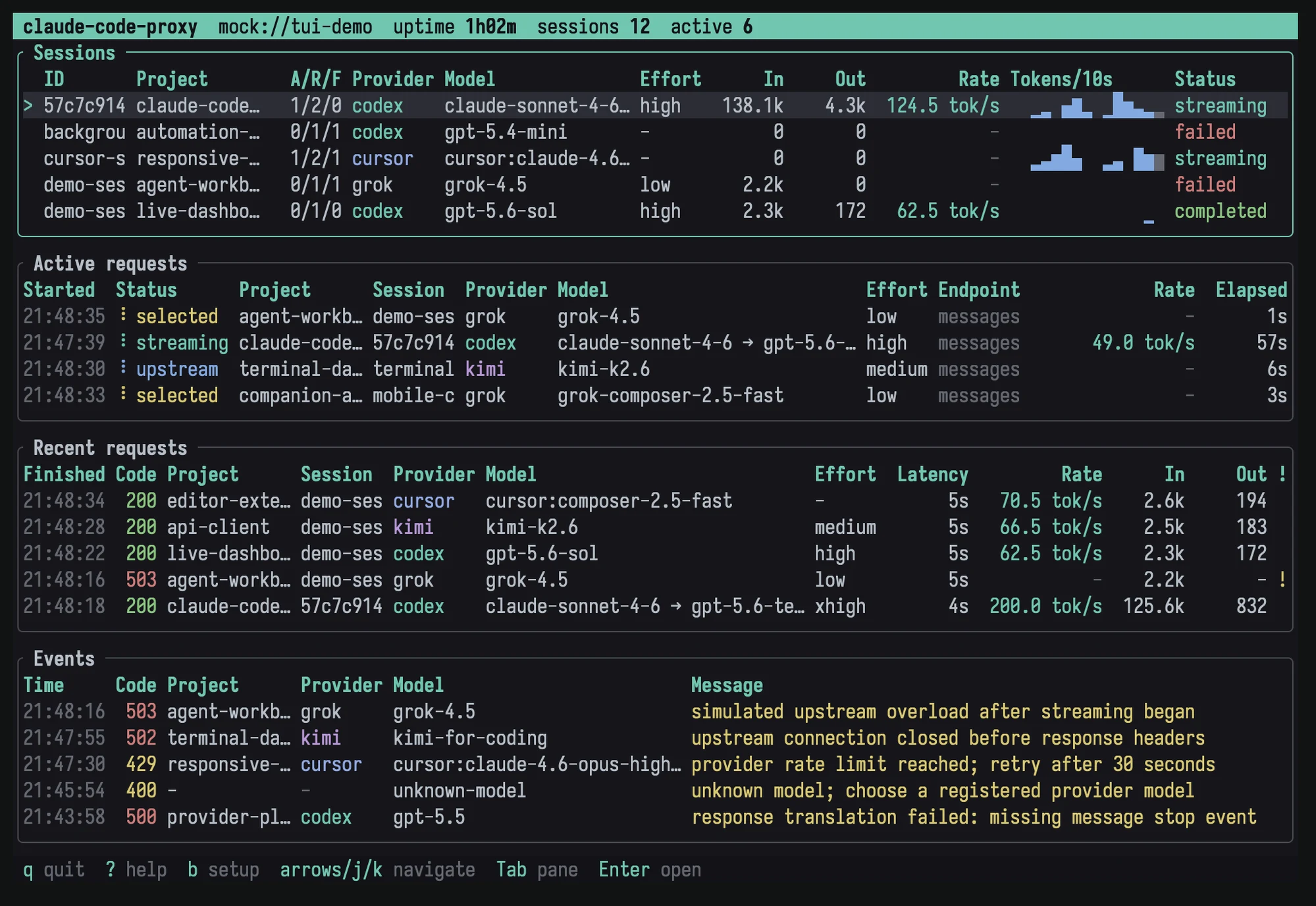
## What the monitor shows
[Section titled “What the monitor shows”](#what-the-monitor-shows)
* Sessions grouped by Claude Code session ID and project
* Active request lifecycle and selected provider or model
* Recent requests, HTTP status, elapsed time, and errors
* Input and output token totals
* Output throughput based on matched upstream timing and cumulative usage samples
* Paths to traffic captures when capture is enabled
* Configuration overrides and a ready-to-copy Claude Code setup
## Keyboard controls
[Section titled “Keyboard controls”](#keyboard-controls)
| Key | Action |
| ------------------ | --------------------------------------------------------------------------------------------------- |
| `Tab`, `←`, `→` | Change focused pane |
| `j`, `k`, `↓`, `↑` | Move selection |
| `Enter` | Open session or request details |
| `Esc` | Close details or an overlay |
| `?` | Toggle shortcut help |
| `b` | Toggle the setup overlay |
| `q` | Detach an attached dashboard; in the built-in dashboard, confirm proxy shutdown |
| `Ctrl-C` | Detach an attached dashboard; in the built-in dashboard, start shutdown (press again to force exit) |
The request table changes columns as the terminal width changes.
## Plain logs
[Section titled “Plain logs”](#plain-logs)
Use plain output when the process runs under a service manager, in CI, or through a pipe:
```sh
claude-code-proxy serve --no-monitor
```
Non-terminal stdout also selects plain mode. `CCP_LOG_STDERR=1` mirrors JSONL log events to stderr in plain mode.
Plain mode retains monitor accounting even with no dashboard attached. On Unix, SIGTERM starts graceful proxy shutdown; Ctrl-C does the same. The service manager owns the process lifetime.
## Demo mode
[Section titled “Demo mode”](#demo-mode)
Explore the full interface without binding a port or using provider credentials:
```sh
claude-code-proxy demo
```
The deterministic simulation covers active, successful, and failed requests across providers, projects, throughput states, and responsive layouts.
## Background service
[Section titled “Background service”](#background-service)
Run the installed binary under your operating system’s service manager when you want it to start at login or boot:
```sh
claude-code-proxy serve --no-monitor
```
The service manager controls stdout and stderr destinations. The proxy writes its structured `proxy.log` under the state directory described in [Files and storage](/claude-code-proxy/reference/files-and-storage/). Authenticate each provider interactively as the same user that runs the service.
Run `claude-code-proxy monitor` to inspect that service. The monitor endpoint only accepts loopback connections, even if the inference listener binds a LAN address. For a service on another machine, forward its port with SSH and point `monitor --url` at the local end of the tunnel.
History remains in the proxy’s memory and resets when the proxy restarts. The dashboard polls snapshots every 250 ms and displays server-computed durations and throughput. The attached setup overlay describes its connection; provider setup remains with the service and its built-in dashboard.
# Switching models and backends
> Choose launch-time patterns for switching between claude-code-proxy and direct Anthropic, then switch routed models within a proxy session.
Claude Code binds its base URL and client auth when the process starts. A **backend switch** needs a new Claude Code process. A **model switch** can stay in the same proxy-backed session because the proxy routes each request by model ID.
| Goal | Pattern |
| ---------------------------------------------- | ---------------------------------------------------------- |
| Always use the proxy | Put client variables in `~/.claude/settings.json` |
| Try one model once | Prefix `claude` with environment variables or use an alias |
| Toggle between proxy and direct Anthropic | Use a launch wrapper controlled by a flag |
| Stay on the proxy and change provider or model | Use `/model`, `--model`, or a new `ANTHROPIC_MODEL` |
## One-shot aliases
[Section titled “One-shot aliases”](#one-shot-aliases)
```sh
alias csol='ANTHROPIC_BASE_URL=http://127.0.0.1:18765 ANTHROPIC_AUTH_TOKEN=unused ANTHROPIC_MODEL="gpt-6-sol[1m]" ANTHROPIC_DEFAULT_HAIKU_MODEL="gpt-6-luna[1m]" CLAUDE_CODE_AUTO_COMPACT_WINDOW=272000 CLAUDE_CODE_DISABLE_NONESSENTIAL_TRAFFIC=1 CLAUDE_CODE_DISABLE_NONSTREAMING_FALLBACK=1 claude'
alias cgrok='ANTHROPIC_BASE_URL=http://127.0.0.1:18765 ANTHROPIC_AUTH_TOKEN=unused ANTHROPIC_MODEL=grok-4.5 ANTHROPIC_DEFAULT_HAIKU_MODEL=grok-4.5 CLAUDE_CODE_DISABLE_NONESSENTIAL_TRAFFIC=1 CLAUDE_CODE_DISABLE_NONSTREAMING_FALLBACK=1 claude'
```
These affect only the launched process.
## Flag-controlled wrapper
[Section titled “Flag-controlled wrapper”](#flag-controlled-wrapper)
Put a wrapper named `claude` ahead of the real binary on `PATH`. Set `REAL_CLAUDE` to a path that cannot resolve back to the wrapper.
```bash
#!/usr/bin/env bash
# Route Claude Code through the proxy when the flag file exists.
set -euo pipefail
real_claude="${REAL_CLAUDE:-$HOME/.local/bin/claude-real}"
flag="$HOME/.claude/claude-code-proxy-enabled"
model_file="$HOME/.claude/claude-code-proxy-model"
if [ -f "$flag" ]; then
model="gpt-6-sol[1m]"
[ ! -f "$model_file" ] || model="$(tr -d '[:space:]' <"$model_file")"
export ANTHROPIC_BASE_URL="http://127.0.0.1:18765"
export ANTHROPIC_AUTH_TOKEN="unused"
export ANTHROPIC_MODEL="${ANTHROPIC_MODEL:-$model}"
export ANTHROPIC_DEFAULT_HAIKU_MODEL="${ANTHROPIC_DEFAULT_HAIKU_MODEL:-$model}"
export CLAUDE_CODE_DISABLE_NONESSENTIAL_TRAFFIC=1
export CLAUDE_CODE_DISABLE_NONSTREAMING_FALLBACK=1
fi
exec "$real_claude" "$@"
```
Toggle it with ordinary file operations:
```sh
mkdir -p ~/.claude
touch ~/.claude/claude-code-proxy-enabled
printf '%s\n' 'kimi-for-coding[1m]' > ~/.claude/claude-code-proxy-model
# Disable for future sessions
rm ~/.claude/claude-code-proxy-enabled
```
New processes read the flag and model. Running processes retain their launch environment.
## In-session model changes
[Section titled “In-session model changes”](#in-session-model-changes)
With the base URL already pointing to the proxy:
```text
/model gpt-6-sol-fast[1m]
/model kimi-for-coding[1m]
/model grok-4.5
/model cursor:gpt-5.5
```
The provider changes with the model. Provider auth must already exist. Claude Code preserves one conversation, while provider-specific in-memory continuation can reset when the provider or model changes.
## Scope
[Section titled “Scope”](#scope)
claude-code-proxy does not provide a profile GUI, rewrite Claude Code settings, change base URLs in a running process, or configure Desktop and IDE launch environments. Use process environment, a wrapper, or a dedicated profile manager for those concerns.
# Troubleshooting
> Diagnose listener, authentication, model routing, streaming, context, Cursor discovery, rate-limit, logging, and traffic-capture problems.
## Proxy is unreachable
[Section titled “Proxy is unreachable”](#proxy-is-unreachable)
Check the process and liveness route:
```sh
curl http://127.0.0.1:18765/healthz
```
A healthy listener returns `{"ok":true}`. Confirm `ANTHROPIC_BASE_URL` uses the same address and port. `claude-code-proxy serve --port 11435` and `PORT=11435` change the listener port. `--port` wins for that command.
## Setup page is locked or shows HTTP 401
[Section titled “Setup page is locked or shows HTTP 401”](#setup-page-is-locked-or-shows-http-401)
Obtain a fresh private link from the same profile that serves the UI:
```sh
claude-code-proxy ui --print-url
# For Docker with the default host port:
docker compose exec proxy claude-code-proxy ui --print-url
# For a published host port of 18766:
docker compose exec proxy claude-code-proxy ui --print-url --url http://127.0.0.1:18766
```
A native CLI with another `CCP_CONFIG_DIR` prints another profile’s key. Run the CLI inside the container for its profile. The inference placeholder `ANTHROPIC_AUTH_TOKEN=unused` does not unlock setup. The page removes the bootstrap fragment and retains its key for the tab session; reopening a bare `/ui/` link in a new tab can require the private link again.
HTTP 403 indicates a rejected Host or origin. Open the UI on its loopback URL and keep the browser and management requests on the same origin. Publishing the container to a LAN address does not make the management UI a shared service.
## Disconnect or sign in reports an active request
[Section titled “Disconnect or sign in reports an active request”](#disconnect-or-sign-in-reports-an-active-request)
Setup returns HTTP 409 while the provider has active inference or token refresh work. A blocking refresh can continue after its caller disconnects, so wait for it to finish and retry. During a conflicting guided login, inference returns HTTP 503 with `Retry-After: 2`. Complete or cancel sign in in the provider dialog.
A failed or malformed login response preserves the previous working credential. Use the provider’s native `auth` command for detailed authorization diagnostics; avoid sharing raw tokens or private setup links.
## Container starts, but Claude Code cannot connect
[Section titled “Container starts, but Claude Code cannot connect”](#container-starts-but-claude-code-cannot-connect)
Inspect the published port and health:
```sh
docker compose ps
docker compose logs --tail 100 proxy
```
Use the host port, such as `http://127.0.0.1:18766`, in Claude Code’s `ANTHROPIC_BASE_URL`. The proxy still listens on 18765 inside the container. A source checkout’s private `.env` can change `CCP_HOST_PORT`; `docker compose ps` shows the active mapping. If you change ports, update the endpoint in **Connection and session preferences** and copy a fresh command.
An existing native proxy may already use port 18765. Follow [Choose a host port](/claude-code-proxy/using/docker/#choose-a-host-port) to run both. If expected logins are missing after recreation, check the Compose project name and profile volume: a different project name selects a different volume. `docker compose down --volumes` removes the saved profile. See [Docker setup and updates](/claude-code-proxy/using/docker/) before removing volumes.
The UI retries status reads after a restart and clears its unavailable warning when the service returns. A profile with an unsupported schema is preserved and blocks setup until a compatible application or profile is restored.
## Authentication error
[Section titled “Authentication error”](#authentication-error)
Check the provider selected by the model, then inspect its credential:
```sh
claude-code-proxy codex auth status
claude-code-proxy kimi auth status
claude-code-proxy grok auth status
claude-code-proxy cursor auth status
```
Use that provider’s sign in dialog or login command when credentials are missing. An expired access token may refresh during verification; sign in again if refresh fails. Codex requires ChatGPT subscription auth, not an OpenAI API key. Each provider uses proxy-owned credentials. OpenCode Go has no `auth status` command; save its API key in the setup UI or configure it through `CCP_OPENCODE_API_KEY`, `OPENCODE_API_KEY`, or `opencode.apiKey` in `config.json`.
## Model returns HTTP 400
[Section titled “Model returns HTTP 400”](#model-returns-http-400)
Run:
```sh
claude-code-proxy models
claude-code-proxy models --full
```
An unknown local ID returns a catalog in the error. A known ID can still be rejected upstream when the account, subscription, or region lacks access. Cursor’s prefixed form, such as `cursor:gpt-5.5`, forces Cursor routing and avoids cross-provider collisions.
## Cursor returns `not_found` after an upgrade
[Section titled “Cursor returns not\_found after an upgrade”](#cursor-returns-not_found-after-an-upgrade)
A model can appear in `claude-code-proxy models --full` while an older proxy process still serves Claude Code. Installing a new executable does not replace a running process. The CLI catalog and the listener can therefore use different protocol implementations.
On macOS or Linux, identify the listener and its executable:
```sh
lsof -nP -iTCP:18765 -sTCP:LISTEN
# Replace with the listener's PID from the preceding command.
lsof -a -p -d txt
command -v claude-code-proxy
claude-code-proxy --version
```
Stop the old server in its terminal or through its service manager, then start the intended executable with `serve`. If several installations exist, use its absolute path. Restarting clears pending Cursor tool runs, so do this between requests. Retry a short prompt before resuming a longer conversation.
Copy the exact model selection from the current account catalog and quote shell assignments containing brackets, for example `ANTHROPIC_MODEL='cursor:gemini-4-argon[reasoning_effort=high]'`. A catalog entry establishes discovery; a successful inference request establishes that the running server and account can use it. If the current server still returns `not_found`, inspect the selected provider and model in its diagnostics before changing aliases or credentials.
## Background requests fail
[Section titled “Background requests fail”](#background-requests-fail)
Set `ANTHROPIC_DEFAULT_HAIKU_MODEL` to a concrete routable ID. Claude Code sends title and small background tasks through that model independently of the main model.
## A tool runs twice
[Section titled “A tool runs twice”](#a-tool-runs-twice)
Set `CLAUDE_CODE_DISABLE_NONSTREAMING_FALLBACK=1` for Claude Code. Retrying a partially completed stream as non-streaming can duplicate tool calls.
## Session reaches context limits
[Section titled “Session reaches context limits”](#session-reaches-context-limits)
`[1m]` changes Claude Code’s local compaction threshold and does not enlarge upstream context. Use a safe `CLAUDE_CODE_AUTO_COMPACT_WINDOW`, remove `[1m]`, or compact earlier. For ChatGPT GPT-5.6 subscription models, `272000` is the documented setup value.
## Codex WebSocket fails
[Section titled “Codex WebSocket fails”](#codex-websocket-fails)
For a non-TUN local HTTP proxy, set both destination-scheme variables before starting the proxy:
| Variable | Value |
| ------------- | ----------------------- |
| `HTTP_PROXY` | `http://127.0.0.1:7890` |
| `HTTPS_PROXY` | `http://127.0.0.1:7890` |
Set them through the operating system, service manager, or shell, then start `claude-code-proxy serve` in the same environment.
The default `wss://chatgpt.com` connection uses `HTTPS_PROXY`; a working proxy should show `CONNECT chatgpt.com:443`. The `http://` value is normal: it describes how to reach the proxy, while `HTTPS_PROXY` describes which destinations use it. Restart claude-code-proxy after changing these variables because the client and pooled WebSocket route are created at startup.
Check `NO_PROXY` when the proxy sees no request. Proxy connection, authentication, or CONNECT failure is returned as an error and never retried directly. Environment variables are supported; OS proxy settings and PAC/WPAD discovery are not automatic.
Use HTTP SSE to isolate transport behavior:
```sh
CCP_CODEX_TRANSPORT=http claude-code-proxy serve
```
`auto` falls back only when WebSocket setup fails before sending the request. It does not replay an in-flight request.
## Cursor models are missing or rejected
[Section titled “Cursor models are missing or rejected”](#cursor-models-are-missing-or-rejected)
Check the proxy-owned login and refresh the account catalog:
```sh
claude-code-proxy cursor auth status
claude-code-proxy models --full
```
The native provider does not load a Cursor Agent JavaScript bundle. `CCP_CURSOR_AGENT_BUNDLE` is a legacy setting with no effect. If authentication has expired, run `claude-code-proxy cursor auth login` again. An installed `cursor-agent` supplies the client version when available; use `CCP_CURSOR_CLIENT_VERSION` only for a controlled compatibility check.
Account and administrator policies can still block a listed model. Inspect the upstream error in the monitor or structured log. See [Cursor Agent](/claude-code-proxy/providers/cursor-agent/) for discovery, parameter selections, and account boundaries.
## Rate limited
[Section titled “Rate limited”](#rate-limited)
Upstream limits are shared with other clients on the same account. Codex limit responses and Kimi HTTP 429 responses surface as HTTP 429 with `retry-after`. Wait for the indicated interval or reduce concurrent traffic.
## Find the complete error
[Section titled “Find the complete error”](#find-the-complete-error)
The monitor shows request detail. `proxy.log` contains structured JSONL events, and `errors/` stores complete redacted failed-response payloads. A `request_failed` event includes the error file path.
For a source checkout, run the isolated helper:
```sh
./scripts/debug-proxy
```
It prints a random local URL, a sourceable `client.env`, and artifact paths. Keep the terminal open, reproduce once, then press Ctrl-C. Captures contain sensitive prompt and tool content.
## Focused traffic capture
[Section titled “Focused traffic capture”](#focused-traffic-capture)
```sh
CCP_LOG_VERBOSE=1 \
CCP_TRAFFIC_LOG=1 \
claude-code-proxy serve --no-monitor
```
Traffic capture writes the inbound request, translated upstream request, upstream headers and events, and downstream events in emission order. Known credentials are redacted, but prompts and tool content are preserved. Disable capture and delete artifacts after diagnosis.